Open Science is model-agnostic at the workspace level: a research project is not permanently tied to one model vendor. Researchers can choose among supported agent frameworks, provider connections, models, and model-specific reasoning controls while keeping project files, sessions, and research records in the same application. These choices are not arbitrary, however. Each agent framework supports specific authentication and API routes, and Open Science validates compatible provider and model combinations instead of treating every endpoint as interchangeable.
This article explains what "model-agnostic" means in Open Science, how the four configuration layers work together with explicit compatibility checks, the four ways to connect a model, and the boundaries of what can switch without losing your workspace. It is based on the Open Science v0.17.0 release and the current aipoch/open-science repository source.
Why Model Lock-In Is a Problem for Research Workflows
Research infrastructure built around a single model vendor creates migration cost, capability gaps, and regional access barriers when that vendor changes pricing, deprecates a model, or imposes new rate limits. Labs face a choice: absorb the cost or rewrite automation scripts, reconnect data pipelines, and retrain researchers on a new interface.
Single-vendor tools also inherit that vendor's capability gaps. If your provider does not support long-context models, multimodal inputs, or a reasoning mode your task requires, you cannot access those capabilities without migrating to a new platform. Models differ in context limits, modality support, tool use, latency, and cost, and no single vendor leads in every dimension.
Regional access compounds the problem. Some cloud AI providers restrict service availability by country or require specific payment methods unavailable to international research teams. Self-hosted or regional providers may be the only viable option, but adopting them should not require rebuilding the entire research stack.
How Open Science's Model-Agnostic Architecture Works
Open Science is model-agnostic at the product level: you can connect it to major cloud LLM providers, a custom gateway, or an existing subscription. The architecture treats Agent Runtime, Provider, Model, and Reasoning as four separately selectable configuration layers connected by explicit compatibility checks instead of one locked bundle.
The Four-Layer Compatibility Chain: Runtime, Provider, Model, Reasoning
Layer 1: Agent Runtime
The Agent Runtime is the framework that interprets prompts and drives agent execution, while Open Science provides the workspace, approval surfaces, tool integrations, persistence, and compatibility validation around it. Open Science supports three selectable agent runtimes: Claude Code, OpenCode, and Codex. Each implements a different agent control protocol and determines which provider authentication routes and API formats are compatible.
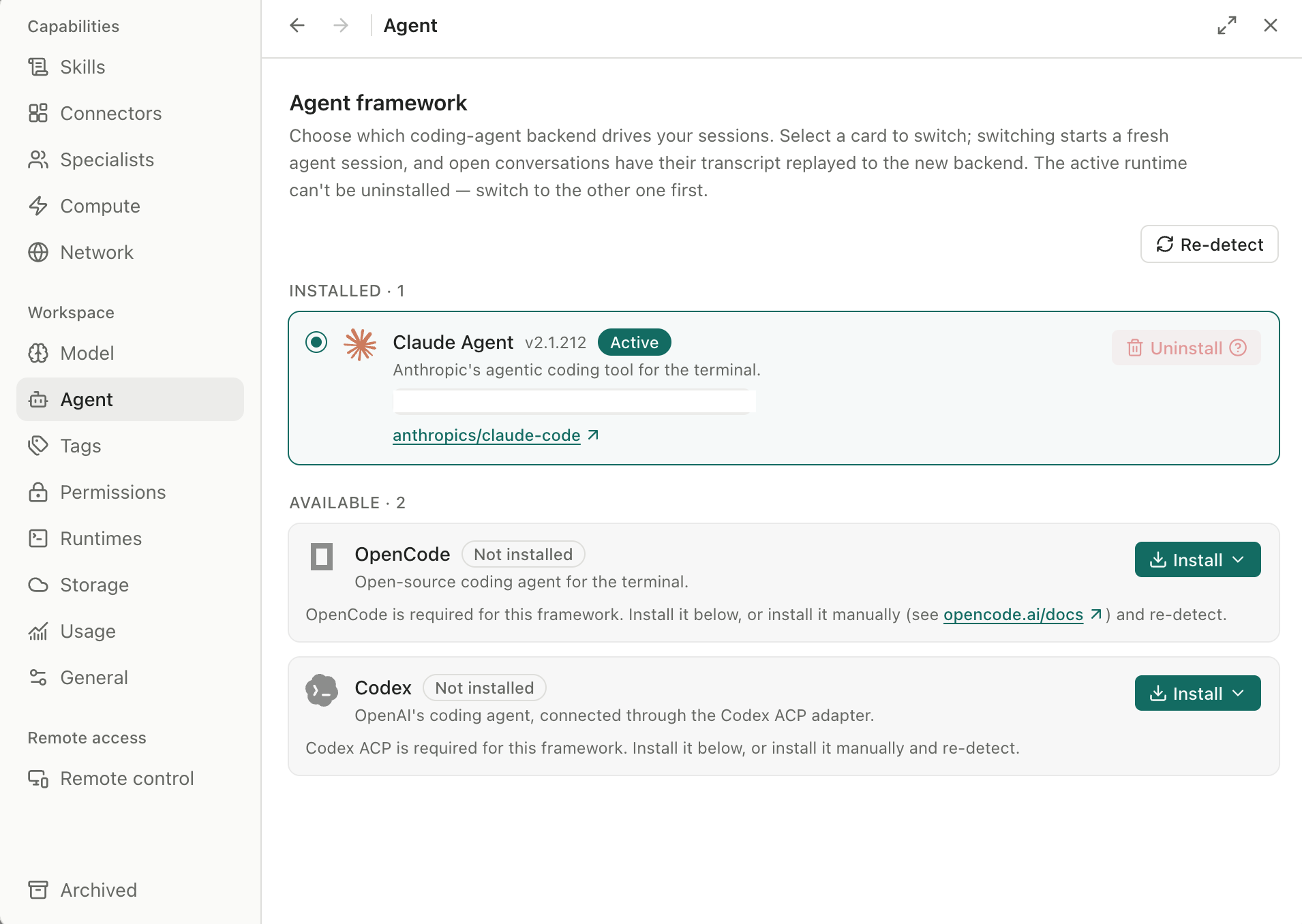
You select the runtime during first-time setup under the Agent runtime step. App-managed runtimes can be installed without requiring Node.js, npm, or administrator access. The runtime can be switched later in Settings, and Open Science revalidates the provider and model combination required by the new backend before allowing a connection.
Layer 2: Provider
The Provider layer handles authentication, endpoint configuration, and model routing within the API format supported by the selected framework. Provider and authentication options depend on the selected agent framework. The framework also determines which model API route—such as Messages, Chat Completions, or Responses—a compatible provider or gateway must expose.
Open Science supports four provider connection modes: built-in cloud providers (Anthropic, OpenAI, DeepSeek, Grok, and others), Custom Gateway (your own base URL and API key), Claude Subscription (shared or app-isolated browser login), and Codex Subscription (requires Codex runtime first). The providers and models shown as available depend on the selected agent framework and installed app version. Use the provider picker and connection test as the source of truth for a specific configuration.
Layer 3: Model
The Model layer selects which specific model processes each task. Built-in providers show a validated model list; Custom Gateway requires you to supply the exact model ID your endpoint serves. Model selection happens per-session in the composer, and you can switch to another registered compatible model mid-project without recreating the session or re-uploading files.
According to the Open Science v0.11.0 release notes, switching between registered compatible models and providers became available without reconnecting the agent process, reducing the cost of trying a different model on the same task when the combination remains within the framework's supported targets.
Layer 4: Reasoning
Some models support multiple reasoning effort levels (low, medium, high) that trade latency for deeper problem-solving. Open Science exposes this as a combined composer picker where you select model and reasoning effort together. Reasoning availability is model-specific: not all models support all levels, and the picker only shows valid combinations for the selected model.
When a model does not support reasoning modes, the picker defaults to standard inference without requiring manual fallback configuration.
Four Ways to Connect a Model in Open Science
Open Science validates each connection mode before allowing it to be used. The provider connection test runs during setup and whenever you change provider settings, catching configuration errors before they break a research task.
Built-In Cloud Providers
Choose from the provider list shown in Settings → Model. Open Science currently includes Anthropic, OpenAI, Grok (xAI), DeepSeek, Zhipu AI (GLM), Kimi (Moonshot), MiniMax, StepFun, Xiaomi MIMO, SenseNova, Volcengine Ark, Bailian (Alibaba Cloud), and OpenRouter, among others; some are region-specific.
You supply the API Key from that provider's developer console. Credentials are stored locally and use operating-system secure credential storage when available. Model requests and necessary context are sent through the provider or gateway route you configure; review that route and the provider's data policy before running a task.
When to use it: You have an active account with a major cloud LLM vendor and want the simplest connection path.
Custom Gateway
Supply a compatible Base URL, API Key, and exact model ID. The default API format is derived from the active agent framework, so a properly configured gateway that exposes the required route works without additional protocol selection.
Custom Gateway is the connection mode for self-hosted models, regional providers not included in the built-in list, and enterprise AI gateways that front multiple vendors. A self-hosted or enterprise gateway may work when it exposes the exact API format and capabilities required by the selected framework. Compatibility should be confirmed with the in-app connection test; OpenAI-compatible branding alone is not a guarantee.
When to use it: You run your own model server, need a regional provider, or connect through an enterprise gateway that aggregates multiple vendors.
Claude Subscription (Shared or Isolated)
If you already have a Claude subscription, Open Science can reuse it in two modes:
- Shared: A browser login that stores credentials in your default
~/.claudeprofile, shared with other Claude Code installations on the same machine. - Isolated: An app-managed
claude setup-tokenrun under an app-ownedCLAUDE_CONFIG_DIR, fully isolated from~/.claude/, with a browser flow plus a paste-a-token fallback.
This mode eliminates the need to obtain a separate API key for Open Science when you already pay for Claude access elsewhere.
When to use it: You already subscribe to Claude and want to reuse that authentication instead of managing a separate API key.
Codex Subscription
Select the Codex agent framework first under Agent runtime, then choose Codex subscription in the provider picker. This mode reuses an existing Codex login, similar to Claude Subscription but tied to the Codex backend.
When to use it: You subscribe to Codex and want Open Science to use that authentication.
Hot-Switching Models and Providers Without Restarting
Open Science can apply a registered compatible model or provider target to the current agent process after active generation drains. A framework, authentication lane, wire route, or unsafe capability change still triggers a reconnect. The session record remains, but in-flight tool state is not transferred between agent backends.
This means you can:
- Switch to another registered compatible model for the next turn.
- Change reasoning effort when the selected model exposes that option.
- Try a different provider within the same framework's supported API routes.
The session's project files, uploaded artifacts, conversation history, and durable permissions all persist across compatible switches. Only the model serving the next turn changes.
Limitations: Switching from one agent framework to another (Claude Code to Codex, for example) requires an agent restart. Open Science will prompt you when a runtime restart is required. Switching agent backends does not delete the project or stored conversation. The active agent process is replaced, in-flight tool state is not transferred, and Open Science revalidates the provider/model combination required by the new backend.
What Model-Agnostic Does NOT Mean
Open Science's model-agnostic architecture has clear boundaries. "Model-agnostic" does not mean:
Not automatic protocol interchangeability: Different AI providers use different API protocols (Anthropic Messages API, OpenAI Chat Completions, custom Responses format). Open Science validates protocol compatibility against the selected agent runtime instead of pretending all APIs are identical. A Custom Gateway configured for OpenAI Chat Completions will not work if the runtime expects Anthropic Messages format.
Not any-model plug-and-play: Open Science can connect to many models, but it cannot guarantee every model will perform every research task successfully. A model with a 4K context window cannot process a 50-page literature review. A model without tool-calling support cannot invoke Open Science's built-in connectors. Provider configuration validation catches endpoint and authentication errors, but task-specific model capability limits remain the researcher's responsibility to evaluate.
Not automatic migration of prompts and outputs: Switching models does not automatically translate prompts optimized for one vendor's conventions into another vendor's preferred format. Model-specific prompt engineering (Claude's XML tags, GPT's system message conventions) may need adjustment when switching providers, and output formatting differences persist.
Not zero-cost exploration: Changing models mid-session works, but each new model call consumes tokens from that model's provider and incurs that provider's cost. Hot-switching is technically frictionless; financially, every call is billed.
According to the Open Science design principles, the goal is "explicit multi-provider compatibility" where "the app validates provider configuration and makes endpoint requirements visible instead of treating every API protocol as interchangeable."
When to Use Which Connection Mode
| Your situation | Recommended mode | Why |
|---|---|---|
| You have an OpenAI, Anthropic, or DeepSeek account | Built-in cloud provider | Simplest setup; validated model list; no manual endpoint configuration |
| You run a self-hosted model or use an enterprise gateway | Custom Gateway | Point to your inference server or gateway; compatibility confirmed with connection test |
| You already subscribe to Claude | Claude Subscription (shared or isolated) | Reuse existing authentication; no separate API key needed |
| You already subscribe to Codex | Codex Subscription | Reuse Codex authentication through the Codex runtime |
| You need a regional provider not in the built-in list | Custom Gateway | Supply the provider's endpoint and API key manually |
| You want to compare outputs from multiple vendors | Built-in provider + compatible model switching | Switch models mid-session when they remain within the framework's supported targets |
For the most current list of built-in providers and their regional availability, check the provider picker in your installed Open Science app under Settings → Model. Provider catalogs evolve independently of this article.
Conclusion
Open Science's model-agnostic architecture separates Agent Runtime, Provider, Model, and Reasoning into four separately selectable configuration layers connected by explicit compatibility checks, allowing researchers to switch between Claude, GPT, DeepSeek, self-hosted models, and custom gateways without rebuilding their research workflow. The architecture validates compatibility explicitly, supports switching between registered compatible models mid-session, and works with built-in cloud providers, Custom Gateway endpoints, Claude Subscription, and Codex Subscription modes.
Model-agnostic does not mean every model works identically or that protocol differences disappear—it means the research workspace itself is not permanently locked to one vendor's API. Researchers can choose the model that fits the task, the budget, and the access constraints without losing session history, project files, or durable permissions.
For more on Open Science's architecture, see How Open Science Organizes Projects and Sessions and the Open Science GitHub repository. To learn how artifacts link back to the model and runtime that produced them, see How Open Science Tracks Artifact Versions and Provenance.
FAQ
Can I use any AI model with Open Science?
Open Science can connect to many models through built-in providers, Custom Gateway, Claude Subscription, or Codex Subscription. However, compatibility depends on the selected agent framework and whether the model's API protocol matches what that framework supports. Not every model will successfully complete every research task—context limits, tool-calling support, and reasoning capabilities vary by model.
Do I need an API key?
Not if you reuse an existing subscription. Claude Subscription (shared or isolated browser login) and Codex Subscription (on the Codex runtime) let you authenticate without a separate API key. Built-in cloud providers and Custom Gateway do require their own API keys.
Can I switch models in the middle of a session?
Yes, when the new model remains within the selected framework's registered compatible targets. Open Science can apply a compatible model or provider change without restarting the agent process. Switching to a different agent runtime (e.g., Claude Code to Codex) requires an agent restart, but your session history and project files remain intact.
What happens to my session if I switch runtimes?
Switching agent backends does not delete your session, files, or conversation history. The active agent process is replaced, in-flight tool state is not transferred, and Open Science revalidates the provider/model combination required by the new backend. Your research record remains intact.
Does "model-agnostic" mean I can use GPT and Claude identically?
No. Model-agnostic means the workspace itself is not locked to one vendor, but models still have different capabilities, context limits, API protocols, and output behaviors. Open Science validates compatibility and supports multiple providers; it does not erase the differences between models.
Disclaimer
This article is intended for informational purposes only. Open Science is a research workflow tool designed to support researchers in connecting to multiple AI model providers. Model outputs require independent verification and expert interpretation before use in any research context. Researchers remain fully responsible for evaluating model capabilities, data flow policies, and the appropriateness of outputs for their specific tasks.
References and external links in this article are provided for informational purposes. AIPOCH does not endorse and is not responsible for the content of third-party sources.