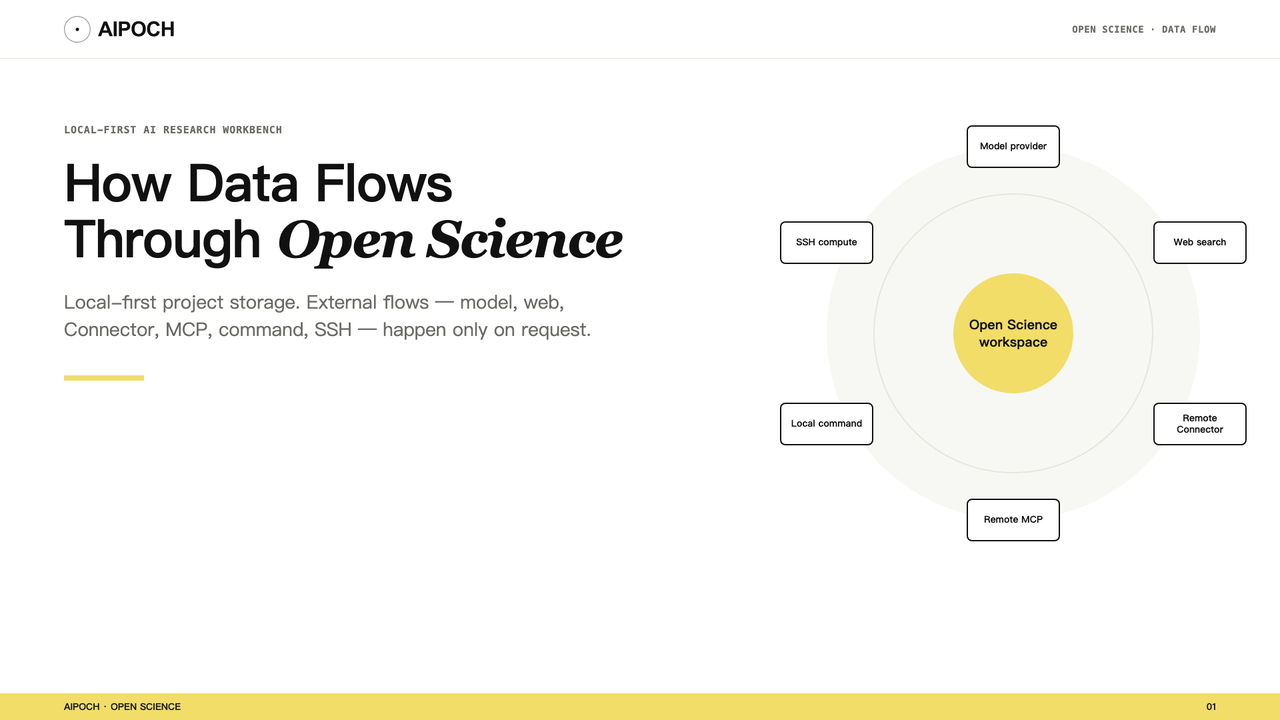
AIPOCH Open Science is an open-source, local-first, model-agnostic, self-hosted AI research workbench for traceable and inspectable scientific workflows. Projects, sessions, files, Artifact versions, and Provenance records live on the researcher's computer by default.
Local-first does not mean that every workflow is offline. A model request, web search, remote Connector, MCP tool, or SSH job may send information to another service or computer. The relevant question is therefore not only “Where is the project stored?” but:
Which information is being sent to which destination, for which operation?
This article maps the main data-flow paths in Open Science and explains what researchers should inspect before working with sensitive, unpublished, or regulated information. For the broader product architecture, see What Is Open Science? A Local-First, Model-Agnostic AI Research Workbench.
What Open Science Stores Locally
Open Science stores the following on the local computer:
- project and session state;
- uploaded and generated files;
- Artifact versions and available Provenance evidence;
- application settings;
- local execution and diagnostic logs.
Logs are not uploaded automatically. API keys are also stored locally and use operating-system secure credential storage when it is available.
Local storage gives the researcher control over the project record. It does not prevent an authorized task from sending necessary context to a configured external service.
Data-Flow Map
The table below maps six common operations to their possible destinations and the information they may transmit.
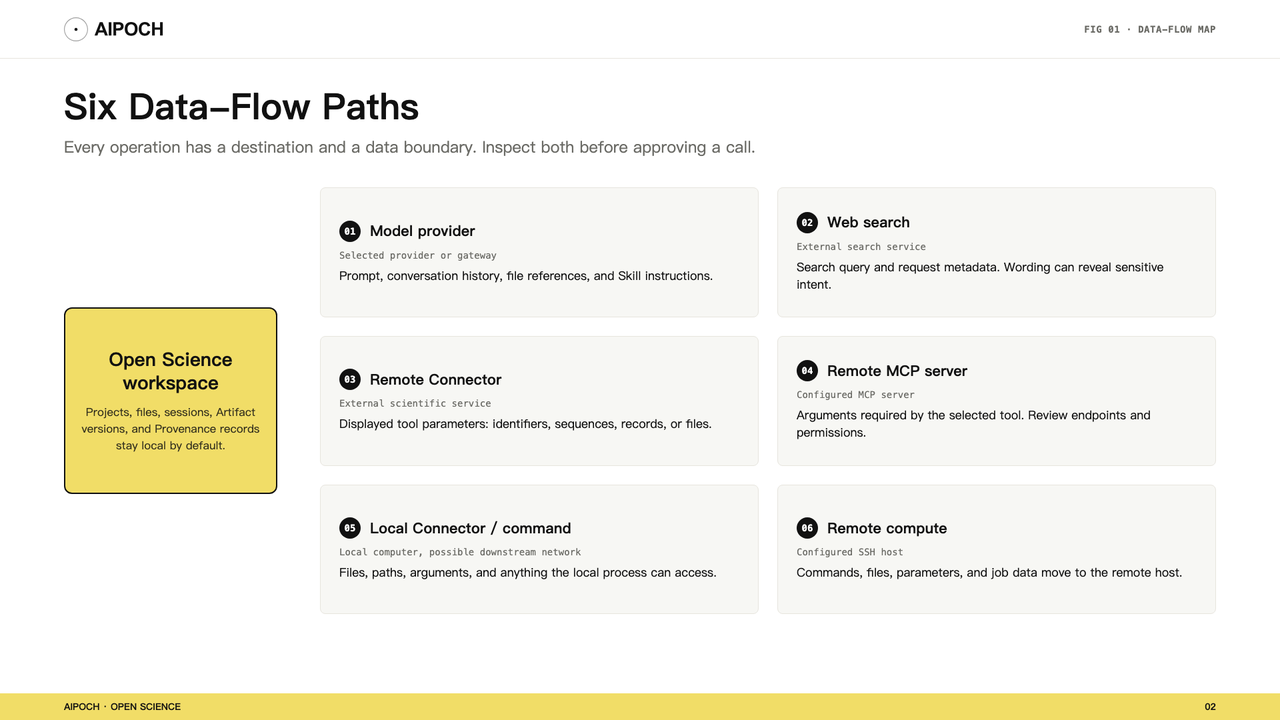
| Operation | Possible destination | Information that may be exposed or transmitted |
|---|---|---|
| Model request | Selected model provider or compatible gateway | Prompt and task context needed for the request |
| Web search | External search service | Displayed query parameters and service-required request data |
| Remote Connector | External scientific service | Displayed tool parameters, which may include identifiers, text, sequences, records, or files |
| Remote MCP tool | Configured MCP server | Arguments required by the selected tool |
| Local Connector or command | Local computer, with possible downstream network activity | Files, paths, command arguments, and anything the local process is allowed to access |
| Remote compute | Configured SSH host | Commands, files, parameters, and job-related data needed on that host |
The actual data depends on the task. Inspect the destination and request arguments rather than inferring safety from a provider or tool name.
1. Model Provider Requests
A model request sends the prompt and selected task context to the configured provider or compatible gateway.
The model needs enough context to respond and decide which actions to request. Depending on the task, that context may include:
- the prompt;
- selected conversation history;
- text extracted from attachments;
- explicit
@file references; - Skill instructions;
- Connector results;
- summaries of tool activity.
The exact provider and request protocol depend on the selected Agent Runtime and compatible model configuration. Review the provider's data handling, retention, region, account, and organizational policies before using sensitive material.
Do not assume that storing the project locally prevents selected content from entering a model request. Minimize the context supplied to the task and avoid referencing sensitive files unless they are necessary.
2. Web Search
A web search sends the displayed query parameters and service-required request data to the configured search service.
Search terms can reveal unpublished topics, target compounds, internal project names, or other sensitive intent even when no document is uploaded.
Use neutral query wording where possible. Do not put API keys, patient identifiers, confidential study names, or proprietary data into search terms.
3. Remote Connectors and MCP Servers
These calls send the displayed tool parameters to the configured external service or MCP server.
A remote Connector receives the parameters displayed for the requested tool call. Depending on the tool, those parameters may include:
- publication or database identifiers;
- genes, variants, proteins, or chemical structures;
- search terms or sequences;
- structured records;
- text or file content.
Inspect the destination endpoint and exact arguments—not only the Connector name—before approving the call.
OAuth or another authentication method establishes identity and access. It does not determine whether the proposed data is appropriate to send. Imported MCP configurations should be reviewed for endpoints, tool descriptions, requested permissions, and expected network behavior.
4. Local Connectors and Commands
Local execution keeps immediate inputs on the computer, but the process can still read files, spawn subprocesses, or make its own network calls.
A local Connector or command may keep its immediate inputs on the computer, but it can still read files, create processes, modify state, or start network activity of its own.
“Local” describes where the process starts. It is not a safety rating.
Review scripts and third-party Skills for filesystem access, dependencies, subprocesses, and network calls before enabling them with sensitive projects.
5. Remote Compute
Remote compute moves commands and task data to a configured SSH host.
When an SSH host is configured as an execution target, commands and task data may move to that host. The host, account, storage, scheduler, retention, backups, and institutional controls remain the researcher's responsibility.
Open Science v0.13.0 uses SSH as its remote-compute primitive. It does not yet provide a general Slurm or cloud-GPU backend.
Before transferring data, confirm that the destination is approved for the relevant data classification and that temporary files and job outputs will be handled appropriately.
Attachments, References, Logs, and Outputs
Many ordinary workflow artifacts can expose sensitive information even when the underlying dataset stays local.
Several ordinary workflow elements can contain sensitive information:
- uploaded attachments;
- explicit
@file references; - prompts and conversation history;
- execution logs and error messages;
- local file paths;
- generated tables, figures, and reports;
- screenshots and exported sessions.
A report can expose sensitive values even if the raw dataset never leaves the computer. An error log can reveal a username or directory structure. A screenshot can reveal a token, unpublished result, or patient identifier.
Review outputs and logs before sharing them outside the project.
How Permissions Affect Data Flow
Open Science uses three conversation approval profiles—Ask for approval, Auto-approve edits, and Full access—plus scoped allow grants and Connector/tool-level policies.
These settings determine whether protected actions pause for approval. They do not change the privacy policy of a model provider, Connector, MCP server, or remote host. A permitted request still sends its displayed data to the configured destination.
For a complete explanation of profiles, grants, and tool policies, read How Open Science Controls Agent Permissions.
A Practical Data-Minimization Workflow
Consider a task that analyzes a local CSV, generates a figure, and searches for related methods.
1. Classify the inputs
Identify whether the files contain public, internal, unpublished, proprietary, patient-level, or regulated information.
2. Minimize task context
Attach or reference only the files and fields required for the task. Remove direct identifiers and unnecessary metadata where appropriate.
3. Select approved services
Review the model provider, search service, Connector, MCP endpoint, and remote host against institutional requirements.
4. Inspect each external request
Confirm the destination and exact parameters before allowing the call. A search query and a file upload are different data transfers even when they occur through the same Connector.
5. Review the record afterward
Inspect tool activity, execution logs, generated reports, and exported files for sensitive content. Check the artifact provenance record to understand what produced each output. Revoke temporary grants and remove temporary credentials or configurations that are no longer needed.
Before Approving an External Call
Use this checklist:
- Destination — Which provider, domain, Connector, MCP server, or remote host will receive the request?
- Parameters — What exact query, identifiers, text, file, sequence, record, or command will be sent?
- Purpose — Is each piece of information necessary for this operation?
- Sensitivity — Does it include patient identifiers, unpublished results, credentials, internal paths, or proprietary information?
- Provider policy — What are the service's retention, training, region, logging, and account controls?
- Code behavior — Can the script or local tool make additional network or filesystem calls?
- Output — Could a result, error, log, export, or screenshot expose information later?
- Cleanup — Can temporary files, grants, tokens, or configurations be removed after the task?
Never place API keys, access tokens, authorization headers, cookies, patient identifiers, unpublished data, or sensitive local paths in prompts, screenshots, public issues, or shared logs.
What Data-Flow Controls Do Not Guarantee
As of v0.13.0:
- Agent network sandboxing is not complete.
- A permitted local script may initiate additional network activity.
- A remote service's handling of data remains governed by that service.
- Authentication does not make a destination appropriate for sensitive data.
- Local storage does not automatically anonymize prompts, logs, or generated outputs.
- Open Science does not replace institutional privacy, security, or compliance review.
Use operating-system controls, isolated environments, approved accounts, contractual provider settings, and institutional data-governance procedures when the work requires them.
Conclusion
Open Science keeps the project record local while allowing researchers to use configured models, web services, scientific Connectors, local tools, and remote compute.
That architecture gives researchers flexibility, but it also makes destination and context review essential. Local-first describes ownership of the workspace; it is not a promise that no data ever leaves the computer.
Before each external operation, review what is being sent, where it is going, why it is necessary, and how the receiving service handles it. Send only the information the task needs.
Frequently Asked Questions
Does Open Science send all project data to the selected model?
No. Project data is stored locally, but a model request sends the prompt and necessary task context to the configured provider. What enters that context depends on the task, attachments, explicit references, tools, and conversation history.
Does local-first mean Open Science works completely offline?
No. Local project storage can coexist with cloud model requests, web searches, remote Connectors, and SSH compute. A fully local workflow depends on the model, tools, and execution targets the researcher configures.
Does a remote Connector receive an entire project?
Not by default. It receives the parameters required for the requested tool call. Those parameters can still contain sensitive identifiers, text, sequences, records, or files, so inspect each call before approving it.
Is a local Connector always safe?
No. A local process can read files, modify state, launch subprocesses, or make its own network requests. Review its source and behavior before use.
Can permission settings guarantee that external data is deleted?
No. Permissions govern whether an action can run. Retention, deletion, training, and logging are controlled by the receiving provider or infrastructure and the applicable account agreement.
Disclaimer
Open Science is a research workflow tool. It does not replace researcher judgment, and researchers remain fully responsible for evaluating the accuracy, completeness, and appropriateness of any outputs generated. All outputs require independent verification and expert interpretation before use in any research context.
References and external links in this article are provided for informational purposes. AIPOCH does not endorse and is not responsible for the content of third-party sources.
Sources and Version Note
Interface details may change; use the installed app and current release notes as the source of truth.
Scientific and privacy boundary: Researchers remain responsible for data classification, provider selection, permissions, institutional compliance, and the scientific validity of generated outputs.