Open Science is an open-source, local-first, model-agnostic, self-hosted AI research workbench maintained by AIPOCH. For a high-level overview of what the workbench is and who it is for, see What Is Open Science?. The latest release referenced here is v0.14.1.
A research agent needs more than a growing list of tools. It needs reusable methods, controlled access to external services, task-specific working profiles, and a way to use compute beyond the local machine — without collapsing those responsibilities into one opaque system.
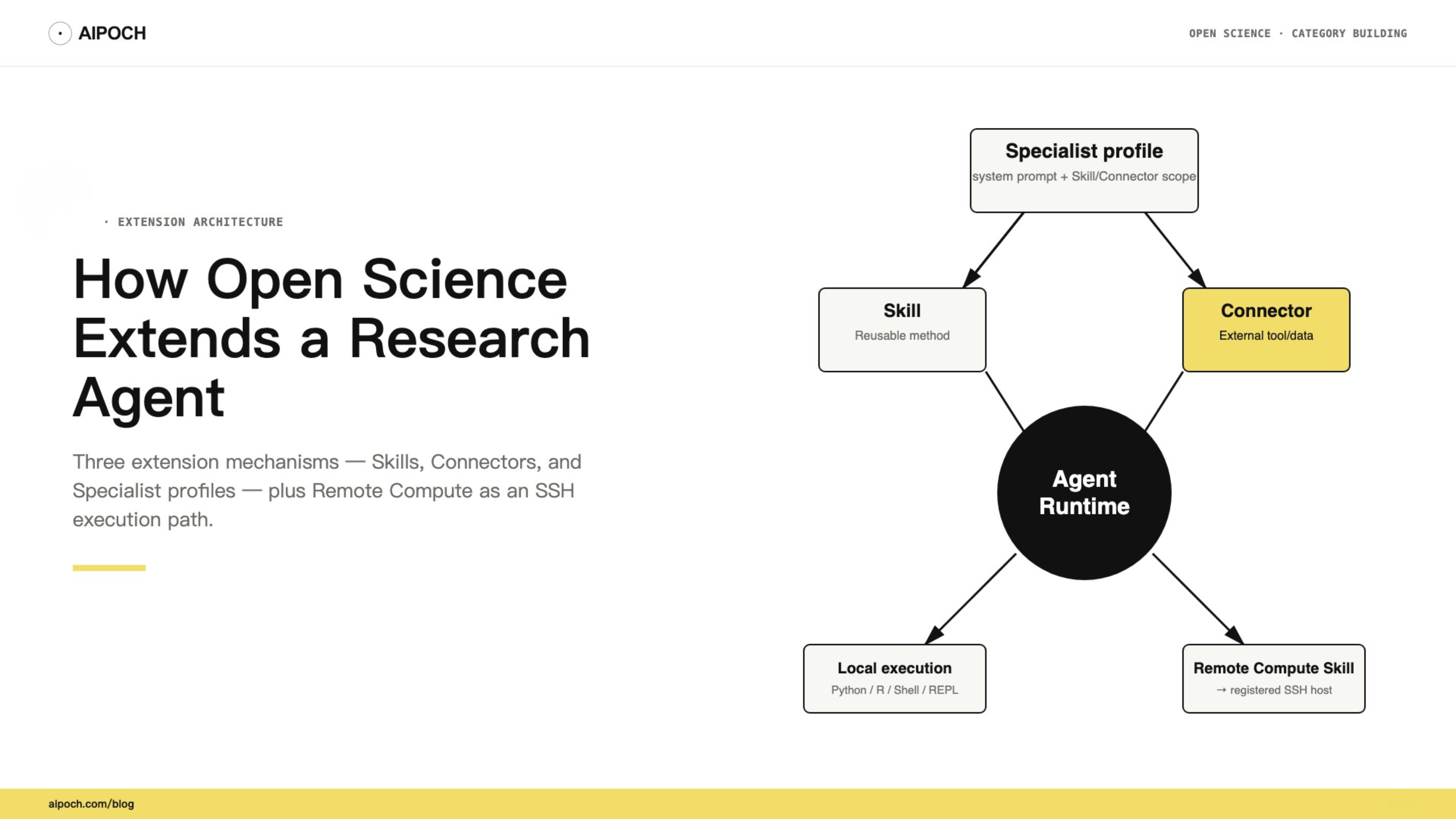
Open Science separates these concerns into three primary extension mechanisms: file-based Skills, permissioned Connectors/MCP, and personal Specialist profiles. Remote Compute is a concrete execution pattern built from a Remote Compute Skill and an SSH host registered by the user. Understanding the difference helps researchers add capability without overstating compatibility, permission control, or scientific assurance.
One Agent, Several Kinds of Extension
Not every research problem is solved the same way:
- Some problems need a reusable method: "Run the analysis the same way every time."
- Some need a new data source or tool: "Query this database or API."
- Some need a focused working context: "Stay in the role of a literature reviewer."
- Some need more execution resources: "Run this job on the lab server."
Open Science uses different mechanisms for each. Treating them as the same thing would blur both the architecture and the boundaries.
Quick Comparison
| Mechanism | Product form | What it solves |
|---|---|---|
| Skill | File-based method package centered onSKILL.md | Tells the agent how to perform a reusable workflow |
| Connector / MCP | External data or tool interface with Tool-level policies | Lets the agent call named external capabilities |
| Specialist | Reusable agent profile with system prompt and Skill/Connector scope | Fixes a role and narrows discoverable extensions for a session |
| Remote Compute target | An SSH host registered by the user and invoked through the Remote Compute Skill | Runs commands or long jobs on a remote machine the user controls |
Remote Compute is not a fourth package type. It is an execution path: the Remote Compute Skill sends work to a registered SSH host, alongside local Python, R, REPL, and Shell execution. For details on local execution environments, see How Open Science Runs Python, R, REPL, and Shell Code.
Skills: Reusable Methods
A Skill is a file-based method package centered on SKILL.md. It contains reusable instructions and may include scripts, references, templates, or other resources that help the agent perform a defined workflow.
In a session, you enable Skills in settings and select one by typing /. The composer shows the enabled Skills, and the agent then uses that method's conventions for the current task.
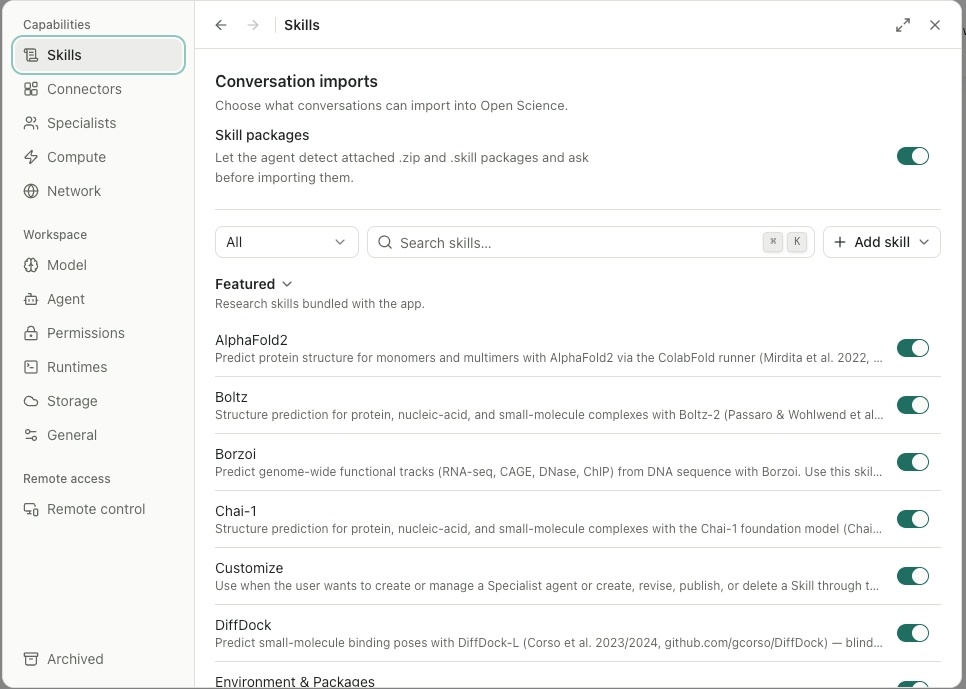
Open Science ships with featured built-in Skills across literature review, data analysis, molecular modeling, and remote execution. The exact catalog changes with releases; the installed Skills panel is the authoritative source for what is currently available.
You can also create personal Skills or preview and import compatible Skill packages from GitHub URLs or local packages. Import preview and confirmation are inspection points, not an automatic compatibility guarantee or security audit. Before enabling a third-party Skill, review its SKILL.md, bundled scripts, dependencies, network behavior, license, and expected outputs. Skills are currently local-only: there is no public Skills Commons, cross-device sync, or user-visible version pinning.
Connectors / MCP: Permissioned External Tools
A Connector links the agent to external data sources and tools. Open Science provides built-in scientific Connectors covering literature, genes and ontologies, structures and functions, chemistry and drugs, clinical trials, and more.
For tools that are not built in, Open Science supports custom MCP (Model Context Protocol) Connectors over stdio, HTTP, or SSE. This lets you attach a read-only internal document index, an internal metadata API, a team-maintained dataset catalog, or a local file conversion service.
Each Connector exposes one or more tools, and permissions are controlled independently:
- Always allow: the tool can run without asking.
- Ask each time: the tool requires per-call approval.
- Block: the tool is disabled.
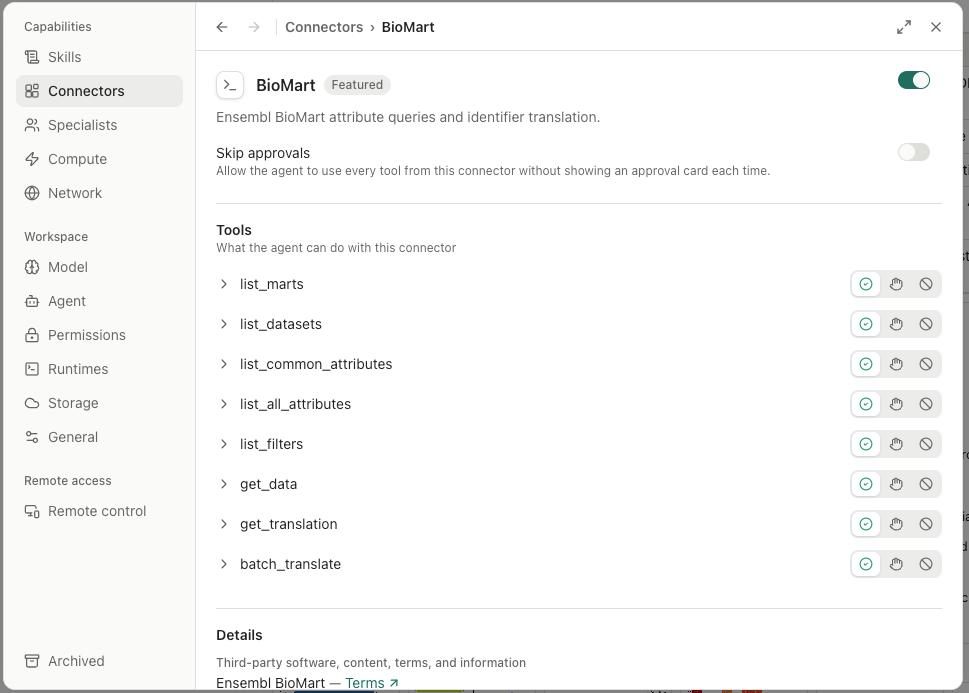
This means you can give the agent access to a public database while keeping a private write API blocked, or allow read access to an internal catalog while requiring approval for any state-changing call. Connector runtime status and recovery are visible in the interface, so you can see when a remote tool is unreachable and retry or reconfigure it. For more on how Open Science controls what stays local and what leaves, see Open Science Data Flow: What Stays Local and What Leaves.
Tool policies control whether an exposed call is allowed; they do not provide a general network sandbox. A Connector call can send its displayed parameters to an external service, and a local stdio Connector can run a trusted local command.
Specialists: Reusable Profiles, Not Security Sandboxes
A Specialist is a reusable agent profile. It combines a system prompt with a selected Skill and Connector scope, so you can bind a focused working context to a session.
For example, you might create an "Evidence Synthesizer" Specialist with a focused system prompt, the Literature Review Skill, and selected literature Connectors. This narrows the profile's discoverable Skills and Connectors, while conversation approval settings and Connector/Tool policies continue to govern execution.
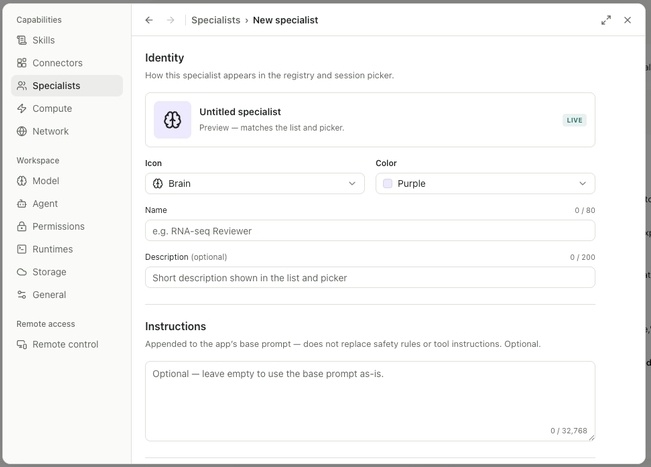
A Specialist is a reusable agent profile, not a standalone security boundary. It does not override the Agent Runtime, session approval mode, Notebook/REPL policy, or Connector/Tool permissions. It cannot guarantee that the agent "only reads CSV files" or "never installs packages" — those behaviors are enforced by the broader permission system, not by the Specialist profile alone.
Specialists are currently personal-only and bound one-per-session: you create a reusable agent profile for your own use, attach it to a session, and switch between profiles as the task changes. Subagent delegation is a separate orchestration capability; choosing or resolving a Specialist for delegated work does not turn the Specialist profile itself into the orchestration system.
Remote Compute: A Skill Connected to an SSH Target
Remote Compute is an execution path, not a package type. The built-in Remote Compute Skill sends commands or jobs to an SSH host that the user registers and controls.
To use it, enable the Remote Compute Skill, register your host under Settings → Compute, and invoke the Skill from a session. Remote Compute supports:
- Host registration and authentication configuration
- Short commands over SSH
- Background completion detection, output harvesting, and a follow-up analysis turn
- Result recovery and artifact import back into the project
The current public boundary is SSH-only. Remote Compute does not provision cloud instances, manage Slurm or other batch schedulers, or provide a local GPU backend. It is a bridge between your local Open Science project and a remote host you already operate.
How They Compose in One General Workflow
A single research task can use multiple mechanisms. Consider turning a set of papers and a CSV into a reviewable analysis package:
- Skill: Select a Literature Review Skill to structure the method.
- Connector: Allow selected literature Connector tools for retrieval.
- Specialist: Use an Evidence Synthesizer profile to keep the task focused.
- Remote Compute: Submit a long-running analysis through the Remote Compute Skill to a registered SSH host.
Open Science records the available tool activity and generated artifacts, while the researcher still reviews external data flows, methods, and conclusions.
Boundaries: Compatibility, Permission, Data Flow, and Validation
Extensions make Open Science more adaptable, but they do not make it universal. The current design has clear limits:
- Skills are file-based method packages, not sandboxed plugins: third-party Skills require manual review; there is no central store or automatic compatibility guarantee.
- Connectors expose named tools behind policies: Tool policies control exposed calls, not general network sandboxing.
- Specialists are reusable profiles, not standalone security boundaries: execution control still depends on the Agent Runtime, session approval mode, and Connector/Tool policies.
- Remote Compute is SSH-only and user-managed: it does not provision cloud resources or manage batch schedulers.
- Extensions do not verify scientific correctness: a Skill can run a valid pipeline and still produce a wrong conclusion. The extension layer adds capability; the researcher remains responsible for validation.
You can inspect the recorded tool activity and the provenance evidence Open Science could retain for generated artifacts, with unavailable evidence marked rather than inferred. For more on how those records become inspectable outputs, see Plan → Execute → Artifact: How Open Science Turns Research Tasks into Traceable Outputs and How Open Science Tracks Research Results: Artifact Versions & Provenance.
Frequently Asked Questions
What is the difference between a Skill and a Connector in Open Science?
A Skill adds a reusable research method or workflow to the agent. A Connector adds access to an external data source or tool. You select a Skill with /; you enable and authorize a Connector in settings.
Can I use my own MCP server as a Connector?
Yes. Open Science supports custom MCP Connectors over stdio, HTTP, or SSE. Each MCP tool gets its own permission setting (Always allow / Ask each time / Block).
Is a Specialist a security sandbox?
No. A Specialist is a reusable agent profile that narrows discoverable Skills and Connectors. Execution control still depends on the Agent Runtime, session approval mode, and Connector/Tool policies.
Does Remote Compute provision cloud GPUs?
No. Remote Compute connects to SSH hosts you already control. It does not provision cloud instances, manage Slurm, or provide a local GPU backend.
Do extensions guarantee that results are correct?
No. Extensions add capability and structure, but they do not verify scientific correctness. A Skill can run a valid pipeline and still produce a wrong conclusion. The researcher remains responsible for validation.
Conclusion
Open Science's extension model treats the research agent as a core that gains capability through three well-defined mechanisms: Skills for reusable methods, Connectors and MCP for permissioned external tools, and Specialist profiles for focused working contexts. Remote Compute adds an execution path to user-controlled SSH hosts through the Remote Compute Skill.
This design keeps the workbench adaptable without making it anarchic. You can add what your field needs, restrict what a sensitive task should touch, and still inspect the recorded activity and provenance evidence behind the work.