The best AI agent workspace for research depends on what you need to hand over. Start with AIPOCH Open-Science for an analysis with code and figures, Elicit for a structured literature review, or Consensus for finding evidence behind a claim. For a project that spans public websites and reports, ChatGPT Deep Research and Claude Research offer broader research workflows.
This guide compares seven platforms through their documented features and a public AIPOCH case. Suggested trial tasks below are examples you can adapt to your own project.
What is an AI agent workspace?
An AI workspace brings research material, conversations, and outputs into a shared working context. An agent workspace adds the ability to carry out a sequence of actions, such as planning searches, finding sources, extracting information, or executing an analysis.
For researchers, an AI agent workspace becomes useful when you can inspect the connection between the question and the result. A literature review needs traceable studies and screening decisions. A data analysis needs the code and assumptions behind its figures. The platforms below support different parts of that process.
Compare seven research workspaces
| Product | Core purpose | Main features | Suitable task |
|---|---|---|---|
| AIPOCH Open-Science | Execute and document research | Configurable models, Skills, connectors, Python/R, portable records | Analyze data and hand off the work |
| Elicit | Find and synthesize academic evidence | Research Agent, reports, systematic-review screening and extraction | Build a study characteristics table |
| Consensus | Explore evidence behind questions | Scholarly search, citation tracing, filters, referenced reports | Check a claim and find related studies |
| Elsevier LeapSpace | Explore scholarly information | Literature and author discovery, funding insights, Trust Cards | Scope a university research project |
| Gemini Notebook, formerly NotebookLM | Work with a defined source collection | Source discovery, questions, citations, research summaries | Compare an assembled reading set |
| ChatGPT Deep Research | Investigate across sources | Research planning, domain controls, citations, report revision | Compare public research methods |
| Claude Research | Investigate questions iteratively | Successive searches, follow-up investigation, connected tools | Explain conflicting reports |
1. AIPOCH Open-Science
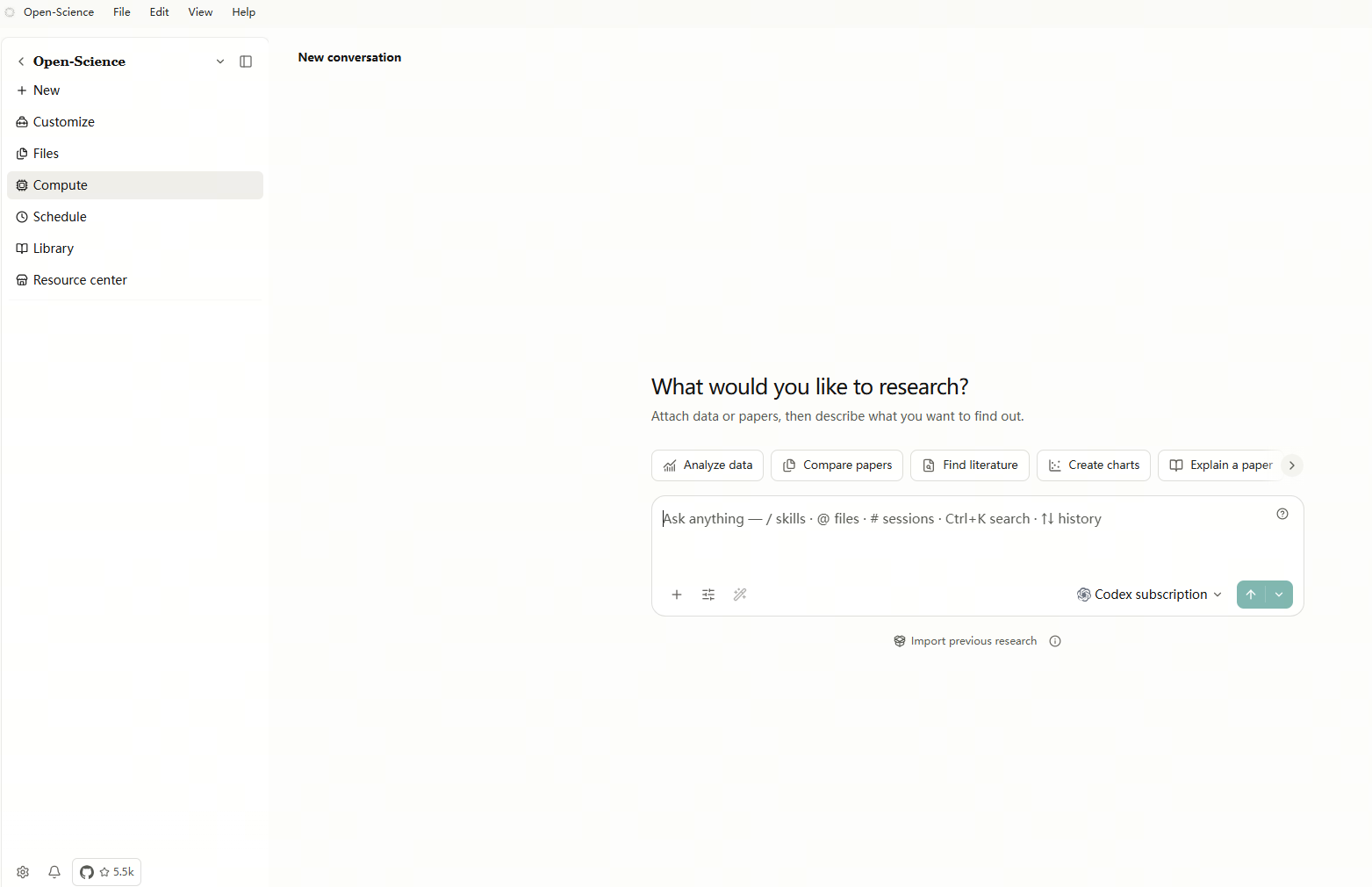
AIPOCH Open-Science is an open-source, local-first research workbench. It brings agent workflows, scientific data connectors, and Python or R execution into a persistent project. It is especially relevant when the final deliverable includes files that another researcher must inspect or continue working on.
Main features
- Configure model providers, reusable Skills, and connectors for the task. Skills supply research procedures, connectors reach data or tools, and Notebook execution carries out the analysis.
- Preview reports, tables, figures, and code in the workspace, with available links to inputs, execution history, and artifact versions.
- Export selected research records as a portable
.sciencepackage for review, handoff, or archiving.
Who it suits and when
- Researchers producing computational analyses, figures, or structured reports.
- Teams that need to hand a documented research session to a collaborator. Available evidence depends on what the session recorded and what the export includes. AIPOCH Open-Science
A short research workflow
-
Enter the question. The public NHANES case starts with physical activity and diabetes. An adapted prompt is “Compare the unweighted and survey-weighted estimates, then show how adjustment changes the association.”
-
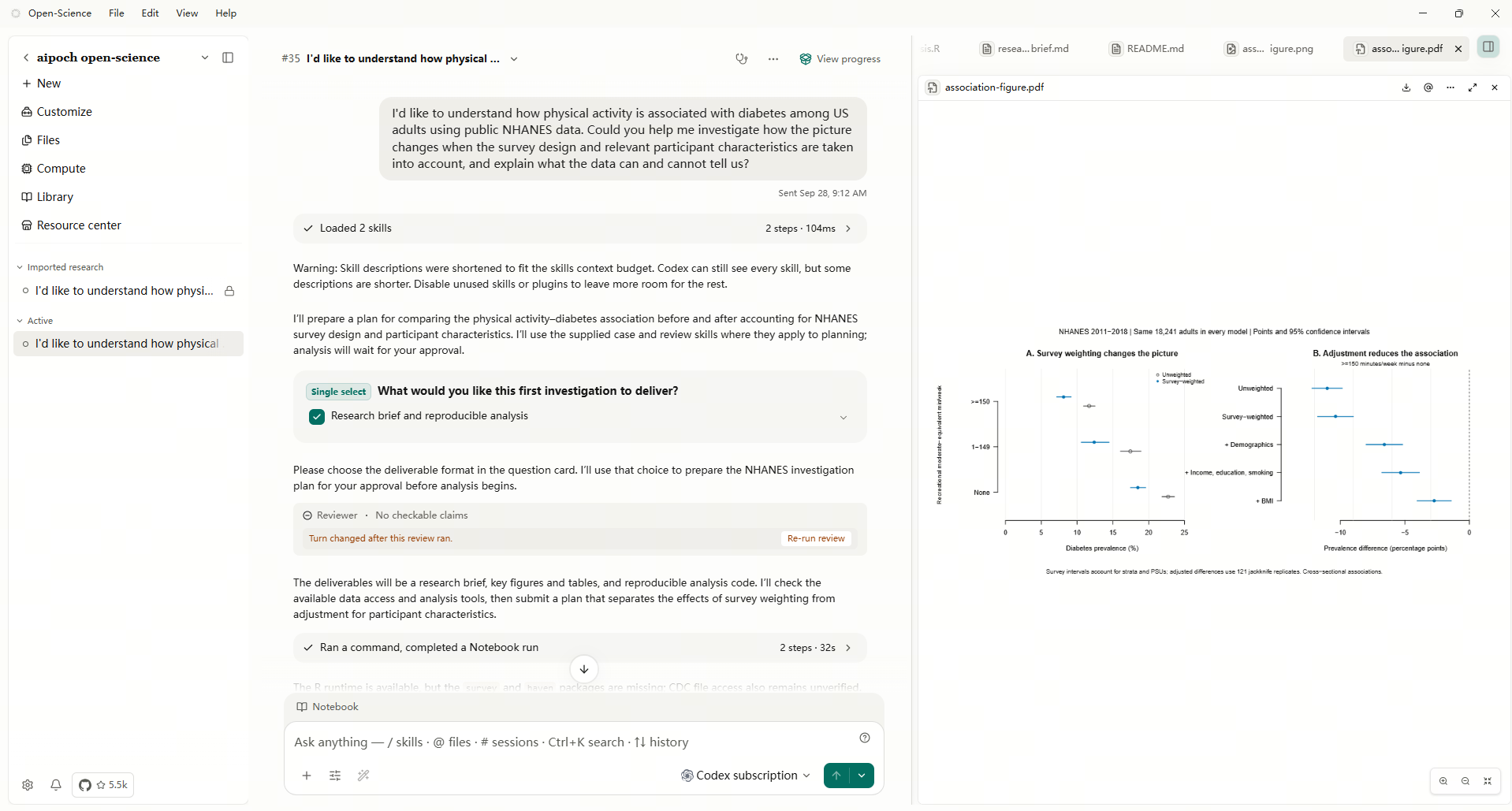
Run and preview the outputs. Review the figure alongside the analysis script, research brief, and specification. The case provides R analysis and reproduction materials.
-
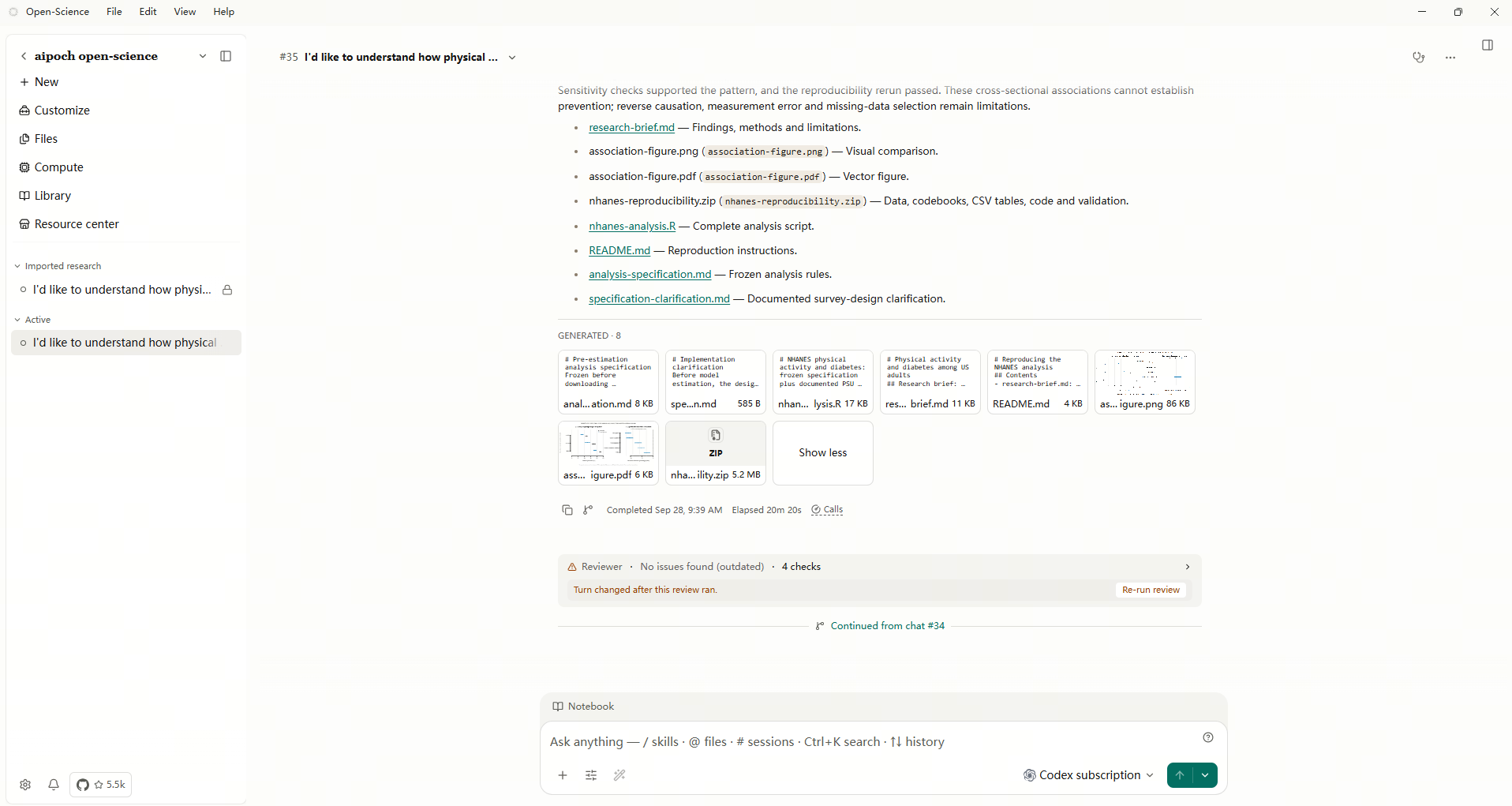
Review and export. Inspect the selected evidence before creating the session package. The export dialog shows an essential option containing history and required evidence.
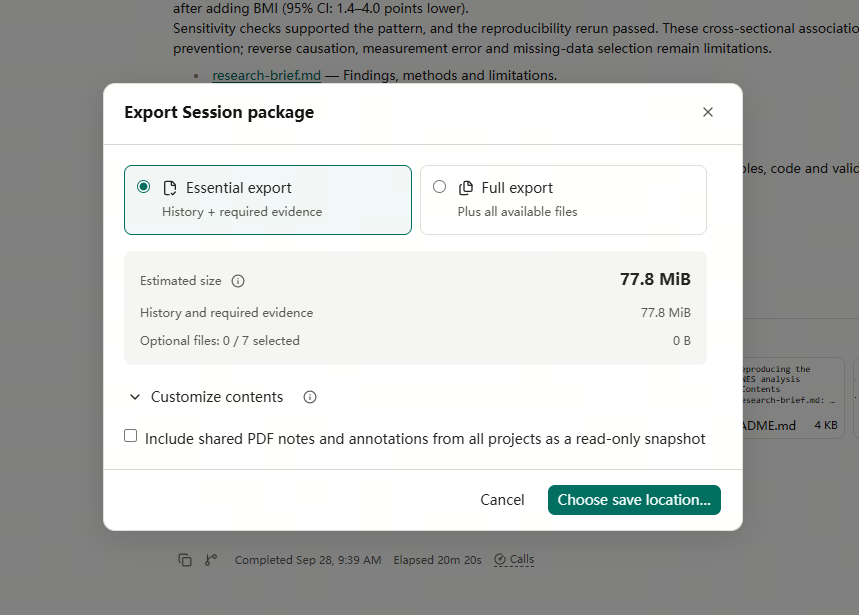
The screenshots in the article package illustrate this published case. Its research question, results, and limitations are available on the case page. Physical activity and diabetes among US adults
2. Elicit
Elicit is a research platform for finding, understanding, and synthesizing academic evidence. It offers a flexible Research Agent, a report workflow, and a dedicated Systematic Review workflow. That choice matters when deciding how much control you need over screening and extraction.
Main features
- Move from finding papers to extracting information, investigating individual studies, and synthesizing evidence in an agent session.
- Generate a referenced research report for an initial overview.
- Use the Systematic Review workflow to gather studies, apply inclusion criteria, extract fields, and produce a PRISMA-style report.
Who it suits and when
- Reviewers who need consistent evidence tables and explicit study-selection decisions.
- Researchers exploring a field before defining a formal review protocol.
Start with a question and draft eligibility criteria. For example, screen five papers and extract population, activity measure, outcome definition, and follow-up. Resolve ambiguous definitions before expanding the review. Your first useful output is a table another reviewer can audit against the papers. Usage allowances depend on the selected workflow and plan. Getting started with Elicit — Which workflow should I use?
3. Consensus
Consensus is an academic research product for finding studies and exploring the evidence behind a question. Its Research Agent can turn a request into multiple searches, follow citation relationships, and produce a referenced synthesis.
Main features
- Trace references and later citing work from a starting paper or DOI.
- Apply research filters such as study type, publication period, and sample size.
- Use research workflows to review a topic, find supporting evidence, or examine a draft’s sources.
Who it suits and when
- Researchers checking the evidence behind a statement in an introduction or discussion.
- Students and reviewers building a reading list around a known paper.
Begin with a precise claim or a trusted paper’s DOI. Ask which later studies used the same measurement approach, then examine the cited methods. The output can guide your reading, but whether a paper supports your exact wording still depends on its population, design, and findings. This is particularly useful when you need to follow the evidence surrounding one claim. Consensus Research Agent
4. Elsevier LeapSpace
LeapSpace is Elsevier’s AI-assisted research workspace for exploring scholarly information. It combines literature exploration with author discovery, funding insights, and features that help researchers examine the support behind an answer.
Main features
- Explore research topics and identify relevant authors or funding opportunities.
- Open a cited reference’s Trust Card to see bibliographic details and an explanation of its connection to the statement.
- Follow the publisher link, where available, to inspect the underlying source.
Who it suits and when
- University researchers developing a project and identifying relevant expertise.
- Teams that want to review how a generated answer connects to scholarly sources.
Sign in through the appropriate Elsevier or institutional route and begin with a focused research question. Examine one reference’s Trust Card, then read the original paper before citing it. The useful outcome is a supported route into the literature, with leads for further investigation. Access depends on institutional arrangements, so check your library’s provision when comparing options. ScienceDirect AI and LeapSpace FAQs · How do Trust Cards work?
5. Gemini Notebook, formerly NotebookLM
Google’s notebook product organizes research around a collection of sources. It suits projects where the team wants to ask questions about a specific reading set and revisit the material behind the answers. Google has renamed NotebookLM to Gemini Notebook. NotebookLM is now Gemini Notebook
Main features
- Discover relevant web sources and select which ones to add to a notebook.
- Ask questions about the collection and use citations to return to supporting material.
- Turn source material into summaries such as briefing documents and FAQs.
Who it suits and when
- Researchers comparing definitions, methods, or arguments across an assembled reading set.
- Students preparing a seminar from assigned sources.
Start with two public survey manuals. Ask how each edition defines the same variable and request the supporting passage for each definition. Review those passages before saving a comparison note. The notebook then becomes a place to revisit the question with the source collection in view. Check which editions you imported, because an accurate summary of the wrong manual will still mislead the project. Discover sources from around the web
6. ChatGPT Deep Research
Deep research is a research agent in ChatGPT that investigates questions across multiple sources and produces a structured report with citations. It is useful when a research question extends across public agency pages, technical documentation, and published reports.
Main features
- Define the scope and shape the research plan before the investigation proceeds.
- Restrict research to selected domains or prioritize preferred sources.
- Follow progress, refine the direction, and request revisions to the resulting report.
Who it suits and when
- Researchers comparing approaches across institutions or disciplines.
- Teams preparing a background brief whose evidence is distributed across websites.
Specify the question, timeframe, source boundaries, and expected format. For a comparison of survey methods, request one row per edition and prioritize the issuing agencies. Check that each row cites the matching manual and year. The report can become a working brief that you revise for a proposal or meeting. Access to particular tools and sources depends on the account and workspace configuration. OpenAI Academy — Deep research
7. Claude Research
Claude Research is a research mode that runs successive searches and decides what to investigate next based on earlier findings. It can explore different angles of a question and use enabled connectors as part of the investigation.
Main features
- Build an investigation through multiple searches and follow-up questions.
- Research the web and supported connected tools from the web or desktop application.
- Continue discussing the findings and refine the question as uncertainties emerge.
Who it suits and when
- Researchers investigating why sources appear to disagree.
- Teams whose research spans several documents and questions that evolve during the work.
Enable web search and Research, then supply a question with a clear scope. For example, ask why two public reports estimate different participation rates. Request the methodological differences and the uncertainties that remain. Review whether the sources establish each explanation. Research requires an eligible paid plan. Mobile Research searches the web, so use the web or desktop application when the task depends on connectors. Use research on Claude
How to choose an AI workspace for your research
Choose by the material you start with and the output your colleague needs. For papers and screening decisions, compare Elicit and Consensus. For an assembled source collection, try Gemini Notebook. For institutional literature exploration, check LeapSpace access. For broader web investigations, compare ChatGPT Deep Research and Claude Research. For code, figures, and a portable research record, examine AIPOCH Open-Science.
Test an agent workspace with a small task that exposes its workflow. Ask a colleague to trace three extracted values to their papers, one report claim to its source, or one figure to its script. Record how much explanation they need from you. That shows whether the product supports the handoff your project requires.
Conclusion
A useful AI agent workspace connects the research question to evidence the next person can inspect. Choose the platform around your immediate deliverable, then evaluate it with the reviewer who will receive that work.
FAQ
Which AI workspace should I try for a reproducible analysis?
Try AIPOCH Open-Science when the deliverable includes code, figures, and research records. Use the public NHANES case to identify the files a collaborator would need, then check that your own session includes equivalent materials.
How can I hand an agent workspace’s results to a collaborator?
In AIPOCH Open-Science, review and export selected records as a .science package. Include the inputs, artifact versions, and execution evidence needed for the review. Ask the recipient to inspect one result before treating the handoff as complete.