v1.2.0 runs approved jobs on Kubernetes, Hugging Face Jobs, Modal, and Ray, makes a built-in agent the default, and adds step-linked discussions and differential macOS updates.
Open-Science is AIPOCH's open-source, local-first, model-agnostic AI research workbench: scientific AI agents, Python and R execution, and scientific data connectors that support reproducible execution and inspectable provenance evidence on macOS, Windows, and Linux.
What new capabilities help researchers in v1.2.0?
Approved remote jobs on Kubernetes, Hugging Face Jobs, Modal, and Ray
Remote compute previously covered direct SSH and Slurm. Kubernetes, Hugging Face Jobs, Modal, and Ray were not available as targets, so a job meant for one of them could not be submitted from inside a session.
v1.2.0 lets a session submit approved jobs to Kubernetes, Hugging Face Jobs, Modal, and Ray alongside SSH and Slurm. Each external submission freezes its inputs and asks for approval of the target, command, resources, and outputs. Recovery records let result collection resume after a restart, and published results open from Compute Preview.
Researchers can keep the job and its recorded approval inside the same session, then inspect the published result where the rest of the work already lives. This supports reproducible execution and gives each submission inspectable provenance evidence; it does not by itself verify the scientific result.
These backends run on user-provisioned targets and need the account, software, resources, and permissions of the approved target. Jobs on cloud backends may incur costs on the connected account, provider choice remains constrained by the active framework's endpoint compatibility, and there is no local GPU compute backend or multi-user real-time collaboration.
A built-in Open-Science Agent as the default
New setups previously started with Claude as the default agent rather than a runtime shipped inside the app.
A standalone built-in Open-Science Agent runtime now ships as the default for new installations. It uses provider-neutral turn execution, validated tool handling, streaming adapters for major API protocols, and durable stores. Claude Code, OpenCode, Codex, CodeBuddy, and Pi remain available.
A new installation can start a session without selecting an agent first, while teams that prefer Claude Code, OpenCode, Codex, CodeBuddy, or Pi can still choose one explicitly.
Provider choice is still per framework rather than one unified gateway, and remote endpoints must use HTTPS. The runtime does not validate scientific claims, citations, or methods.
Differential macOS updates
Updating the desktop app meant downloading the whole app image each time, even when only a small part of it had changed.
macOS updates now download only the changed blocks of the app image via blockmaps, with automatic fallback to the full download when the differential path is unavailable.
Updates can be smaller to fetch while keeping a working install path when block-level downloading is not possible.
Step-linked discussions on imported research
An imported .science package is inspectable and referenceable, but the import itself stays read-only. Step-linked child discussions were not available on an imported package or a replay step.
Ask from an imported package or a replay step now opens a child conversation linked to that step. The parent keeps its identity, discussions survive archiving, and deleting the parent converts the discussions into ordinary conversations. Forking provides a writable continuation.
A researcher can question a single recorded step without modifying the import, and the resulting discussion stays traceable to the step that prompted it. Replay reproduces recorded steps rather than re-executing them; solver-exact equivalence remains open, and replayable verification remains the deterministic check.
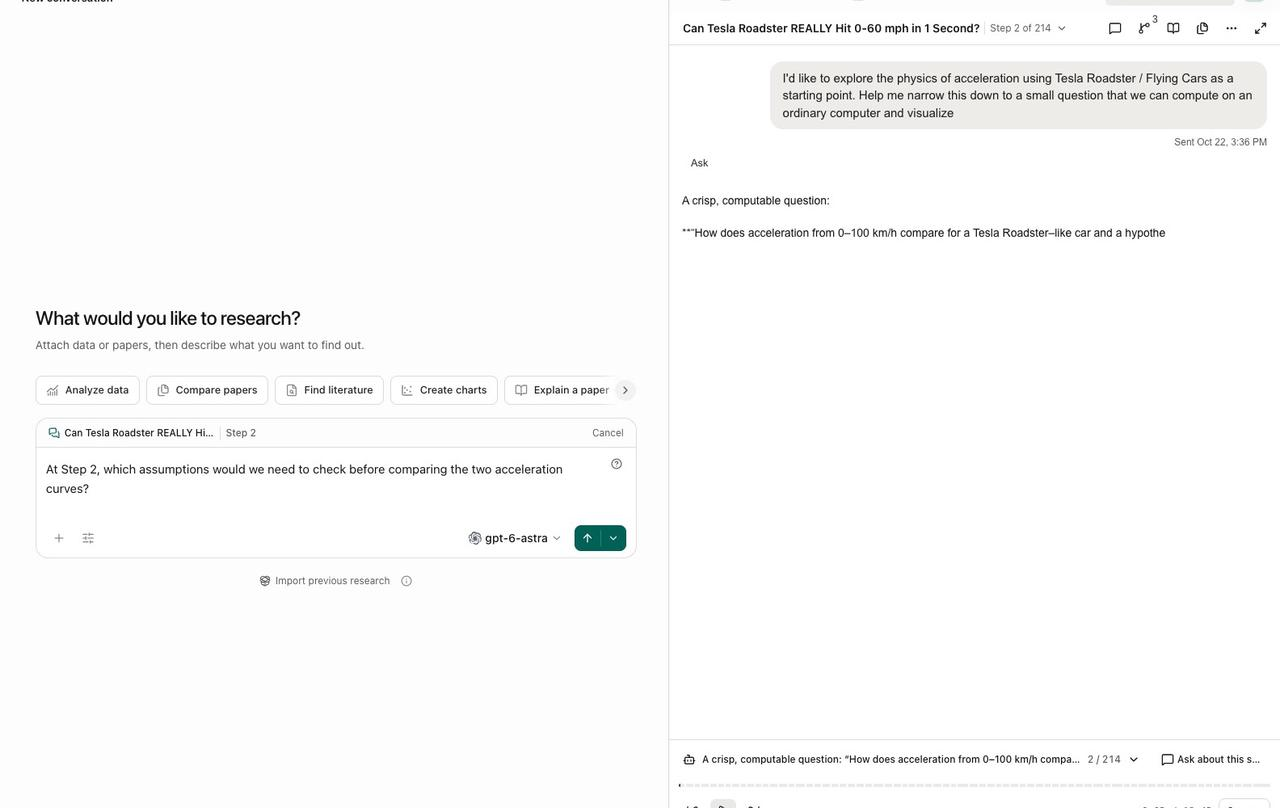
Clicking "Ask about this step" on Step 2 of an imported English Roadster case replay opens a new discussion draft that keeps the case source and a Step 2 link, with the matching replay still visible on the right. An English question is typed but not sent. The image shows the step-linked entry point and the draft; it does not show a generated answer or verified persistent discussions.
What else is new in v1.2.0?
- Source link previews. A hover card shows the destination domain and, for approved HTTPS sources, title and description metadata.
- A calmer sidebar. Groups are ordered Pinned, Imported research, Active, and Recents, and child sessions read clearly as branches of their parent.
- A clear next step for imported history. All four actions remain, with Fork to continue as the single primary action.
- Stable reading position. Sending a prompt while reading an earlier turn keeps the transcript anchored instead of jumping to the end.
- Local capabilities in Settings. The Model settings tab becomes Local capabilities, covering PDF extraction, OCR language packs, and research narration with aligned cards.
- Ask in replay. Questions attach to the selected step or Notebook run, including cells outside the current page.
- Clearer tool errors. Messages state the failed call and the explicit next step instead of reading as if the tool were unavailable.
- Responsive notebooks. Large-source analysis runs off the main thread, file evidence reuses a resident worker, and owned-process exits are awaited natively.
- Stricter literature extraction. External literature PDF extraction recovers only proven native prose, math, and table fragments and rejects look-alike captions and citation tails.
- Identifier-only references. The manual Add reference form accepts entries such as a PMID and generates a title from the first identifier.
- Quieter video export. Export controls stay compact while progress runs, and the film button no longer flashes the wrong action while its status loads.
Bug fixes that affect daily use
- DeepSeek aliases. Model aliases route through chat completions, fixing validation and runtime failures on the Responses path.
- Windows managed R. Rscript launches with the activated Conda DLL directories, fixing STATUS_DLL_NOT_FOUND exits.
- Windows display scaling. The main window clamps to the display work area, so the taskbar can no longer cover the input area.
- Fixed-layout PDF translation. Independently translated pages are retained when one page has an unsupported layout, instead of discarding the whole preview.
- Update installation checks. The running macOS bundle is verified before reporting installation-busy, Windows names the processes holding app files, and blockers resolve without blocking the app.
- macOS background service. The shared service detaches from the desktop's crash handler, so a stale handler no longer holds files or blocks updates.
- Startup diagnostics. Diagnostics survive an automatic restart after a backend exit.
- Windows notebook recovery. Runtime recovery proves the kernel process tree exited before clearing startup fences, and shell tasks prefer the app-managed Node over host shims.
- Codex cleanup. Runtime cleanup resolves taskkill reliably on restricted Windows environments.
Disclaimer
Open-Science assists researchers by organizing evidence, recording approved job submissions, and making steps inspectable. It does not replace scientific judgment or peer review. Replay reproduces recorded steps rather than re-executing them, the reviewer is opt-in and record-scoped, and remote jobs run under user-provisioned accounts. Researchers remain responsible for checking citations, units, statistics, methods, and results.