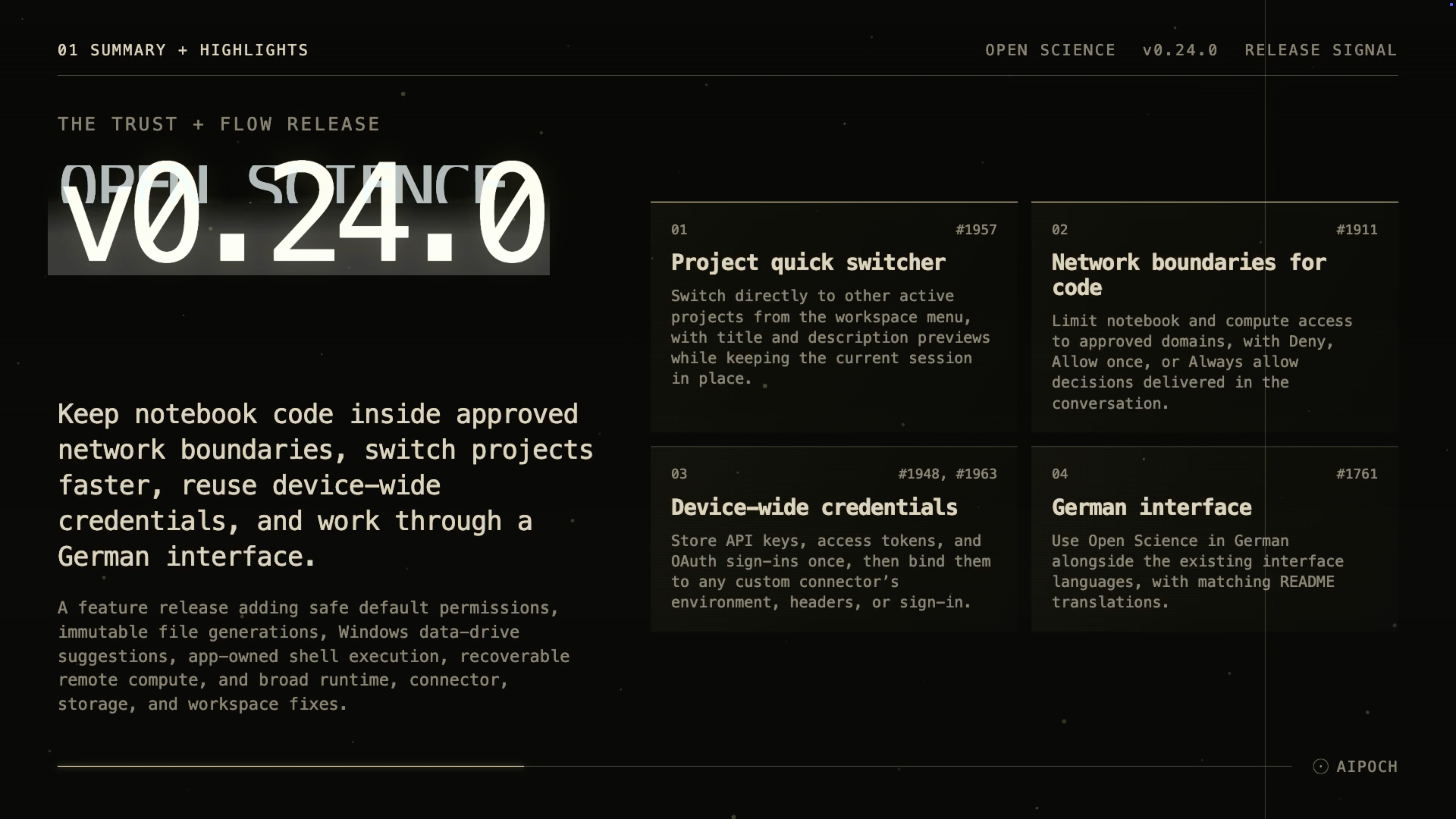
v0.24.0 adds network boundaries for code, faster project switching, reusable credentials, safer permissions, and immutable file generations.
Open Science from AIPOCH is an open-source, local-first AI research workbench for inspectable research across models, scientific agents, code, and data connectors.
What new capabilities help researchers control access and keep work moving?
Open Science v0.24.0 adds explicit boundaries for notebook and compute traffic while reducing repeated setup across projects and custom connectors.
Notebook and Compute Network Boundaries
Research code can access remote package registries, APIs, databases, or other services, but unrestricted network access makes it harder to know where data may travel. Settings → Network now defines the domains that Open Science notebook and compute runtimes may reach, alongside required Open Science defaults.
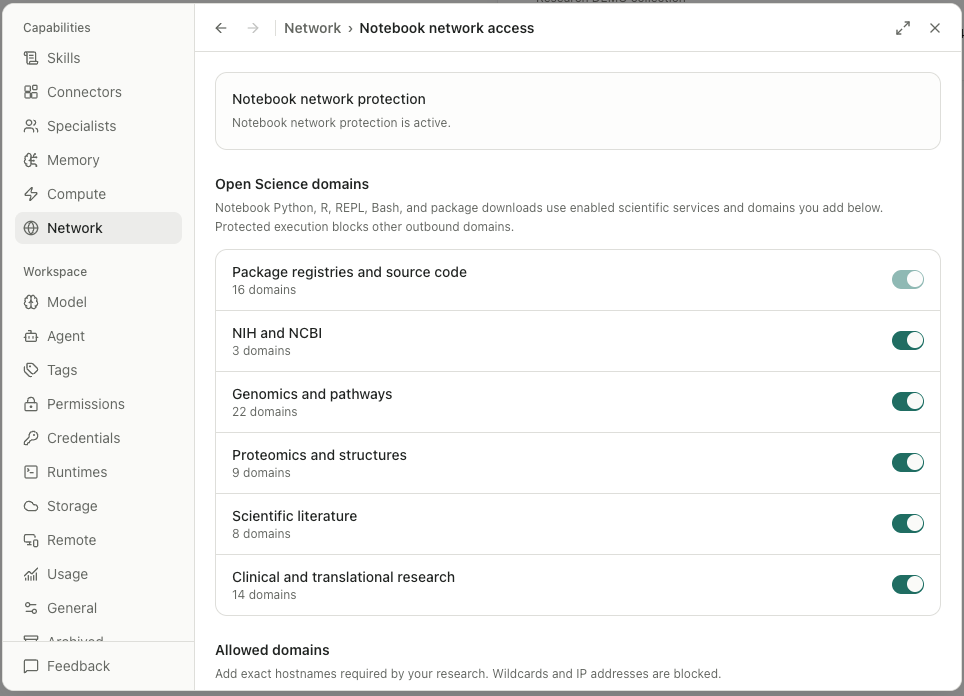
When code requests an unapproved destination, the decision appears in the conversation with Deny, Allow once, and Always allow choices. An Allow once decision applies only to the exact command that requested it, while a persistent decision adds the destination to the approved set. This keeps the destination and the requesting command visible at the point of approval.
The network boundary is active out of the box on macOS and Linux. Windows requires a one-time administrator setup for the sandbox; until that setup is complete, notebook and compute code is not covered. The allowlist applies to Open Science notebook and compute runtimes, not to every process launched elsewhere on the device.
Project Quick Switcher
Moving to another project previously required leaving the current session and navigating back through the workspace. The workspace project menu now lists other active projects with title and description previews, while keeping the current session in place. The first five projects appear directly and the remaining projects are available with one more action.
The switcher works on desktop and mobile layouts. Researchers managing several active studies can identify and open the intended project without losing the context of the session they are leaving.
Device-Wide Shared Credentials
Repeatedly entering the same API key, access token, or OAuth sign-in for multiple custom connectors creates extra setup and more credential copies to manage. Settings → Credentials now stores these values once at the device level and lets a custom connector bind them to environment variables, request headers, or an OAuth sign-in.
Browser sign-in runs as a separate cancellable step, and stored values resolve only inside the application. Researchers should still use credentials with the narrowest permissions required and follow their organization's rotation and data-handling policies.
Safe Default Permissions with Restore
New installations now seed baseline grants for invoking skills and reading literature linked to the current message. If a baseline grant is removed, Settings → Permissions provides Restore defaults, which re-adds only missing default entries without removing or changing other user-created grants.
These defaults reduce repeated prompts for common in-scope actions while keeping other protected operations subject to their configured approval policy. A restored permission allows the specified action; it does not validate a method, script, source, or scientific conclusion.
Immutable File Generations from Code Runs
Notebook and compute runs can modify a file repeatedly, which risks hiding the earlier result behind the latest bytes. v0.24.0 preserves files created or changed by those runs as immutable, checksum-addressed generations. An earlier generation remains identifiable instead of being silently replaced.
Immutable generations strengthen the inspectable record around execution, but they do not yet provide deterministic reruns. Portable environment locks and full-fidelity session replay remain outside the shipped capability.
Windows Data-Drive Suggestions and German Interface
On Windows, first-run setup can preselect a suitable secondary drive for the Open Science data location rather than defaulting to the system drive. The selection persists across restarts, helping researchers keep larger project data on an intended storage volume when one is available.
German is now available across the interface, with matching README translations. It joins the existing Spanish, French, Chinese (Simplified and Traditional), Japanese, Korean, and Russian language options.
What else is new in v0.24.0?
The release also strengthens execution records, remote-job recovery, review evidence, and workspace consistency.
- Shell commands from Claude Code, OpenCode, Codex, and CodeBuddy now pass through the application's execution path, preserving durable records and approval boundaries.
- Remote compute jobs can recover after an application restart or crash through durable operation receipts, controlled cancellation and cleanup, and lifecycle enforcement on the remote host.
- The Reviewer can read bounded, paged PDF and Office evidence, media-aware artifacts, and file provenance; correction round-trips preserve researcher responses and the reviewer model identity.
- Tag creation and editing now use the same Settings-page pattern as other application configuration.
Bug fixes that affect daily use
v0.24.0 repairs stale state, credential integrity, storage handling, execution crashes, and workspace recovery paths.
- Sessions and runtimes: Restored sessions reconnect to their persisted project, canceled work no longer leaves stale state, and a provider resume timeout no longer interrupts unrelated work.
- Codex and CLI: Codex child processes handle signals cleanly, loopback model-call details remain available, and CLI status and tooltip focus recover correctly.
- Application recovery: Confirmed quits, renderer load failures, and system-shutdown recovery are handled explicitly.
- Skills and memory: Failed skill loads no longer trap the editor, skill listings no longer rewrite imported catalog metadata, kernel environments import skills correctly, and validation preserves UTF-8 input.
- Memory controls: The global memory gate is respected by conversation controls.
- Connectors and credentials: Credential integrity is enforced through the connector lifecycle, custom connector operations are limited to the application, and unreadable device credentials surface a clear failure.
- Storage and settings: Persisted data integrity is checked, unsupported settings documents are rejected with an explanation, and compute bookmarks survive reloads.
- Artifacts and execution: Publishing an artifact version no longer deadlocks, the REPL kernel resolves its runtime roots, and execution-activity capture handles crashes more safely.
- Updates and workspace: Failed uninstalls enter recovery, canceled update progress clears, review and file-action failures appear in the workspace, and streamed responses render reliably during long turns.
Install or update
Open Science v0.24.0 supports macOS 12+ on Apple Silicon or Intel, Linux x64, and Windows 10/11 x64. Download the appropriate DMG, AppImage, Debian package, Windows installer, or archive from the Open Science v0.24.0 release page. The onboarding wizard can configure an app-managed agent runtime, and an installed app can update itself in place.
Official macOS release builds are Developer ID signed and notarized. Windows builds are not yet Authenticode-signed, so SmartScreen may display an “unrecognized app” prompt; verify that the package came from the official release page before continuing.
Resources
- Open Science v0.24.0 release notes
- AIPOCH Open Science
- AIPOCH
- How Open Science Controls AI Agent Permissions
- How Open Science Tracks Research Results: Artifact Versions and Provenance
- Run Research Tasks on Remote SSH Hosts with Open Science
FAQ
Does Open Science v0.24.0 block all network access on the computer?
No. Its domain allowlist covers code running in Open Science notebook and compute runtimes, not every process on the operating system. macOS and Linux enforce the boundary by default; Windows requires a one-time administrator setup before protection applies.
What happens when notebook code requests a new domain?
The approval appears in the conversation with Deny, Allow once, and Always allow choices. Allow once is limited to the exact requesting command, while Always allow adds the destination to the approved set in Settings → Network.
Can several custom connectors reuse one stored credential?
Yes. v0.24.0 can store an API key, access token, or OAuth sign-in once under Settings → Credentials and bind it to custom connectors as an environment variable, header, or sign-in. Stored values resolve only inside the application.
Do immutable file generations guarantee reproducible results?
No. v0.24.0 preserves earlier files as checksum-addressed generations, which supports inspection and comparison, but deterministic reruns are not yet implemented. Reproduction can still depend on inputs, environments, package versions, services, and runtime state.
Which systems can install Open Science v0.24.0?
The supported desktop targets are macOS 12+ on Apple Silicon or Intel, Linux x64, and Windows 10/11 x64. Official macOS builds are signed and notarized, while Windows builds remain unsigned and may trigger a SmartScreen warning.
Disclaimer
Open Science assists researchers with organizing, executing, and inspecting research workflows. It does not replace scientific judgment, domain-specific validation, or peer review.