An AI PDF research workflow is most useful when the papers being read, the selected passages, and the review process remain connected. AIPOCH Open Science can link up to three PDFs to one session, let the Agent read or search those documents, and attach selected text or page regions to a message with a route back to the source.
In this feature, “evidence” means selected PDF context attached to a message with a return path to its source location. It does not mean that the source or the Agent's interpretation has been scientifically validated.
Introduced in Open Science v0.23.0, the workflow is designed for focused paper reading and researcher review. Open Science is an open-source, local-first AI research workbench for inspectable research workflows across models. Its PDF tools can assist with locating and organizing source context; they do not replace source verification, domain judgment, or formal evidence-synthesis methods.
What Does the PDF Workflow Connect?
The workflow connects a bounded reading set, a source-linked selection, and a separate research-review decision. The v0.23.0 release documents a session reading context containing up to three linked, multi-page PDFs.
Within that context, the Agent can read the current page, batch through a full document, or search across the linked PDFs. The preview supports selectable text, area selection, an outline, thumbnails, document search, page navigation, and zoom. A selection can then be sent with a message and revealed again in its source.
These are distinct layers:
- Reading context identifies which linked PDFs the Agent may inspect for the request.
- Source-linked selection identifies the passage or page region the user wants to discuss.
- Research review checks whether the response represents the source correctly and whether more context or additional sources are needed.
The three-document cap is a product boundary, not a recommended evidence count. Open Science provides an explicit, session-scoped reading set for follow-up questions; it is not a cross-session paper library or a complete literature-review corpus.
How Do You Link, Read, and Search Multiple PDFs?
Start by linking only the papers needed for one focused question, then choose the reading action that matches the task. Open a PDF preview, use Link to session, and repeat for up to two additional documents. Explicit unlinking removes a paper from the active set.
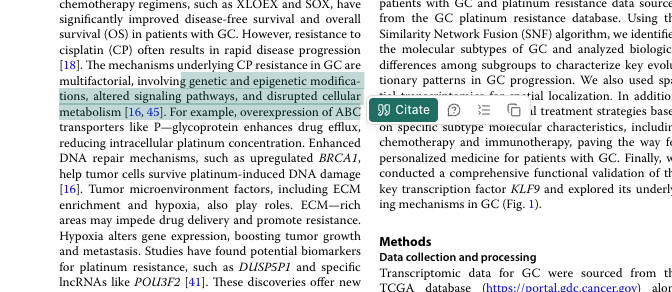
Open Science v0.23.0 PDF preview with page thumbnails and the document marked “In session context.” Screenshot from the user-provided product documentation.
Link Up to Three Papers
Choose the papers around a concrete comparison or extraction target rather than filling all three slots by default. A useful request might ask the Agent to locate how two or three papers define the same outcome, describe a method, or qualify a result.
The linked set belongs to the current session. The official limitations state that there is no cross-session literature library yet, so a new session should be treated as a new reading context unless the relevant PDFs are linked there.
Read the Current Page, Traverse a Paper, or Search the Set
Use current-page reading for a visible paragraph, table, figure, or equation. Ask the Agent to move through a full paper when the answer may depend on several sections. Use cross-document search when the task is to find a term or concept across the linked set.
Search matches are leads for researcher review, not conclusions. A methods phrase may appear in several papers without being defined or applied in the same way. Ask for document identity and surrounding context, then inspect the original pages before accepting a comparison.
The reading snapshot stays stable across queued sends, retries, branches, and resumes, according to the v0.23.0 release notes. This keeps the documented PDF context associated with those control paths. It does not guarantee identical outputs across models, backends, retries, or branches.
How Do Text and Region Selections Return to the Source?
Select the smallest sufficient passage or page region, attach it to the message, and reveal the source before accepting the Agent's interpretation. Text selection works when the PDF exposes a usable text layer. Region selection can identify spatial material such as part of a figure, table, or image-only page segment.
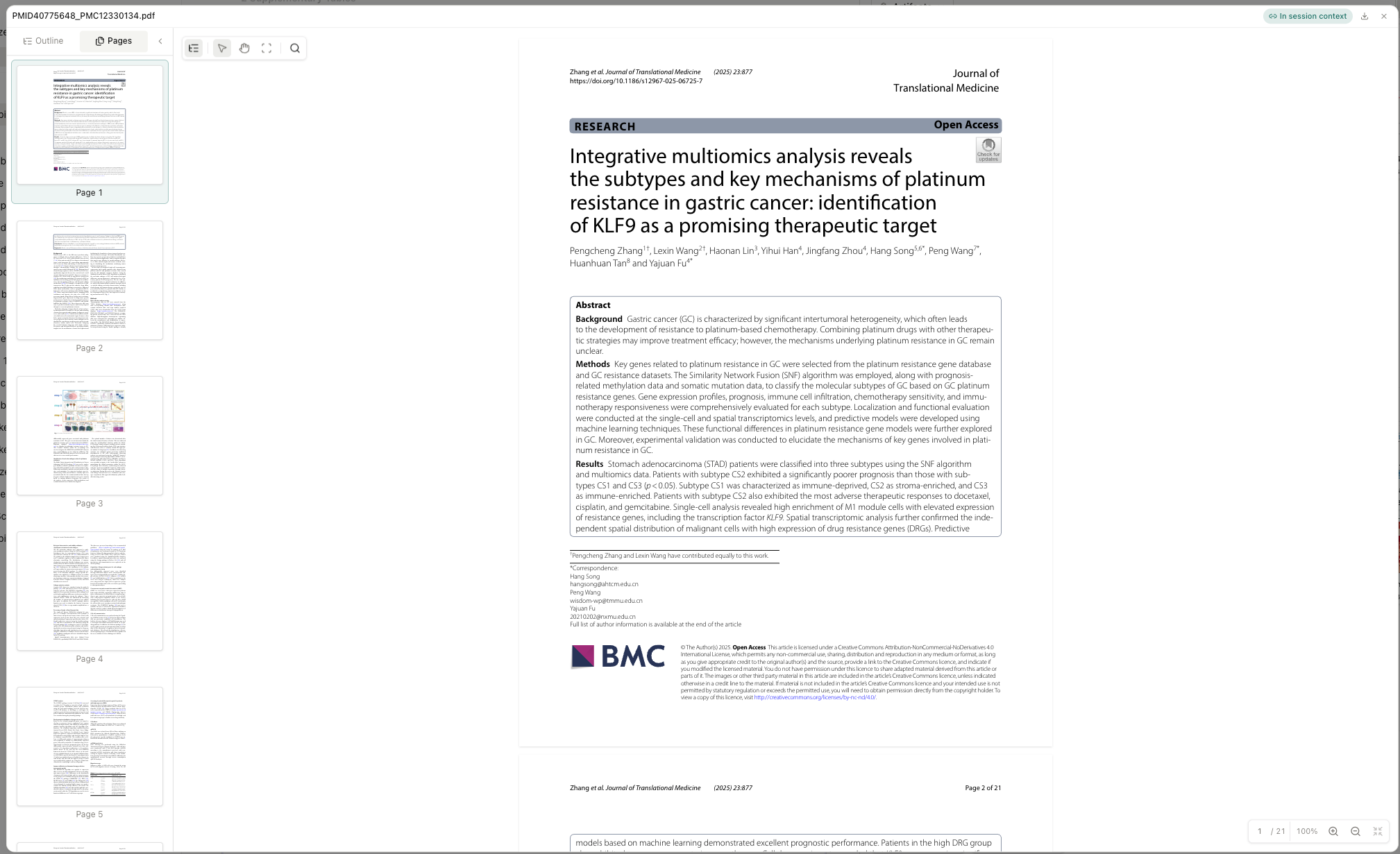
Selected PDF text with the Cite action available for attaching source context to a message. Screenshot from the user-provided product documentation.
Whether a selected region can be interpreted correctly depends on the active model and backend, the document quality, and the information visible in the selection. A coordinate establishes location and context transfer; it does not guarantee reliable reading of a chart, formula, label, or scientific image.
Write a bounded instruction with the selection. For example:
- “Summarize how this paragraph defines the exclusion criteria.”
- “Compare this table row with the corresponding outcome in the second paper.”
- “Flag differences in units and definitions for researcher review.”
The v0.23.0 release states that selected PDF context can reveal its location in the source document. Click-to-reveal reduces the work of relocating a passage; it does not verify the Agent's summary. A selection may depend on a definition introduced earlier, a table footnote, a figure caption, or a limitation stated later.
Before preserving a result, use this review checklist:
- Correct document: Is this the intended version, preprint, supplement, or final paper?
- Correct location: Does the selection address the same cohort, method, condition, or outcome?
- Enough context: Do nearby definitions, footnotes, captions, or qualifications change the meaning?
- Matched certainty: Did the response preserve the source's level of certainty rather than strengthen it?
- Sufficient support: Does the proposed output require another passage or another paper?
What Does a Practical Three-Paper Comparison Look Like?
A focused comparison works well when every proposed table entry can be checked against a selected source location. Consider a researcher comparing how three papers define and report one outcome.
Link the three PDFs to one session. Ask the Agent to search for the outcome name and related terms, list candidate pages, and avoid drawing a final conclusion. Inspect those pages and select the exact definition, methods statement, table row, or figure region from each paper.
Send the selections with a structured request:
Compare the selected outcome definitions, measurement windows, units, and reported limitations. Keep each paper separate, mark missing information as unavailable, and return a table for researcher review. Do not infer equivalence when the wording differs.
Review the table row by row. Reveal each source, inspect surrounding text and footnotes, and correct any merged terms. If one paper uses a different population or time point, record that difference instead of forcing a direct comparison. Save the reviewed table or note as the durable output; the Agent can assist with organization, while the researcher decides whether the studies are comparable.
Which Context Mechanism Should You Use?
Use PDF reading context for document-level access, source-linked selections for exact locations, file references for whole files, and Artifacts for accepted results. Each mechanism answers a different need.
| Mechanism | Best use | Important boundary |
|---|---|---|
| PDF reading context | Let the Agent read or search up to three linked PDFs in one session | Not a cross-session library |
| PDF evidence selection | Attach selected text or a region and return to its source | Does not validate the source or interpretation |
| File reference | Give the Agent access to a complete project file | Does not identify the exact passage under review |
| Artifact | Preserve an accepted result with available production evidence | Still requires deliberate scientific review |
What Can This PDF Workflow Not Do?
Open Science v0.23.0 does not turn linked PDFs into a complete or independently verified literature review. The official release limitations define clear boundaries:
- Reading context is session-scoped, with up to three linked PDFs.
- Built-in OCR is not available; image-only pages may not expose selectable text.
- Citation-style conversion is not built in.
- Source reveal does not establish study validity, appropriate comparability, or support from the wider literature.
- The feature does not provide a review protocol, database search strategy, screening log, risk-of-bias assessment, or completeness guarantee.
Local-first storage also does not mean every model request stays on the computer. The Open Science README states that model requests send the prompt and necessary context to the selected provider. For a fuller explanation of that boundary, see How Data Flows Through Open Science. Review provider policies before sending confidential, unpublished, identifiable, or otherwise sensitive paper content.
Conclusion
Open Science connects multiple-PDF reading with a visible route from selected context back to the paper. Link a focused set of PDFs, ask the Agent to read or search them, select the passages or regions that matter, reopen the source, and review every interpretation before preserving the result.
The feature is available in Open Science v0.23.0. Explore the current documentation in the Open Science GitHub repository, visit the official Open Science product page, or learn more about AIPOCH.
Frequently Asked Questions
Can Open Science read multiple research PDFs in one session?
Yes. Open Science v0.23.0 can link up to three multi-page PDFs to one session. The Agent can read the current page, traverse a full document, or search across the linked set.
Does PDF evidence prove that a claim is correct?
No. “Evidence” in this feature means selected PDF context with a route back to its source location. Researchers must still evaluate the source, surrounding context, and the Agent's interpretation.
Does the reading context survive retries and branches?
Yes. The documented snapshot stays stable across queued sends, retries, branches, and resumes. This preserves context association, not identical output.
Can Open Science apply OCR or format citations?
No. Built-in OCR and citation-style conversion are not available in v0.23.0. Image-only text and bibliography formatting require separate, reviewed workflows.
Disclaimer
This article is for informational purposes only and does not provide medical, clinical, or validated scientific conclusions. Open Science is a research workflow tool that can assist with reading and organizing source-linked PDF context; it does not replace researcher judgment, source verification, domain review, or responsibility for evaluating outputs. The conceptual images are illustrative, and all Agent outputs require independent review before use in research. AIPOCH is not responsible for third-party content linked from this article.