Starting every research session by repeating the same background is slow and easy to get wrong. AIPOCH Open-Science provides optional, project-scoped memory so useful context can remain available across sessions and application restarts.
AIPOCH Open-Science is an open-source, local-first, model-agnostic, self-hosted AI research workbench for reproducible scientific discovery. Its memory feature can support continuity, but recalled notes remain context for researcher review—not scientific evidence.
What is persistent agent memory?
Persistent agent memory stores selected notes that may be useful in later sessions. According to the v0.22.0 release, memory is optional, organized in project-scoped categories, recalled before relevant turns, and manageable from Settings.
This is useful for stable information such as a preferred report structure, an agreed naming convention, or a recurring analysis constraint. It reduces repeated explanations while keeping the saved notes visible to the researcher.
Screenshot: actual AIPOCH Open-Science product interface.
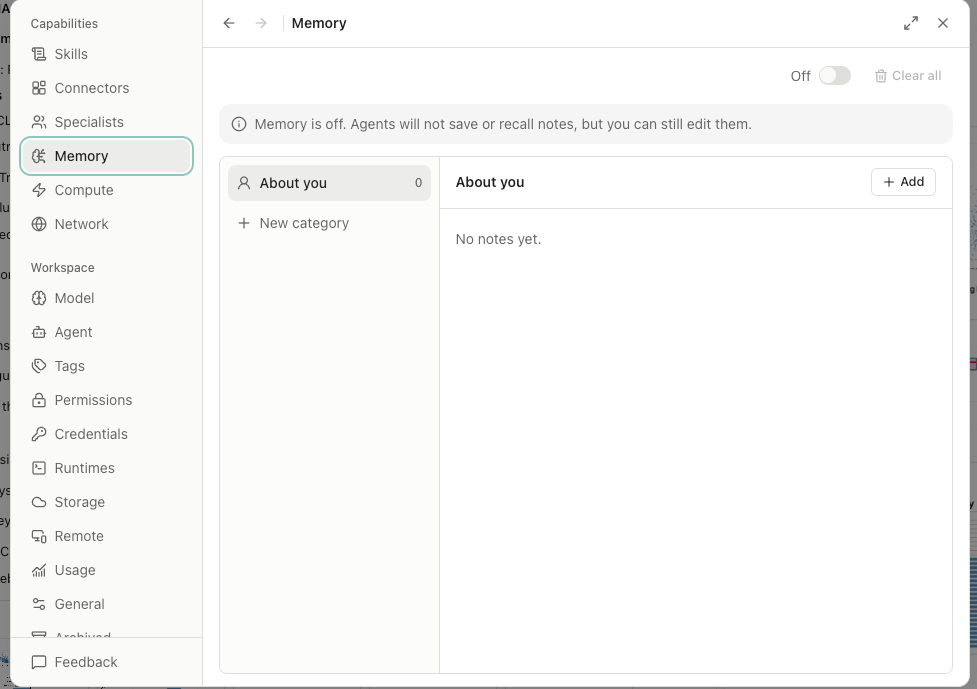
The screenshot above shows memory turned off. Researchers can still inspect and edit the memory area before deciding whether to turn recall on.
How do you organize memory for a research project?
Create a category for one clear type of durable context. In Settings, open Memory, choose New category, give the category a specific name, and describe when a note belongs there.
For example, a “Research Profile” category might hold approved output preferences and stable methodological conventions. A separate category could hold long-lived project definitions. Keep temporary tasks, unverified findings, and changing dataset details out of memory.
Screenshot: actual AIPOCH Open-Science product interface.
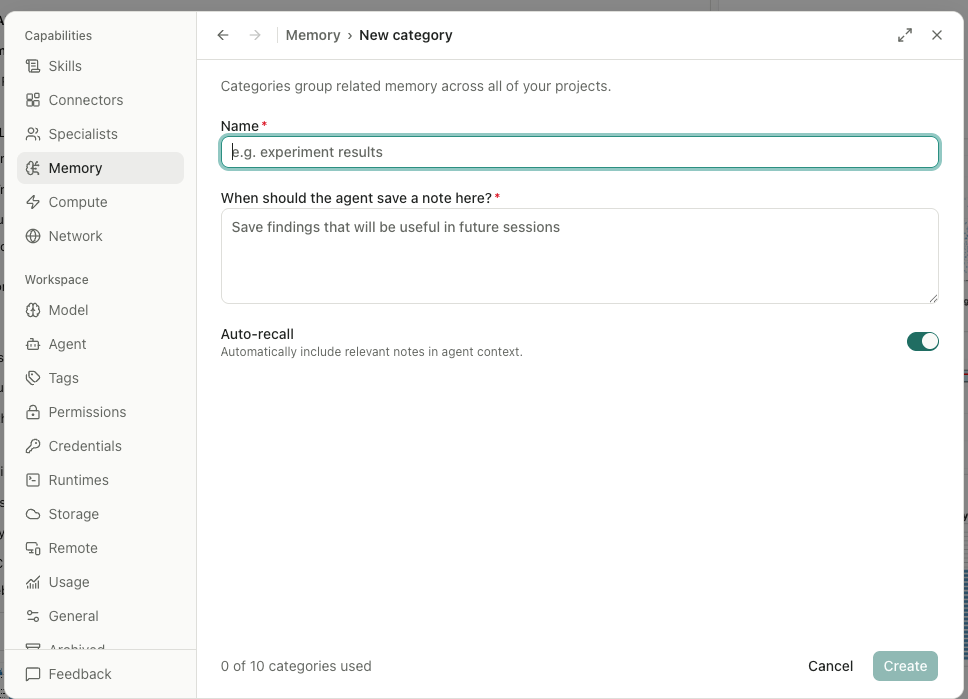
The category description matters because it tells the agent what kind of note should be stored there. Auto-recall can then include relevant notes in later agent context. Researchers should use narrow categories with plain rules instead of turning the memory area into a second project archive.
What should go into research memory?
Save information that is stable, reusable, and safe to retain. Good candidates include preferred language, output format, naming rules, approved conventions, and durable project constraints.
Avoid passwords, API keys, private identifiers, patient-level data, protected health information, and restricted dataset contents. The current repository guidance also makes the broader boundary clear: researchers remain responsible for privacy, methods, interpretation, and scientific validity.
Screenshot: actual AIPOCH Open-Science product interface.
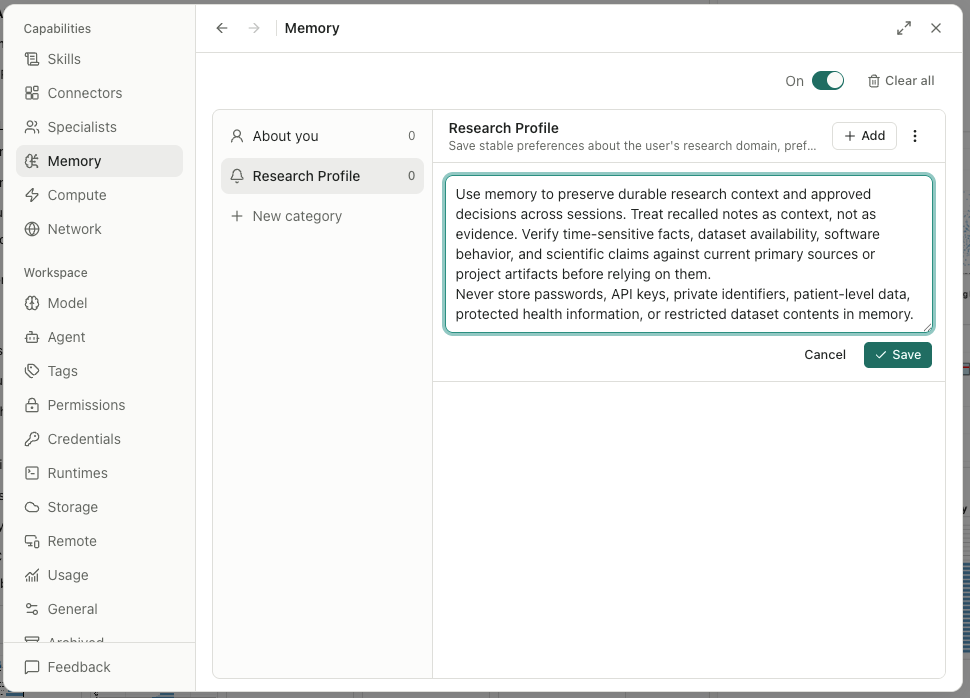
Treat recalled notes as context. Check time-sensitive facts, software behavior, dataset availability, and scientific claims against current primary sources or project artifacts before relying on them.
How do you correct or remove a memory?
Open the Memory settings to review saved entries, then edit incorrect notes or delete information that should no longer influence future sessions. You can also turn memory off or clear stored entries.
Regular review is especially useful after a project changes direction. The v0.26.0 release added stronger guards around memory edits while keeping short search terms usable.
What persistent memory does not do
Memory does not replace source files, a lab record, artifact provenance, or independent verification. Recall and automatic categorization may be imperfect, and a stored note may become outdated.
Use memory to carry forward working context. Keep evidence in the appropriate project files and artifacts, and review any analytical output before using it in research.
Start with one small category
Open Memory in AIPOCH Open-Science, create one narrowly defined category, and add only a few stable notes. In the next session, check what was recalled and correct anything unclear. This small test makes the feature easy to understand before you use it for a longer project.
FAQ
Does AIPOCH Open-Science memory work across sessions?
Yes. The v0.22.0 release documents that project-scoped memory survives application restarts and can be recalled in relevant sessions.
Is persistent memory shared between projects?
No. Memory recall is scoped to the current project, which helps prevent unrelated research work from being mixed together.
Can persistent memory replace research documentation?
No. Memory is supporting context, not evidence or a complete research record. Keep source material and validated outputs in project files and traceable artifacts.
Can I edit or delete saved memory?
Yes. Saved entries remain viewable, editable, and clearable from the Memory settings.
Disclaimer
This article is intended for informational purposes only and does not constitute medical advice, clinical guidance, diagnostic recommendations, treatment decisions, or validated scientific conclusions.
AIPOCH Open-Science is a research workflow tool. Persistent memory provides contextual notes for researcher review and does not replace researcher judgment, source verification, privacy assessment, or expert interpretation. Researchers remain responsible for evaluating the accuracy, completeness, and appropriateness of saved and recalled information.
References and external links in this article are provided for informational purposes. AIPOCH does not endorse and is not responsible for the content of third-party sources.