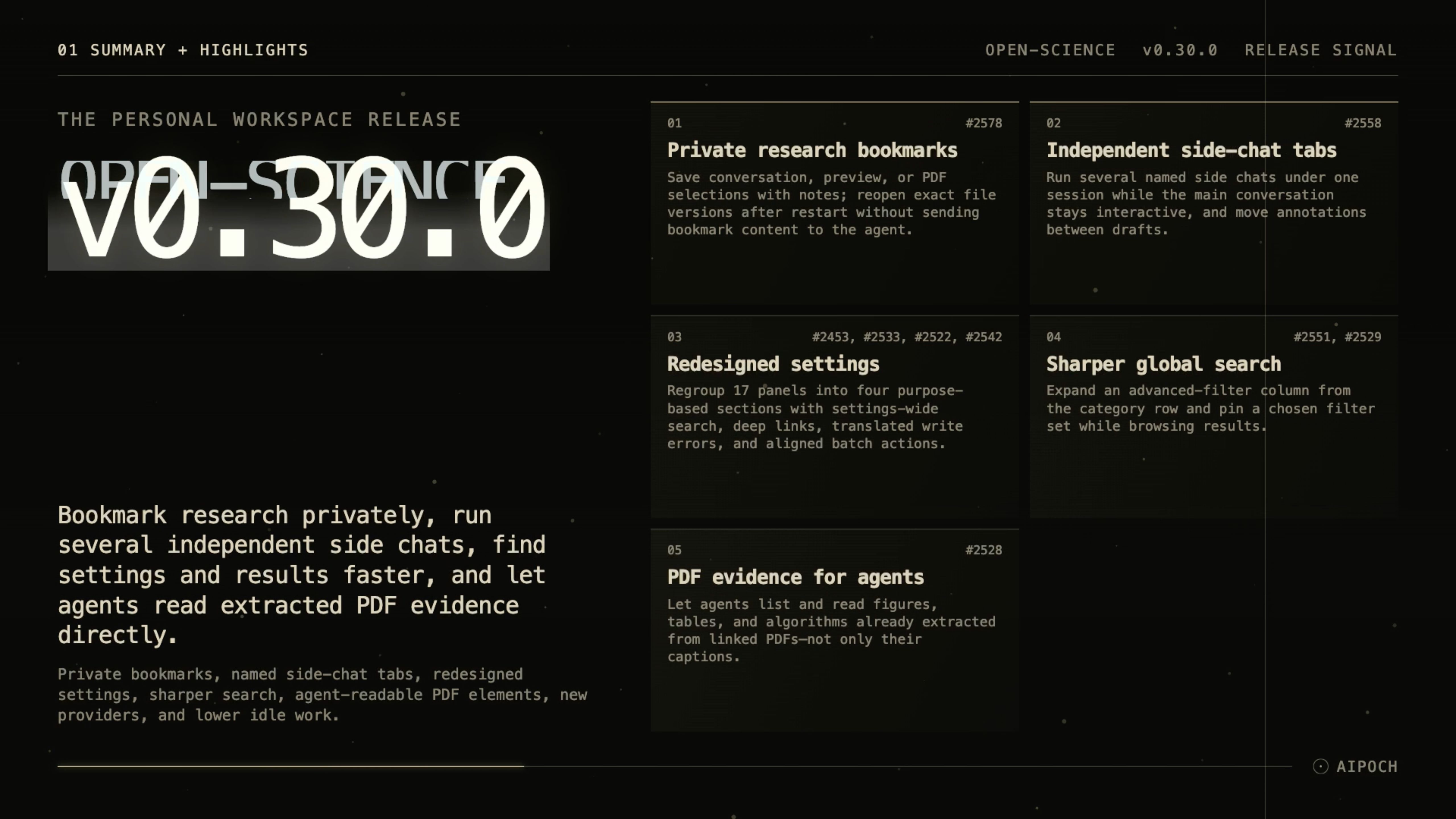
AIPOCH Open-Science v0.30.0 adds private bookmarks, independent side chats, searchable settings, pinned search filters, and agent access to extracted PDF figures, tables, and algorithms.
AIPOCH Open-Science is an open-source, local-first, model-agnostic, self-hosted AI research workbench for reproducible scientific discovery, developed by AIPOCH.
What new capabilities help researchers organize work in AIPOCH Open-Science?
The v0.30.0 release, published September 15, 2026, gives researchers more control over reading, parallel conversations, and workspace navigation. Its five headline changes address practical moments in a research session: saving a passage for later, exploring a separate question, finding a setting, narrowing search results, and asking an agent to inspect an extracted PDF element.
Save private research bookmarks with personal notes
A useful passage can be difficult to find again after a long conversation or another round of document edits. Private session bookmarks let researchers mark conversation text, native text previews, and PDF text or selected regions, with an optional personal note.
Select the passage or PDF region, choose Bookmark or Add bookmark, and add a note if needed. The bookmark list in the message composer provides a route back to saved material, while persistent markers let researchers edit their notes. Bookmarks survive application restarts and can reopen the exact managed file version associated with the selection.
Screenshot: actual AIPOCH Open-Science product interface showing a selected PDF passage and an optional private note.
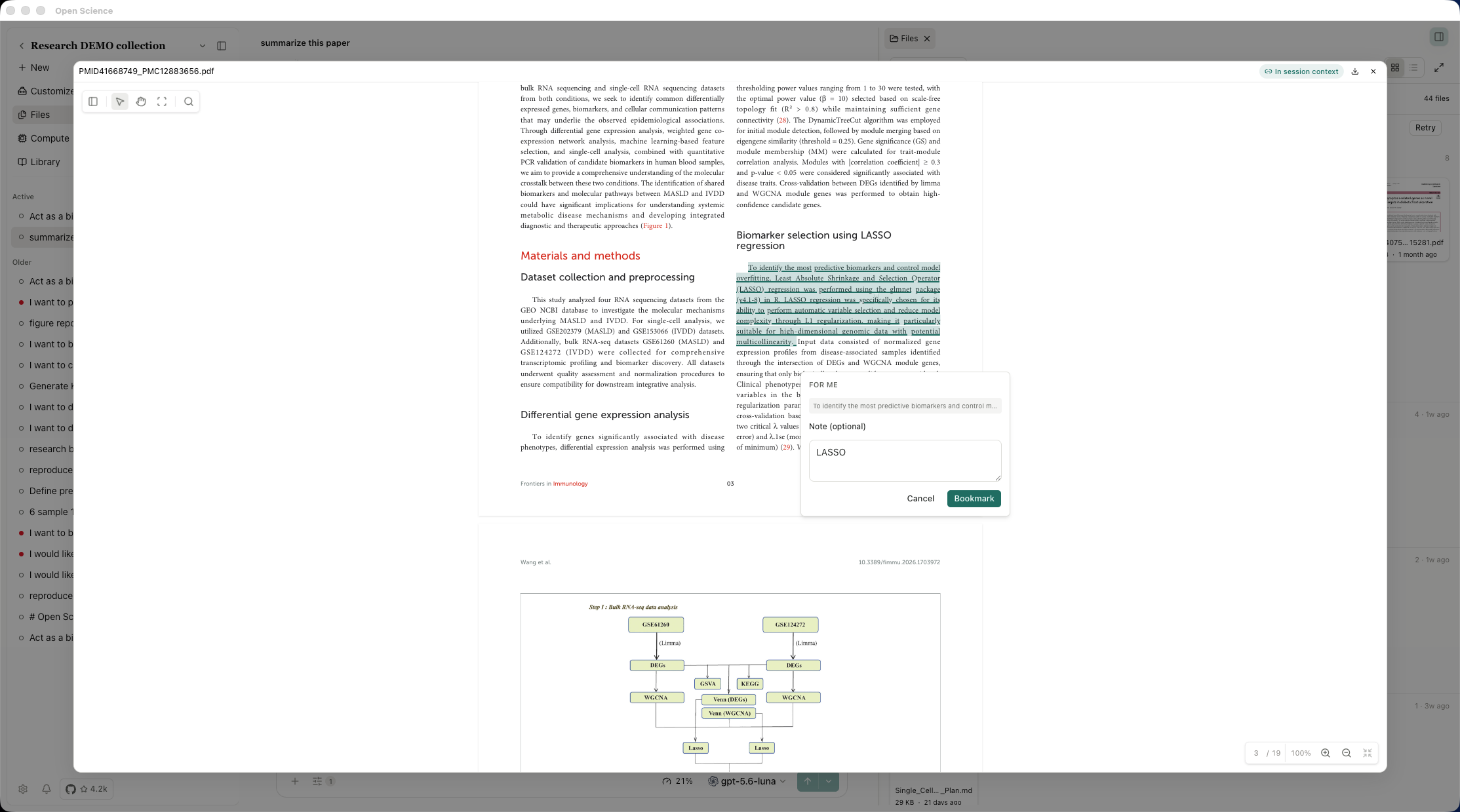
Bookmarking does not send the selection or private note to the agent. This makes it useful for keeping a personal reminder to check a method, revisit an argument, or inspect a figure before deciding what to bring into a conversation. The underlying document may already be available to the agent through a separate context action; creating a bookmark does not change that access.
The release's bookmark boundaries are specific: bookmarks belong to one session, are removed with that session, do not follow branch switches, and are excluded from .science exports and cross-machine synchronization. They provide personal navigation and notes, without establishing that a saved passage is correct or ready to cite.
Keep several side chats open as independent tabs
Research questions often branch into smaller investigations. Checking terminology or exploring an alternative interpretation can require its own conversation while the main task continues.
In v0.30.0, multiple side chats can run under one parent session. Each has its own named preview tab and stable identity, and the main conversation remains interactive. Researchers can transfer annotations between the main draft and side-chat drafts by dragging them or using the shared action menu.
This gives a focused question a visible place in the workspace and makes it easier to return to the main thread of work. Destructive side-chat closure asks for confirmation, and the tab is restored if cleanup fails. These changes are documented under independent side-chat preview tabs in the release notes.
Find settings through grouped navigation and search
Remembering which settings panel contains a particular control becomes harder as a workbench gains more capabilities. Version 0.30.0 reorganizes 17 panels into four sections: Intelligence, Connections, Workspace, and System.
A header search box covers representative entries from every panel. Researchers can navigate results with the keyboard and jump directly to the relevant panel, reducing the need to browse each group. Settings search fields also have clear buttons.
The redesign includes translatable messages when a settings change cannot be saved, shared panel headers, and aligned batch-action areas for Skills, Connectors, and Specialists. Together, these changes make finding and managing workspace configuration more consistent. The Skills, Connectors, and Specialists guide explains how those three capability types fit into a research workflow.
Narrow global search and keep filters applied
Searching a growing workspace often requires more than changing the search phrase. Researchers may need to narrow the scope, adjust ordering, or use time and refinement controls before browsing the results.
Global search now exposes those existing controls in an expandable advanced-filter column reached from the category row. A pin toggle keeps the chosen filter set applied while results are browsed. The filter column also respects reduced-motion preferences.
The practical change is easier access to search controls and a way to hold the selected filters during an investigation. The release notes describe the column resetting on reopen, so the pin should not be treated as a saved-search feature that necessarily persists across future sessions.
Let agents read extracted PDF figures, tables, and algorithms
A figure caption can identify a topic without supplying every plotted detail or table entry needed to answer a research question. Version 0.30.0 lets agents list and read figures, tables, and algorithms that have already been extracted from linked PDFs.
Begin with a PDF linked to the research context and a completed extraction in the PDF structure view. Then ask the agent to list the available elements or inspect a specific one. A focused request might ask for a description of a figure's axes and legend, a comparison of extracted tables, or an outline of an algorithm's steps, with the response treated as a starting point for researcher review.
Screenshot: actual AIPOCH Open-Science interface showing an agent response beside an extracted PDF figure. The generated interpretation requires researcher review.
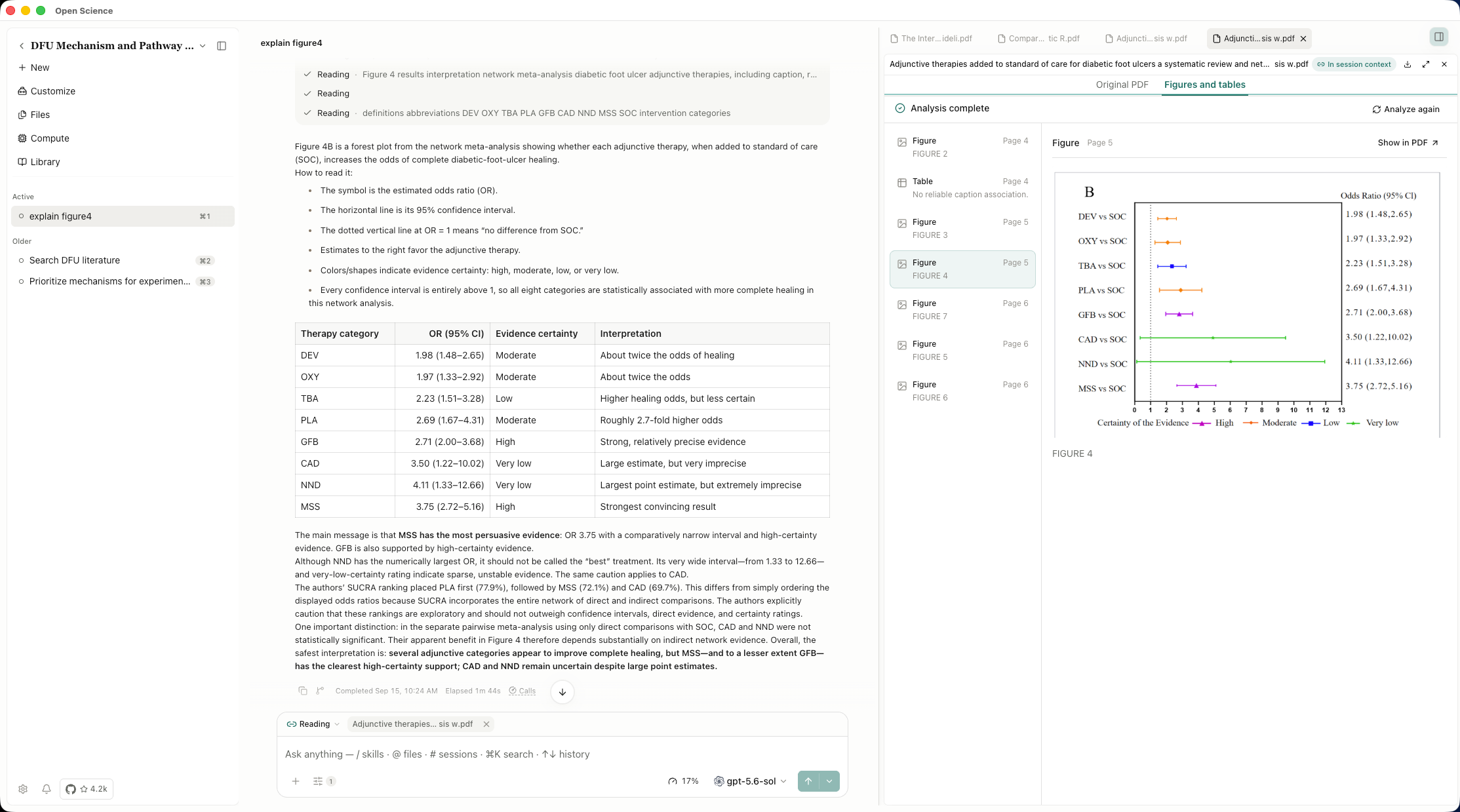
The new capability reuses available extraction results. It does not imply that an agent can read every figure in any uploaded PDF without preparation. Extraction must succeed first, and layout or structure reconstruction can contain errors. Researchers should compare the response with the original figure, table notes, source page, and surrounding text before reusing an interpretation.
For the broader reading workflow, see how AIPOCH Open-Science links PDF evidence back to its source. The v0.30.0 addition makes already extracted elements directly accessible to agents within that workflow.
What else is new in v0.30.0?
The v0.30.0 release also expands provider choices, reduces idle background work, and improves update and recovery feedback.
- Provider catalog: SenseNova gains China and Global endpoints with refreshed chat models, and curated free gateway models join the catalog. Available provider connections still depend on the active agent framework's endpoint compatibility.
- Less work while idle: result-delivery recovery avoids rescanning the session catalog when nothing is pending. Overlapping workspace snapshots are deduplicated, completed remote-job lists stop periodic updates, and cancelled runs stop their timers. The release does not provide a measured battery-life or CPU reduction.
- Update recovery: interrupted shell launches are recovered before restarting the updater, and download progress remains visible while release notes scroll.
- Clearer runtime diagnostics: blocked runtime-recovery setups provide more useful explanations of the problem.
- Workspace details: session numbers appear in hover information, PDF control icons and hints are unified, and batch completion actions are aligned.
Bug fixes that affect daily use
The release's bug-fix section covers PDF handling, connector data, conversation state, execution, and application shutdown.
PDF reading: recovery addresses native figure and table layouts missed during extraction, and text selection aligns correctly on rotated pages.
Scientific connectors: dbSNP placements preserve deletion alleles and escape source separators; VEP queries preserve alleles and count unique transcripts; BioMart boolean filters correctly encode excluded values. These are data-handling corrections, and returned records still require review in their research context.
Agents and sessions: the provider bridge preserves reasoning across assistant history, agent errors retain actionable recovery context, and prompts are protected against conflicts during archiving. Explicit branch selections remain consistent across open clients, and activity-group membership remains valid after merges.
Notebook and compute: write-protection mounts are limited to granted paths, short-lived Windows shell processes are reconciled correctly, and kernel capabilities survive runtime handover.
Startup, shutdown, and cleanup: fixes address pending artifact ancestry at startup, interrupted shell rollback, cleanup failures, released quit confirmations, and stale installation cleanup. Late result continuations stop after disposal, cancelled duplicate transfer starts are rejected, and remote-access shutdown observes cleanup failures promptly. Preview and visibility listeners are also released with the components that own them.
Install or update
AIPOCH Open-Science v0.30.0 is available for macOS 12 or later on Apple Silicon and Intel, Linux x64, and Windows 10/11 x64. Choose the appropriate DMG, AppImage, Debian package, or Windows installer from the release's Assets section.
On first launch, the setup wizard checks the environment and can install and configure an app-managed agent runtime. Existing installations can update in place. Official macOS releases are signed and notarized; Windows builds remain unsigned, so verify the installer came from the official release page if a first-launch warning appears.
To try the update, open an existing research session, bookmark a passage you want to revisit, and inspect one already extracted PDF figure with the agent. Visit the AIPOCH Open-Science product page for the broader workspace overview.
Resources
- AIPOCH Open-Science v0.30.0 release notes and downloads
- AIPOCH Open-Science source repository
- AIPOCH Open-Science product page
- AIPOCH
- AIPOCH Open-Science PDF reading and source-linked evidence
- AIPOCH Open-Science Skills, Connectors, and Specialists
FAQ
What is new in AIPOCH Open-Science v0.30.0?
Version 0.30.0 adds private session bookmarks, independent side-chat tabs, a redesigned settings center, advanced global-search filters with a pin toggle, and agent access to extracted PDF elements. It also updates the provider catalog, reduces idle background work, and fixes PDF, connector, execution, and lifecycle issues. See the official release notes for the complete list.
Are private bookmarks sent to the agent or included in session exports?
No. Creating a bookmark does not send the saved selection or private note to the agent, and bookmarks are excluded from .science exports. In v0.30.0, they remain tied to one session, survive restarts, and can reopen the exact managed file version; they do not follow branch switches or synchronize across machines.
Can several side chats run while the main conversation remains active?
Yes. Version 0.30.0 supports multiple independent, named side-chat preview tabs under one parent session while the main conversation remains interactive. Annotations can move between the main and side-chat drafts through drag and drop or the shared action menu.
Can an agent read PDF figures and tables without extraction?
The new v0.30.0 access applies to figures, tables, and algorithms already extracted from linked PDFs. Complete extraction first, then ask the agent to list or read the relevant elements. Check generated explanations against the original PDF and extracted source material before using them in research.
Which platforms support AIPOCH Open-Science v0.30.0?
The release supports macOS 12 or later on Apple Silicon and Intel, Linux x64, and Windows 10/11 x64. Installers are available from the v0.30.0 download page; official macOS builds are signed and notarized, while Windows builds remain unsigned.
Disclaimer
This article is intended for informational purposes only and does not constitute medical advice, clinical guidance, diagnostic recommendations, treatment decisions, or validated scientific conclusions. Screenshots demonstrate product workflows; generated interpretations shown in them require independent review.
AIPOCH Open-Science assists researchers with reading, organizing, and inspecting research materials. It does not replace scientific judgment or peer review. Researchers remain responsible for checking original sources, extraction quality, methods, and the accuracy and appropriateness of any generated outputs.
References and external links are provided for informational purposes. AIPOCH does not endorse and is not responsible for the content of third-party sources.