By AIPOCH, the team behind Open-Science. Release overview prepared September 20, 2026.
AIPOCH Open-Science v0.31.1 expands the scientific data you can reach from a research session. It adds ENA sequencing queries, g:Profiler enrichment, and NCBI reference-genome lookups, alongside an optional classification model for choosing relevant skills and connectors. Remote pairing, Notebook feedback, and everyday reliability also receive attention.
Released on September 20, 2026, this update from AIPOCH helps with two recurring parts of research: finding the right inputs and keeping an analysis moving. The changes below follow the official v0.31.1 release notes.
Key Takeaways
- Query sequencing accessions, interpret gene sets, and inspect versioned reference assemblies within research sessions.
- Optionally connect a dedicated classification service to select skills and connectors before the agent starts working.
- Update for clearer blocked-run messages, easier remote pairing, and fixes across Windows execution, long conversations, and scientific connectors.
New Scientific Capabilities in AIPOCH Open-Science
The new tools support different stages of a genomics workflow: identifying public sequencing runs, interpreting a gene list, and checking reference information. Each has a specific role, so researchers can start with the capability that matches their immediate question.
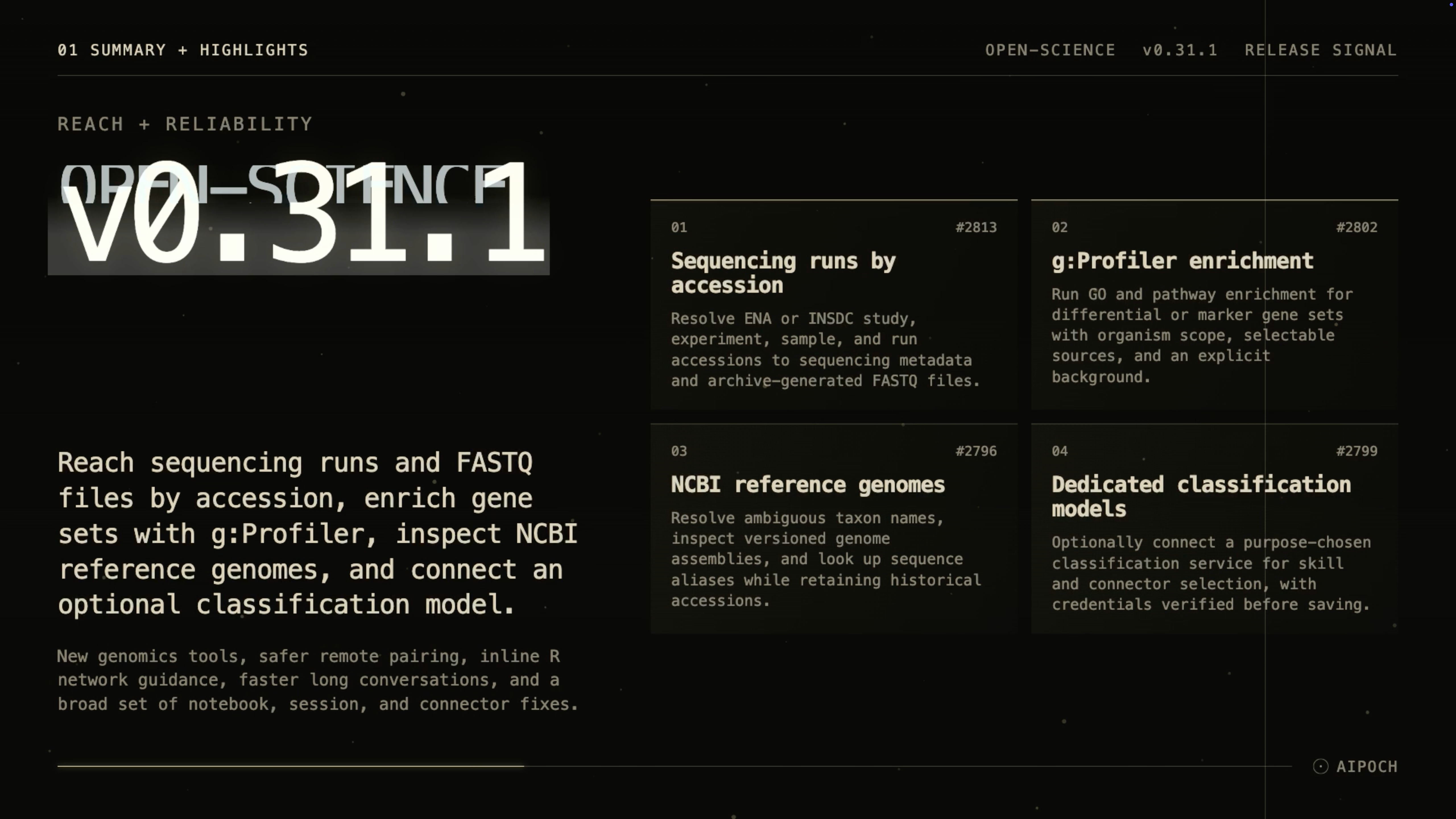 Video: AIPOCH Open-Science v0.31.1 Update Note by AIPOCH.
ENA: From an Accession to Sequencing Runs
The new European Nucleotide Archive (ENA) tools in the Omics Archives connector accept public study, experiment, sample, or run accession identifiers from ENA and the wider INSDC archive collaboration. They resolve those identifiers to sequencing runs and return associated study, sample, experiment, organism, platform, and library metadata, together with references to archive-generated FASTQ sequencing-read files.
For a researcher following up on a published dataset, the useful first step is to inspect which runs belong to the accession and whether their metadata match the intended analysis. The returned FASTQ references support planning the next step; finding those references does not mean the files have already been downloaded or analyzed.
g:Profiler: Interpret Differential or Marker Gene Sets
The Genes connector now supports g:Profiler-backed Gene Ontology and pathway enrichment. You can specify the organism, select evidence sources, supply a custom statistical background, and set significance parameters.
These controls matter when moving from a gene list to a biological interpretation. A useful request should include the list's origin and the background used for comparison. For example, an enrichment question about detected genes should make that tested universe explicit, so the analysis can be reviewed alongside its assumptions. Enrichment provides evidence for interpretation, not proof of a mechanism.
NCBI: Keep Reference Lookups Version-Aware
New NCBI tools resolve taxon names while reporting ambiguity, inspect genome assemblies, and find sequence aliases. Historical assembly accessions remain queryable rather than being silently replaced by their newest revision.
That makes the tools relevant when revisiting an older project. Keep the original assembly accession in your request and check its version before comparing results. Explicit reference selection helps make coordinate-dependent analysis easier to inspect and explain.
Optional Classification Models for Capability Selection
A dedicated classification model can now choose relevant skills and connectors before supported research-agent turns start. The conversation model remains responsible for carrying out the task and explaining its results. Our guide to skills, connectors, and specialists explains how these resources fit together.
The screenshots show this separation in Model > Classification models. Automatic capability selection currently uses the default method, and no classification service has been added. The interface explicitly states that skills and connectors work without one.
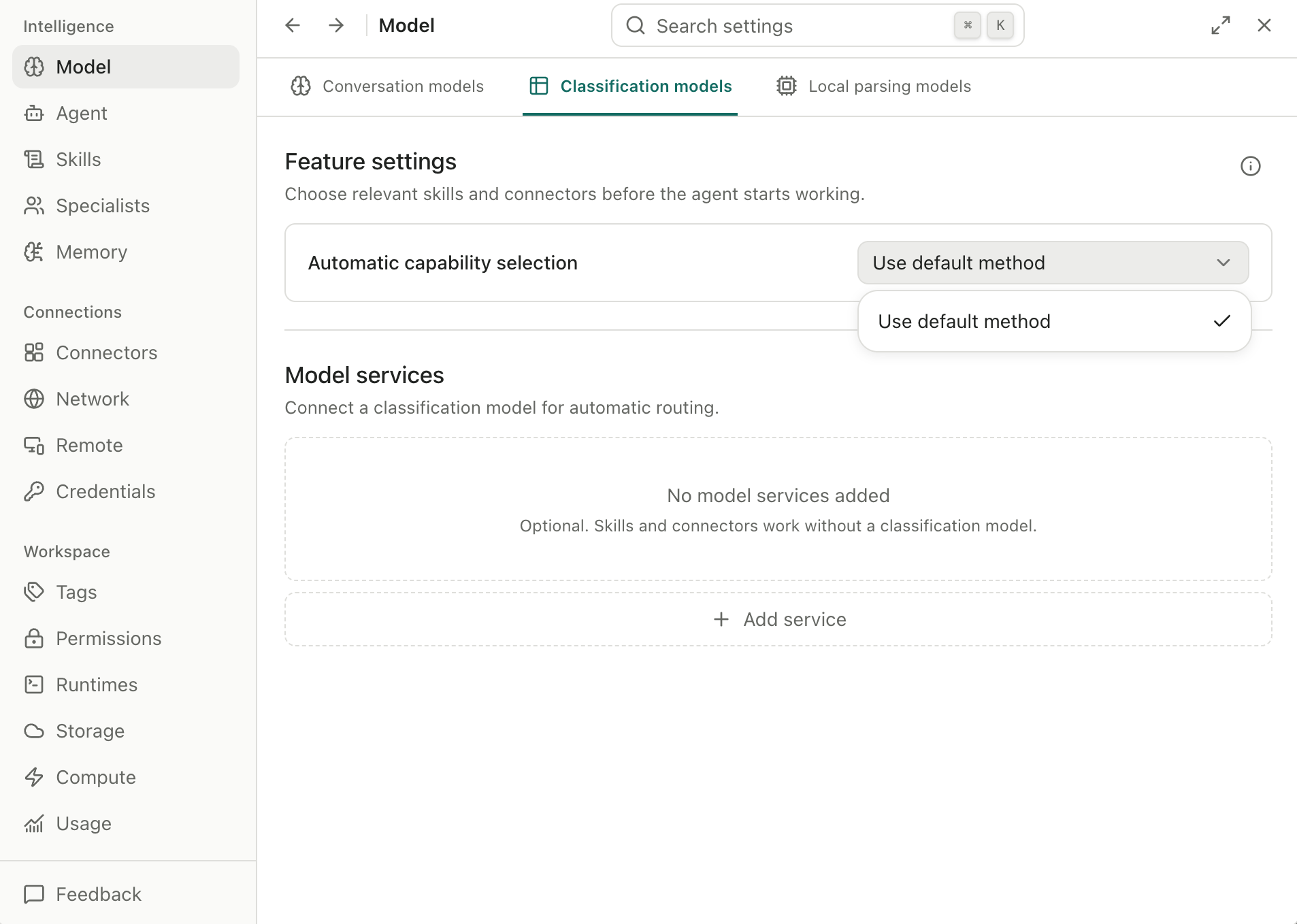
Classification settings before configuration: the default method is selected, and the optional service list is empty. Select the image to view it at full size.
The add-service screen lists TypeSafe AI as a provider. Its structured decision model Jev is included in the v0.31.1 classification catalog. In its introduction to Jev, TypeSafe describes a model that returns constrained decisions and probabilities. Here, that means deciding which available capabilities fit a research request.
For example, a request to interpret a gene list may need the Genes connector's enrichment capability. Classification helps select relevant capabilities; the selected tools and research agent then perform the work. A classification result can still be wrong, and this release does not establish a measured improvement in scientific accuracy, speed, or cost.
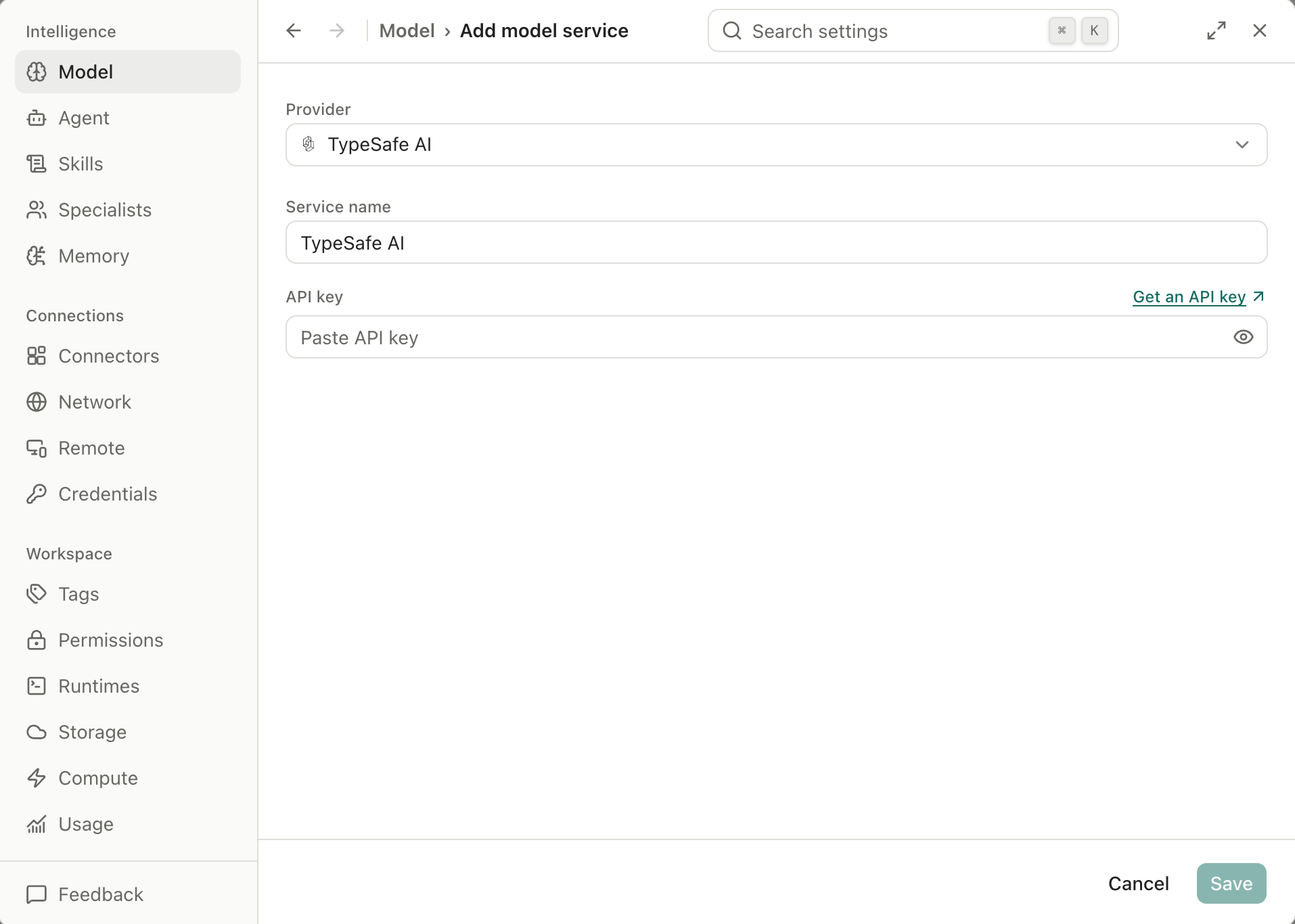
TypeSafe AI service setup with an empty API key field. This screenshot shows the configuration form, not a verified connection.
To enable a classification model:
- Open Model > Classification models > Add service and enter your provider details.
- Save the service; its credentials are checked before the settings are accepted.
- Choose its model under Automatic capability selection. Adding the service alone leaves the default method in place.
In this release, classification applies to eligible primary-agent turns using CodeBuddy or Codex with the Chat Completions API connection. Other paths retain their existing routing, including Codex's native Responses connection. The classification implementation documents this scope. You can keep using the default method without a separate service.
Clearer Remote Pairing, Notebook Feedback, and Long Conversations
Remote access now brings pending browser-pairing requests ahead of the trusted-browser list. Countdowns, urgent indicators, and pairing-code guidance help make a waiting request easier to recognize. Trusted-browser revocation also handles the case where the current browser revokes its own access.
Notebook feedback is more explicit when network protection blocks an R run. An inline warning identifies that the cell did not execute and links to the relevant network setting. This distinction helps you decide whether to review access settings or debug the analysis code.
Long conversations receive improvements to transcript layout and streaming-message processing. Notebook history also traces dependencies in interactive execution and the origins of files produced during session handoffs. Together, these changes improve responsiveness and give researchers more context for inspecting how work progressed, without implying that an entire session can be replayed exactly.
Fixes That Matter During Daily Research
The reliability changes reach execution, session recovery, and external data retrieval:
- Windows execution: persistent-kernel process cleanup helps runs finish cleanly, and stale R package inventories are retried.
- Session continuity: missing OpenCode sessions recover at startup, duplicate attempts to resume the same session are prevented, and approval cards stop repeatedly reopening or taking focus from the message composer.
- Scientific data: GTEx gene-reference results paginate, Open Targets partial errors become visible, and conservation analysis using the hg19 human reference assembly defaults to the correct track.
- Literature work: PDF processing fixes improve recovery of figures and table structure.
These fixes address interruptions that can otherwise complicate interpretation. A truncated query result and a complete result can lead to different conclusions; a visible partial error gives you information you need before relying on a response. See the release's detailed fixes and current limitations for the full scope.
Install or Update AIPOCH Open-Science
Existing installations can update in place. For a new installation, download the appropriate package from the official v0.31.1 release: macOS 12 or later on Apple Silicon or Intel, Linux x64, or Windows 10/11 x64.
Windows builds remain unsigned and may trigger a SmartScreen warning; check that your installer came from the official release. After updating, start with a task you can inspect, such as resolving a known ENA accession or checking the assembly used in an existing project.
Frequently Asked Questions
Do I need a Jev account to use the new scientific tools?
No. A classification service is optional. Skills and connectors remain available with the default capability-selection method; configuring a separate service is a choice about routing.
Does the ENA feature automatically run a sequencing analysis?
No. It resolves accessions and returns run metadata and archive-generated FASTQ references. Downloading data, selecting a pipeline, and executing analysis are subsequent workflow steps.
Can I reproduce an entire research session exactly after this update?
Full-session replay remains an open limitation. Additional dependency and file-lineage records help inspection, but they do not establish exact reproduction of every execution or result.
Further Reading
AIPOCH Open-Science supports research workflows and does not replace scientific judgment or peer review. Researchers remain responsible for checking data, statistical assumptions, methods, and scientific conclusions.