AIPOCH Open Science Session References let one research turn consult another active Session without merging their histories. Type # in the Composer, select a Session, and add a precise instruction for how its context should be used.
Sending the reference grants the active Turn read-only authority for the exact selected Session. It does not eagerly copy or inject the full transcript. When the task requires that context, the Agent can use the Host interface to discover the Session's root Frame and read relevant, sanitized, visible transcript content on demand.
Open Science is an open-source, local-first AI research workbench for inspectable research workflows. Session References were introduced in v0.20.0 and verified against v0.20.1 on August 27, 2026.
What Session References Do
A Session Reference creates an explicit, temporary bridge to another active conversation. The message stores the target's stable sessionId and a snapshot of its title. During that Turn, the Agent receives authority to read that exact Session if the user's request needs it.
The chip itself does not trigger background analysis. The Agent is instructed to read through the Host Frame interface rather than shell commands, databases, or application data folders. Creating or reading the reference does not modify the target Session, although that Session can still evolve through its own work.
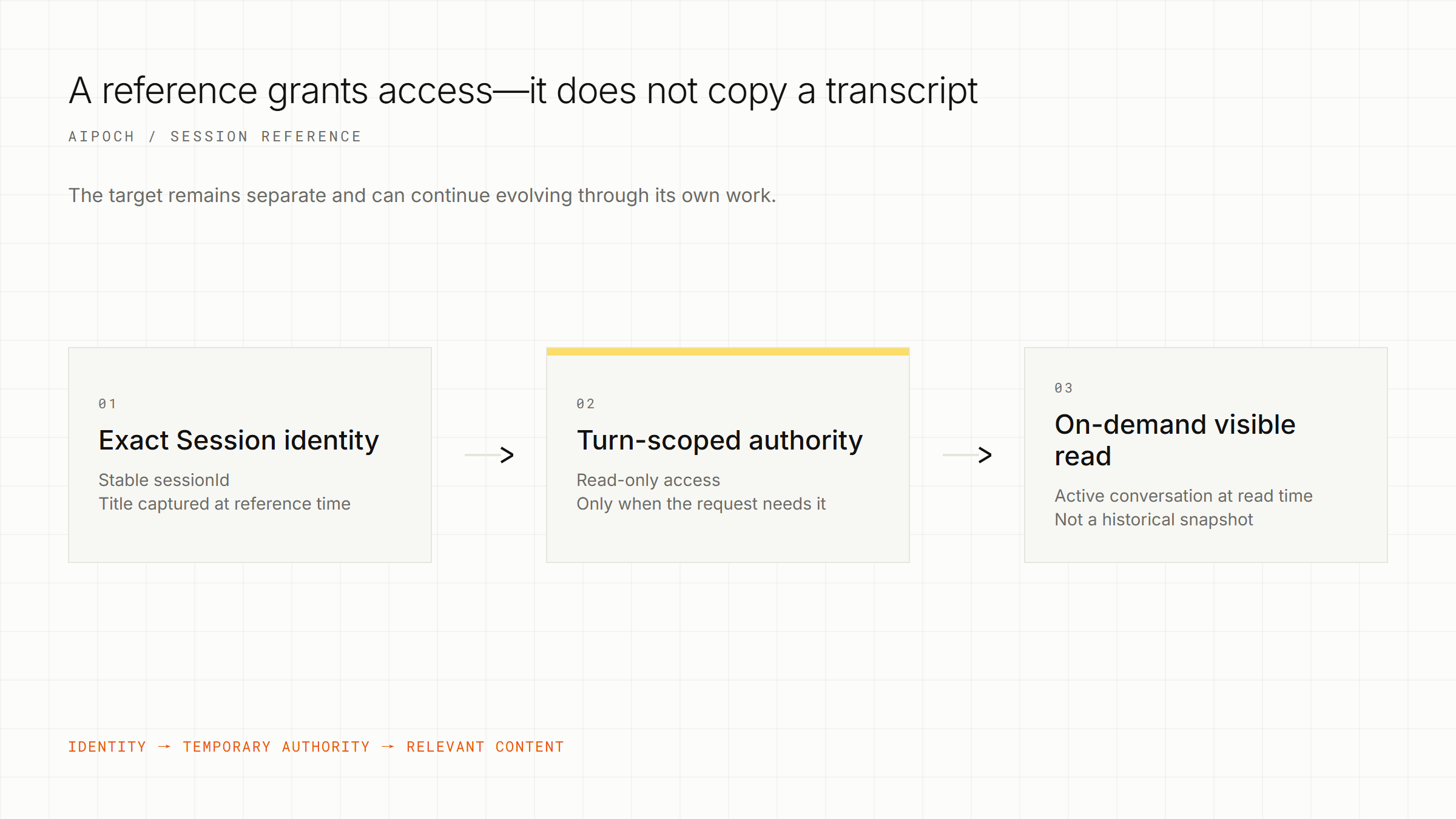
Conceptual flow—not a transcript-copy operation or a historical snapshot.
| A Session Reference does | A Session Reference does not |
|---|---|
| Identify an exact active Session | Merge two conversation histories |
| Grant read-only authority for the current Turn | Eagerly inject or analyze the full transcript |
| Allow an on-demand read of relevant visible content | Pin a historical Frame or Branch |
| Preserve a clickable route to the target Session | Create permanent memory or a durable handoff |
| Leave existing file, Connector, tool, and approval controls in place | Verify the source Session's claims, code, or conclusions |
The reference follows the target Session's active conversation at read time. If that Session switches Branches or continues before the Agent reads it, the available content may differ from what was active when the chip was inserted. Only the chip title is captured at reference time; navigation and authority rely on the stable Session identity.
How to Reference Another Session
1. Select
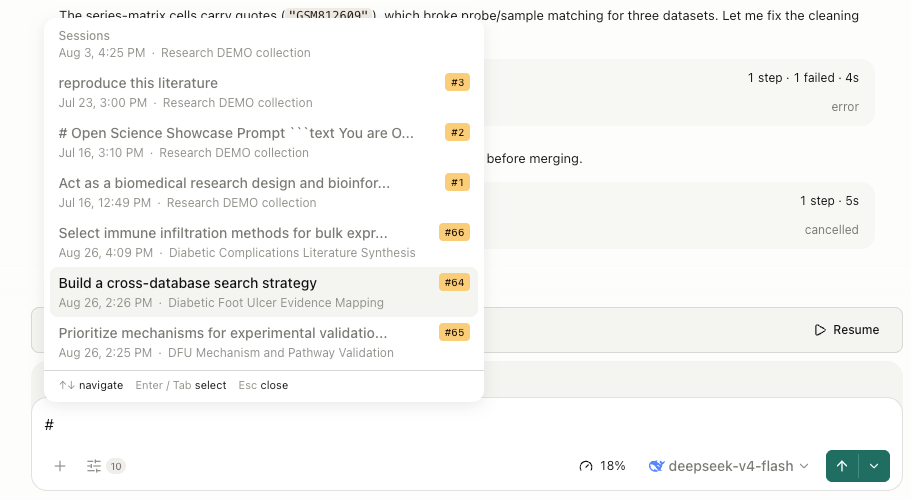
Type # in the current Composer and choose the target. The picker places active Sessions from the current Project first, followed by active Sessions from other Projects. Confirm the title and Project before selecting.
Actual Open Science interface showing the
#Session picker. Session titles and research content are examples from the captured workspace.
2. Instruct
Tell the Agent which decisions or evidence matter and what output you need. For example:
Use the referenced Session's approved database choices, rejected query variants, and unresolved questions. Draft a search-plan checklist. Preserve uncertainty and list anything that still needs researcher confirmation.
A precise instruction helps the Agent read only the relevant context instead of treating the reference as permission to summarize everything.
3. Verify
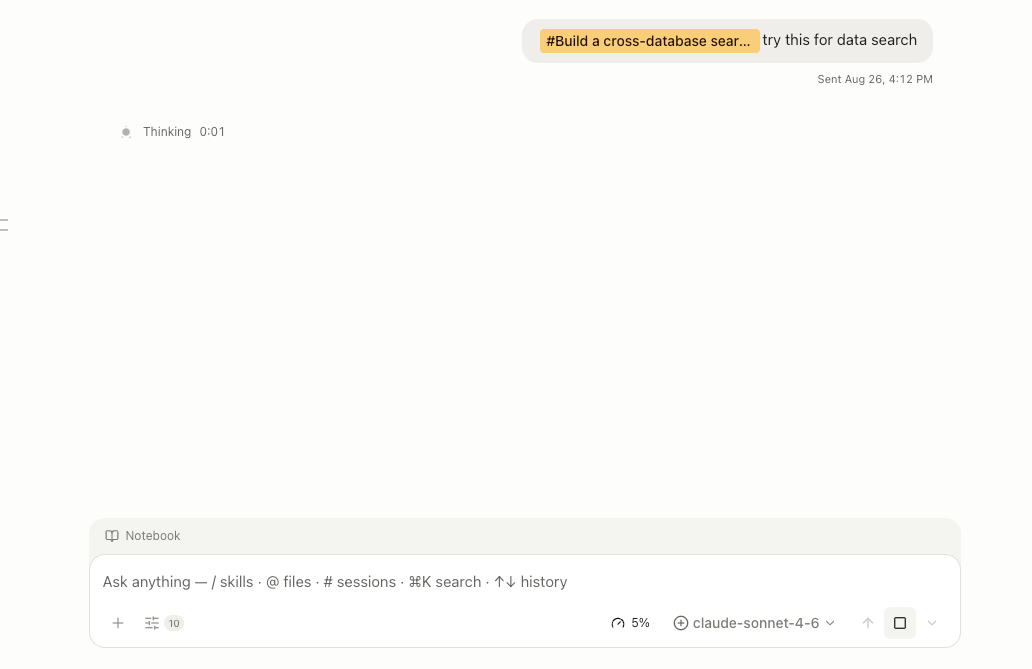
Send the message, then inspect the response against the source Session. The sent chip remains clickable, so you can navigate back to the target while checking caveats, rejected approaches, citations, and new interpretation.
Actual Open Science interface showing a Session Reference chip in a sent message.
What the Agent Can—and Cannot—Read
The grant covers relevant visible conversation content in the referenced Session, not every resource associated with it. A Session Reference does not widen access to local files, credentials, Connectors, external services, code execution, or other tools. Those actions remain governed by the current Session's configuration and approval rules.
This is also a data-boundary decision. If the active Agent uses a remote model provider, referenced transcript content read for the Turn may be included in model requests to that provider. Review sensitive, unpublished, confidential, or regulated information before referencing another Session. Local-first does not mean every selected model runs locally.
If the Host Session or Frame interfaces are unavailable, the Agent should report that the referenced Session cannot be inspected. It should not approximate access through the filesystem or application database.
Session Reference vs Branch vs Durable Handoff
Choose the mechanism based on whether you need temporary access, an alternative path, an independent continuation, or a stable record.
| Mechanism | Use when | Context behavior | Persistence |
|---|---|---|---|
| Session Reference | Another active Session is needed for this Turn | Grants exact-id, read-only access to the target's active visible conversation at read time | Turn-scoped; not a snapshot |
| Message branch | Explore an alternative inside the same Session | Starts another path from a shared conversation point | Persistent branch |
| Branch into new Session | Continue an existing path independently | Creates a new Session with recorded source lineage | Persistent new Session |
| Side Conversation | Ask a bounded parallel question | Can return an advisory to the main Turn | Separate side record plus relay |
| Reviewed file or Artifact | Preserve an approved handoff | Transfers explicit, versioned content | Durable and inspectable |
Use a Session Reference for a focused, temporary consultation. Use a reviewed file or Artifact when exact wording, approval state, or version stability matters.
One Short Workflow Example
Suppose one Session records literature-search decisions: databases in scope, rejected query variants, unresolved date limits, and sources awaiting verification. In a separate Session, reference it and ask the Agent to produce a checklist containing only approved decisions, rejected variants with reasons, and open questions.
Review the checklist against the source. Correct omissions and save the accepted result as a file or Artifact. The Session Reference supports the transition; the reviewed output becomes the stable handoff.
Limits and Frequently Asked Questions
How many Sessions can one message reference?
A message can reference up to five active Sessions. Duplicate Session references are deduplicated.
Which Sessions are excluded from the picker?
The current Session cannot reference itself. Pending and archived Sessions are excluded, as are Sessions inside archived Projects.
Does a Session Reference capture a transcript snapshot?
No. It follows the target Session's active conversation at read time and does not pin a historical Frame or Branch. Use a reviewed file or Artifact when you need fixed content.
Will the Agent remember the referenced Session later?
Do not assume so. The authority is Turn-scoped. Reference the Session again in a later Turn or preserve the reviewed information in a durable output.
Does referencing a Session verify its research results?
No. It transports selected context for the current task. Researchers must still verify sources, methods, statistics, code, and conclusions independently.
Conclusion
Session References are useful when one active research conversation needs selected context from another for a single Turn. They preserve separate histories, grant temporary read-only authority, and keep the source navigable without creating a transcript snapshot or permanent memory. For installation, current releases, and source code, visit the Open Science product page, GitHub repository, or latest release.
Disclaimer
This Product Guide is informational. Session References provide a context-access mechanism, not validation of scientific claims or a guarantee of data confidentiality. Review the referenced material, the selected model provider's data handling, and all generated outputs before research use. AIPOCH and Open Science do not replace researcher judgment or domain-specific review.