AIPOCH released v1.3.3. Eligible Macs can install an update on quit. Windows and Linux desktops can prepare one for the next launch.
AIPOCH Open-Science is the local-first research workbench from AIPOCH. This release also changes how you start a session, revise a figure, and diagnose interrupted work.
How do desktop updates fit around a research session?
AIPOCH Open-Science v1.3.3 gives researchers a choice about when a desktop update takes effect: an eligible Mac can install the update when the app quits, while eligible Windows and Linux installations can prepare the download in the background for the next time the researcher opens the app.
Background downloads require evidence of an unrestricted, unmetered connection and enough local storage. GitHub release notes, 2026. Linux also requires a writable update cache and preserves the existing AppImage path across an update. GitHub release notes, 2026.
| Your desktop | What to expect |
|---|---|
| macOS | Quit the official stable app to install an eligible update. A read-only volume, a translocated app, or an unwritable installation requires the manual route. |
| Windows | Once the workspace is ready and the desktop app is idle in the background, a stable installation can stage the update. The preference is on by default. |
| Linux | The AppImage can prepare its update while the desktop is idle in the background. This preference is also on by default. |
Manual updates
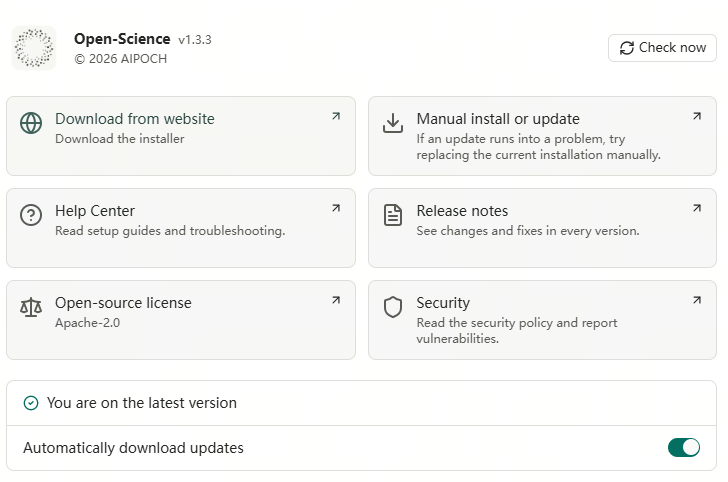 If you are using a metered connection or want to choose the installation time yourself, use the manual download-and-restart option. On Windows, stable releases can also use a smaller installer delta.
What else is new in v1.3.3?
Researchers starting a project in AIPOCH Open-Science v1.3.3 can use the built-in Agent immediately, while researchers revising a generated figure can enter editing from the preview, describe the change in the same conversation, and compare the result with earlier versions before choosing which image to keep.
New projects and sessions default to the built-in Agent, including on clean command-line and SDK installations. GitHub release notes, 2026. Image previews now offer hover and keyboard actions that send editing instructions to the conversation composer. GitHub release notes, 2026.
Choosing an agent
Start with the built-in Agent if you want to begin without downloading an external agent runtime. If a project calls for another framework, selecting it starts a managed download from an npm registry or its documented mirror. Open-Science verifies the download before use.
Revising a figure
Open the image preview, enter editing, and describe one change, such as enlarging a legend. Version navigation and comparison remain available while editing. The conversation stays in place, so you can refer back to the original request.
Which bug fixes affect daily use?
AIPOCH Open-Science v1.3.3 gives researchers more information when a run ends unexpectedly, preserves a pending Agent question across a Windows restart, and fixes PDF translation errors that could separate parts of the same sentence or move translated text across a formula, label, or graphic.
A stopped prompt now retains its cancellation status after cleanup, and the interface distinguishes a user stop from an unanswered continuation. GitHub release notes, 2026. PDF translation uses glyph positions and page geometry to reconnect text split at column breaks, captions, or inline formulas. GitHub release notes, 2026.
- After a restart on Windows. If the built-in Agent was waiting for your answer to a saved question, reopen the app and answer it to resume.
- After a model request fails. The failure details retain the classified error code and request ID across restarts, so you can investigate the same request later.
How can I install AIPOCH Open-Science v1.3.3?
To install AIPOCH Open-Science v1.3.3, open the assets for the tagged release, choose the desktop package that matches your operating system and processor, and use the separately named CLI package if you want the command-line tool with its own bundled Node runtime.
The desktop assets include DMGs for Apple Silicon and Intel Macs and an x64 installer for Windows 10 or 11. GitHub release assets, 2026. Linux users can choose an AppImage or Debian package for x64 or ARM64. GitHub release assets, 2026.
Where can I verify the changes and find earlier workflows?
Use the tagged GitHub release to check whether a change shipped in Open-Science v1.3.3, the product overview to see where the feature fits in the workbench, and the earlier release articles for examples of the research tasks you can continue after upgrading.
The v1.3.0 article introduces scheduled tasks and versioned image editing. Schedule, Create, and Revisit Research Work, 2026. The next article covers web search and citation graphs for following a paper’s references. Search, Connect, and Explore Research Work, 2026.
FAQ
Will quitting Open-Science install an update on every platform?
Only eligible official stable macOS builds support install-on-quit. Windows stable installations and Linux AppImages can prepare an update for the next launch.
Do I need to install an external agent SDK before starting a project?
No. A clean v1.3.3 installation can start a session with the built-in Open-Science Agent. Select an external framework when you need its runtime.
Where do I type an instruction after opening an image for editing?
Use the conversation composer. You can return to earlier versions and compare them with the edited image from the same workflow.
What should I check before sharing a research result?
Researchers using AIPOCH Open-Science v1.3.3 should check an edited figure against the underlying data, read translated passages alongside the original PDF, and apply scientific judgment and peer review before sharing a result that depends on a model’s interpretation of a paper or an image.
The image editor retains version comparison, which lets researchers inspect what changed. GitHub release notes, 2026. The PDF fixes address text boundaries and placement around native notation, two layout problems that matter when checking a translated passage against its source. GitHub release notes, 2026.