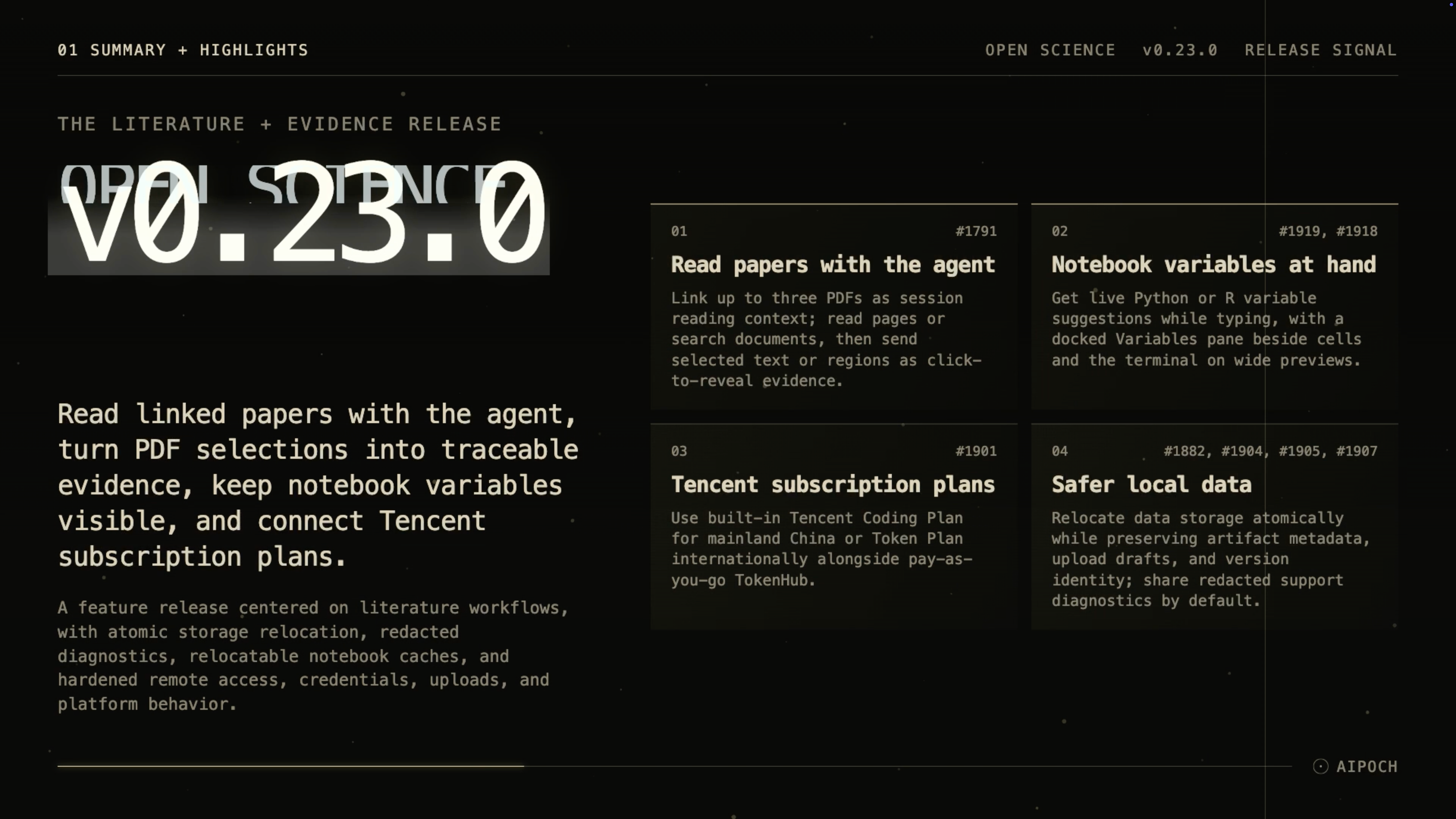
v0.23.0 lets agents read linked PDFs, turns selections into evidence, surfaces live notebook variables, and makes local data handling safer.
Open Science from AIPOCH is an open-source, local-first AI research workbench for inspectable research across models, scientific agents, code, and data connectors.
What new capabilities help researchers read papers and inspect analysis context?
Open Science v0.23.0 brings literature reading into the active research session while keeping the cited source, notebook state, and local-data controls visible.
Linked PDF Reading Context and Evidence
Long papers often require researchers to move repeatedly between a document viewer and an agent conversation. v0.23.0 lets a session link up to three multi-page PDFs as reading context. The agent can read the current page, move through a complete document in batches, or search across the linked PDFs.
The reading snapshot remains stable across queued messages, retries, branches, and resumed sessions. Researchers can explicitly link or unlink each document, so the material available to the agent stays visible and controlled. PDF reading remains session-scoped: there is no cross-session literature library, OCR, or citation-style conversion in this release.
The upgraded PDF preview supports selectable text, rectangular area selection, an outline, page thumbnails, document search, navigation, and zoom controls. A text or region selection can be sent into the conversation as an evidence annotation, and selecting that evidence later reveals the corresponding source location. This creates inspectable provenance evidence for what the agent was asked to consider without claiming that the cited passage validates the resulting interpretation.
Live Kernel Variable Suggestions
Typing analysis commands can require remembering the exact names of objects already present in a Python or R kernel. The shared notebook terminal now suggests matching live variable names and their types while the researcher types. Suggestions support keyboard navigation and input-method editors, helping researchers reference current analysis state without leaving the command they are composing.
Docked Variables Pane for Wide Notebooks
Opening a Variables view previously meant replacing the cells and terminal that gave those objects meaning. On a sufficiently wide notebook preview, v0.23.0 docks the live Variables pane beside the cells and terminal. Narrow previews retain the focused Variables view, and the dock returns automatically when enough space becomes available.
The pane remains a live, read-only view of a running kernel rather than a stored variable history. It helps researchers inspect names, types, shapes, and bounded values while keeping the analysis code in view.
Tencent Subscription Plan Providers
Researchers using Tencent model services can now choose built-in subscription routes in addition to pay-as-you-go TokenHub. Tencent Coding Plan is available for mainland China, while Tencent Token Plan serves the international endpoint. Each provider has its own curated model list and remains subject to compatibility with the active agent framework and route.
Safer Local-Data Relocation and Diagnostics
Changing the local storage location should not leave a project split between old and new directories. v0.23.0 makes relocation atomic and preserves artifact metadata, upload drafts, and artifact version identity. Linked system paths are rejected during migration, incomplete copies are not left behind, and notebook package and workload caches follow the configured storage location.
Support diagnostics are redacted by default before sharing, while locally retained diagnostics are bounded so long sessions do not expand them without limit. These controls reduce accidental disclosure in support reports, but researchers should still review any diagnostic package before sending it outside their organization.
What else is new in v0.23.0?
v0.23.0 also improves how active work and system notifications are handled.
- Quitting during active work now explains why the app cannot close immediately and warns before interrupting a running Reviewer.
- Notifications are localized, respect the operating system's privacy setting for previews, and ignore stale clicks.
- Damaged session files are surfaced instead of being silently skipped.
- Project deletion reports cleanup that is still pending, while recovery remains limited to the deleted material.
Bug fixes that affect daily use
The release fixes storage, access, credential, compute, and platform paths that could previously fail unclearly or retain stale state.
- Storage and migration: Relocation no longer leaves partial data behind, and artifact metadata, upload drafts, and version identity survive the move.
- Remote access: Authorized browser sessions are isolated from one another, authorization is enforced through the full lifecycle, and remote requests follow their defined contracts.
- Credential recovery: Recovery notices now reach the composer, credentials that cannot be decrypted are no longer reported as healthy, and secure-storage status refreshes automatically.
- Linux credential protection: Insecure Linux secret storage is rejected instead of being used silently.
- Provider state: The provider catalog no longer incorporates stale writes.
- Compute and notebook: Automatic analysis outcomes persist across restarts, SSH host aliases and scratch paths are validated, and the R kernel survives repeated cancellation.
- Uploads and sessions: Session finalization requests are validated before use.
- Service and platform: Malformed URL encoding is rejected, update and CLI platform handling is corrected, and the installer lifecycle is more robust.
- Connector permissions: Specialist tool permissions are enforced for connectors, and documents remain isolated between app surfaces.
Install or update
Open Science v0.23.0 supports macOS 12+ on Apple Silicon or Intel, Linux x64, and Windows 10/11 x64. Download the appropriate DMG, AppImage, Debian package, Windows installer, or archive from the Open Science v0.23.0 release page. The onboarding wizard can configure an app-managed agent runtime, and an installed app can update itself in place.
Official macOS release builds are Developer ID signed and notarized. Windows builds are not yet Authenticode-signed, so SmartScreen may display an “unrecognized app” prompt; verify that the package came from the official release page before continuing.
Resources
- Open Science v0.23.0 release notes
- AIPOCH Open Science
- AIPOCH
- Open Science v0.20.2: Read Sources, Inspect Variables, and Navigate Sessions Faster
- How Open Science Tracks Research Results: Artifact Versions and Provenance
- Open Science Data Flow: What Stays Local and What Leaves
FAQ
How many PDFs can Open Science v0.23.0 link to one session?
Open Science v0.23.0 can link up to three multi-page PDFs to one session. The agent can read the current page, move through the document, or search the linked set, but this release does not provide a cross-session literature library.
Can PDF selections be traced back to the source?
Yes. Selected PDF text or a rectangular page region can become an evidence annotation in the conversation, and the annotation can reveal its source location when clicked. This preserves inspectable context; it does not automatically verify the agent's scientific interpretation.
Do notebook variable suggestions work with both Python and R?
Yes. The shared terminal can suggest matching live variable names and types from a running Python or R kernel. The Variables pane is read-only and does not create a persistent history of kernel objects.
Which Tencent plans are available in v0.23.0?
Tencent Coding Plan is available as a built-in provider for mainland China, and Tencent Token Plan is available for the international endpoint. Both appear alongside pay-as-you-go TokenHub and use their own curated model lists.
Which systems can install Open Science v0.23.0?
The supported desktop targets are macOS 12+ on Apple Silicon or Intel, Linux x64, and Windows 10/11 x64. Official macOS builds are signed and notarized, while Windows builds remain unsigned and may trigger a SmartScreen warning.
Disclaimer
Open Science assists researchers with reading, organizing, executing, and inspecting research workflows. It does not replace scientific judgment, domain-specific validation, or peer review.