Per-agent resource access control answers a practical research question: which agent may use a specific Skill or Connector? AIPOCH Open-Science is an open-source, local-first, model-agnostic, self-hosted AI research workbench for reproducible scientific discovery. In v0.33.0, the control is expressed through the Main Agent and saved Specialists, so a role can carry a narrower capability set than the workspace default.
What does per-agent resource access control change?
The feature moves access decisions into the Specialist capability list. A Specialist can use the Skills and Connectors explicitly assigned to its role. When Full access is on, the Specialist uses the Main Agent’s Skills and Connectors, including later additions. When Full access is off, it uses only the selected capabilities. The official capability guide documents this distinction and the save-and-reopen check.
This boundary answers “which role can reach this research resource?” It does not decide whether an operation is approved, whether a credential is valid, or whether a network route is available. Use Agent Permissions in Open-Science for action review and Open Science Data Flow for external destinations.
How do you assign a Skill or Connector to a Specialist?
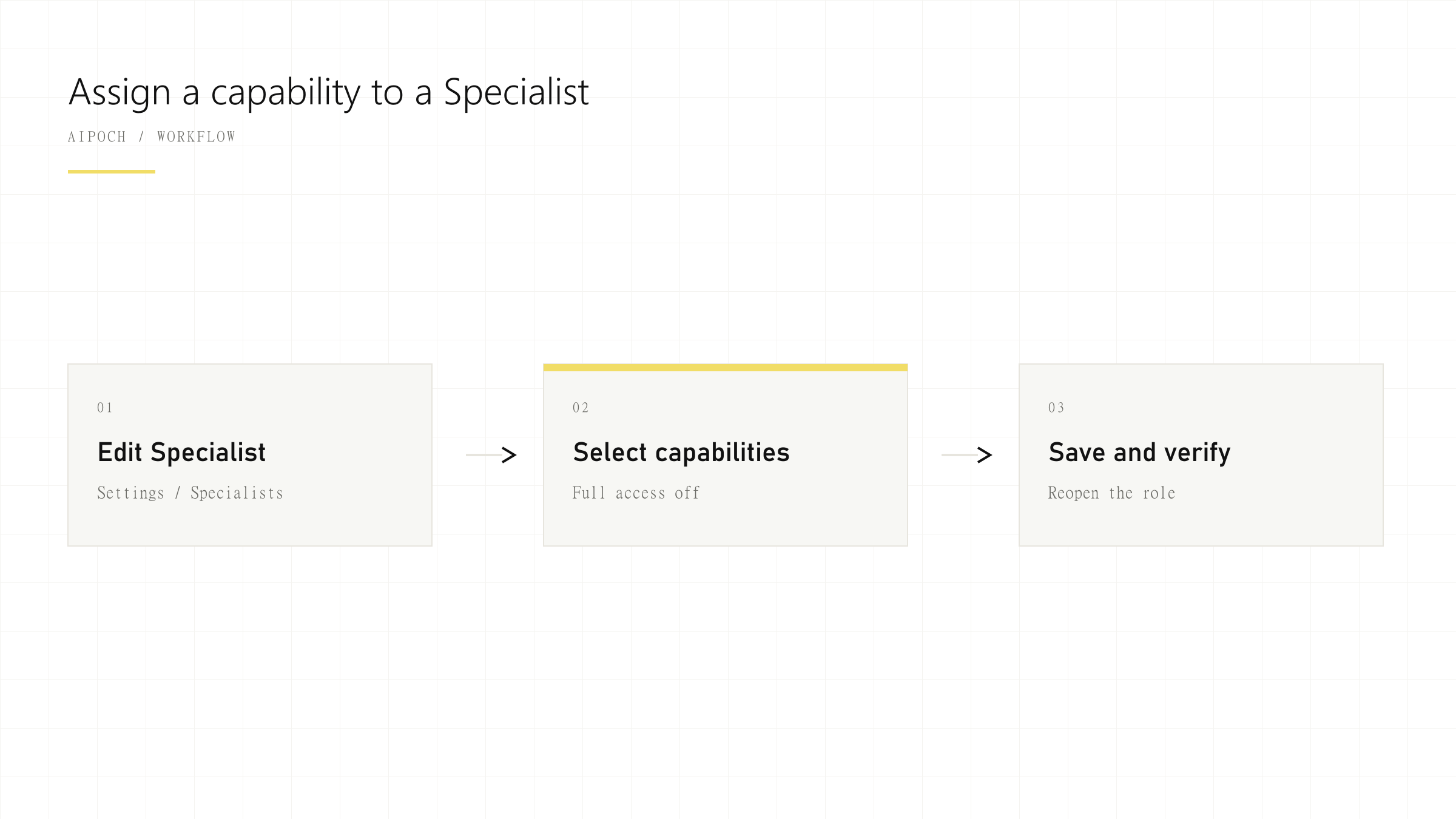
Follow the Specialist-first path in the Assign Skills and Connectors documentation:
- Open the role. Go to
Settings → Specialistsand edit the saved Specialist, such as a literature or RNA-seq QC reviewer. - Turn Full access off. This exposes an explicit capability list for the role.
- Add a Skill. In Skills, choose Add a skill, search for the package, and confirm the selected Skill.
- Add a Connector. In Connectors, choose Add a connector, select the external resource, and confirm the selected Connector.
- Inspect and verify. Open the capability detail, save the role, then reopen it to confirm that the intended association persisted.
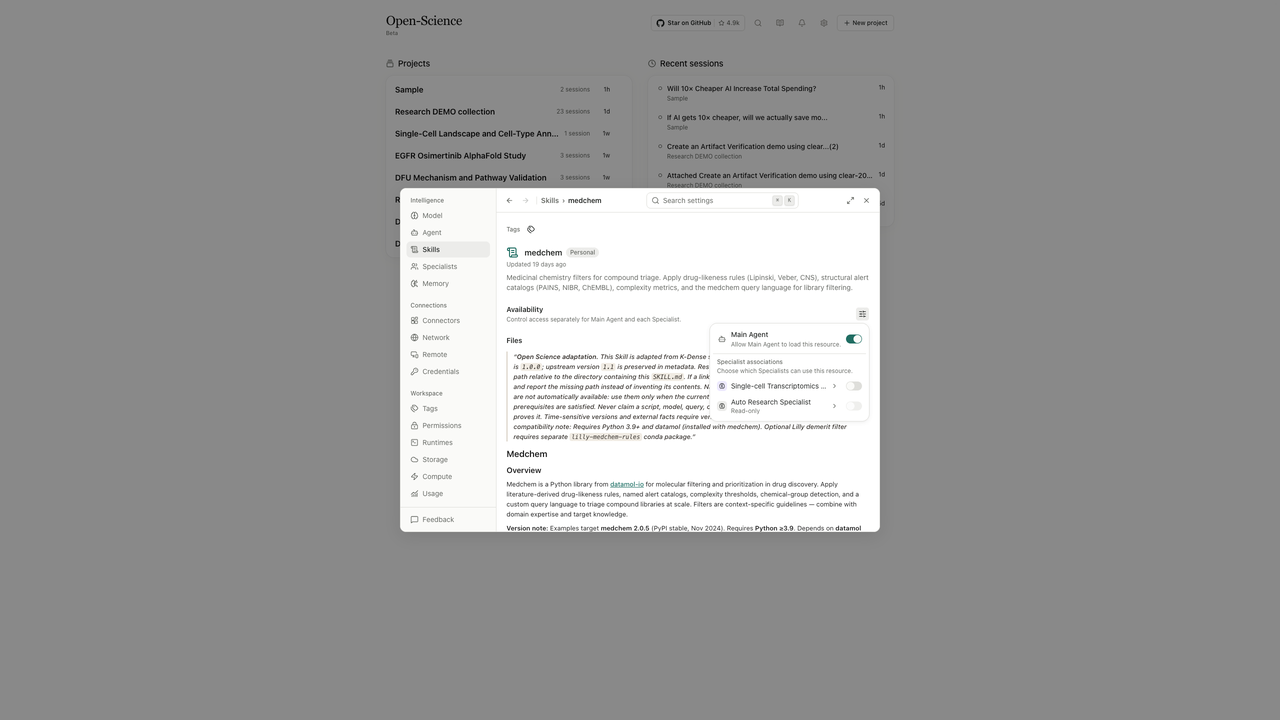
The live product view makes the association reviewable at the resource level. A globally enabled Connector is not automatically available to every restricted Specialist; the role’s capability list remains the source of truth. The screenshot is a product reference captured from the v0.33.0 feature page and uploaded to the public S3 path listed in the front matter.
When is this useful for a research team?
Use an agent–resource map before adding more tools:
- Literature review: give a literature Specialist the search or reference Skill it needs, then keep synthesis with the Main Agent.
- Data analysis: give an analysis Specialist the statistics or plotting Skill required for a defined task.
- External services: assign a Connector only to the Specialist that needs it, then record the destination and review rule.
- Role handoffs: reopen the Specialist after edits so the saved list can be checked during a methods or reproducibility review.
The useful unit is the agent–resource pair. Keep the set small enough that a researcher can explain why each capability is present. The related Specialist AI Agents in Open-Science article covers role design beyond this access boundary.
Before changing a role, write down the research task, the data it needs, and the narrowest capability set that can complete it. After saving, compare the Specialist list with that note. This simple before-and-after record makes later reviews faster and exposes accidental access inherited from a broad workspace configuration.
What is the difference between capability access and permission mode?
Capability access says which Skills and Connectors a role can reach. It does not replace approval mode, filesystem permissions, network boundaries, credentials, or runtime rules. The official guide also notes that Full access does not mean every action runs without asking, and exported Connector IDs are references rather than portable secrets. Keep those controls in the study’s governance record.
For a reproducible review, record the Specialist name, Full access state, selected capability IDs, approval rule, and external data destination. That record lets another researcher explain both the intended tool boundary and the controls that still apply.
Frequently asked questions
How do I control which agent can use a Skill or Connector?
Edit the Specialist under Settings → Specialists, turn Full access off, add the required Skills and Connectors, save, and reopen the role to verify the list.
Can a Specialist have a different tool set from the Main Agent?
Yes. A restricted Specialist can use an explicit capability list, while Full access follows the Main Agent’s Skills and Connectors, including later additions.
Does agent resource access replace operating system permissions?
No. It controls the association between a role and an Open-Science resource. Operating system permissions, network rules, credentials, data-source authorization, and approval policies still apply.
Conclusion
Per-Agent Resource Access Controls gives AIPOCH Open-Science a clear answer to “which agent can use this resource?” Start with one literature or analysis workflow, turn Full access off for a narrowly scoped Specialist, add only the Skills and Connectors it needs, and record the decision with the approval and data-flow review. For product evidence, compare the v0.33.0 release notes with the saved role after the change.
Disclaimer
Per-agent association does not replace operating-system permissions, network controls, credentials, or human review. Check those controls and verify external data destinations before assigning a Connector to a research agent in AIPOCH Open-Science.