创建 Specialist 与编写指令
示例 创建 RNA-seq QC Reviewer 角色
创建 RNA-seq QC Reviewer,单独检查原始计数结果。此例只检查标识符、数值完整性和算术约束,不承担生物学结论判断。
让职责可以验收
应规定输入与输出,不能只写“你是专家”。QC 角色需要报告读取了哪张表、哪些检查通过。只看元数据的复核不能声称重新计算了原始计数。交接文件时使用应用返回的当前不可变版本;文件名不是版本 ID。
此角色已实操创建、重开、导出、复制,并完成真实内联 CSV 委派,12 个样本算术约束全部通过。委派与验证说明其证据范围和文件交接限制。
实现依据: SpecialistEditor.tsx。
创建步骤
- 打开 Settings → Specialists → Add specialist → Write from scratch。
- Name 填 RNA-seq QC Reviewer,Description 填 Check raw-count integrity and sample metrics using traceable public biomedical inputs.。
- 选择图标与颜色,本例为 Brain / Purple;实时预览对应列表和选择器外观。
- 展开 Advanced settings,创建前检查自动生成的
rna-seq-qc-reviewer。 - 填写下面的指令。
- 关闭 Full access,按能力分配添加 RNA-seq Skill 与 Omics Archives,再点击 Create specialist。
- 搜索并重新打开保存结果,核对 ID、指令和两项能力绑定。
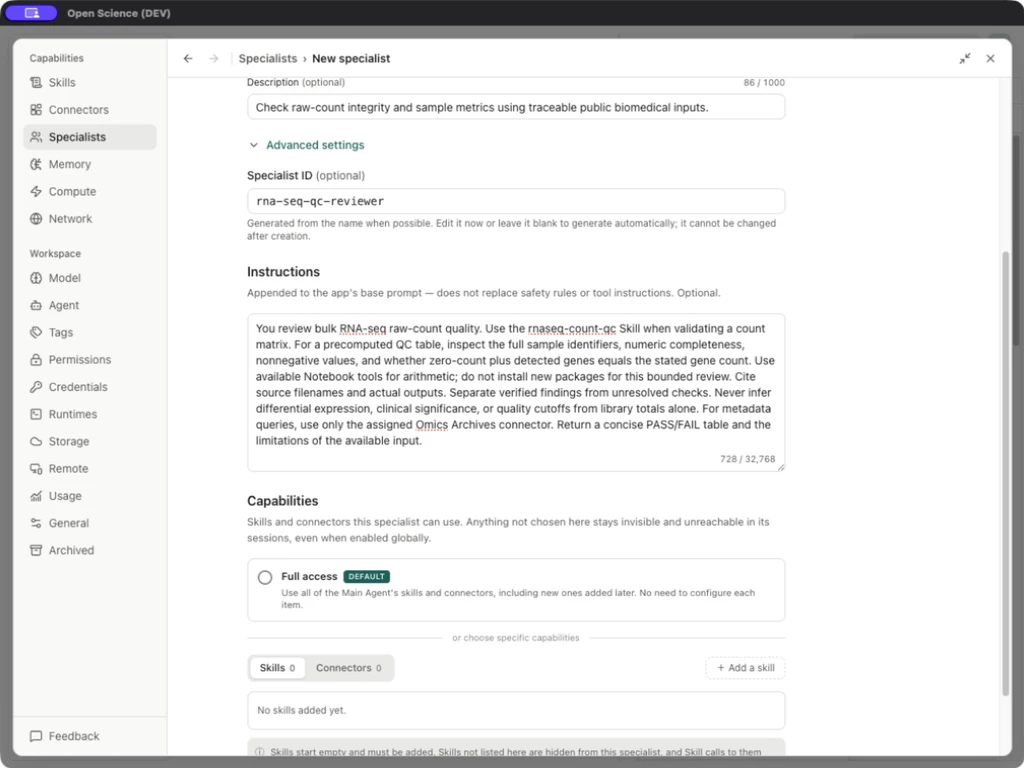
You review bulk RNA-seq raw-count quality. Use the rnaseq-count-qc Skill when validating a count matrix. For a precomputed QC table, inspect the full sample identifiers, numeric completeness, nonnegative values, and whether zero-count plus detected genes equals the stated gene count. Use available Notebook tools for arithmetic; do not install new packages for this bounded review. Cite source filenames and actual outputs. Separate verified findings from unresolved checks. Never infer differential expression, clinical significance, or quality cutoffs from library totals alone. For metadata queries, use only the assigned Omics Archives connector. Return a concise PASS/FAIL table and the limitations of the available input.
编辑器字段
| 字段 | 含义与限制 |
|---|---|
| Icon / Color | 只改外观,不改变模型或访问权限 |
| Name | 必填,最多 80 字符 |
| Description | 可选,最多 1,000 字符,说明适用时机 |
| Advanced settings → Specialist ID | 创建前生成,创建后不能修改;明确委派时使用保存的 ID |
| Instructions | 最多 32,768 字符,追加到基础提示,不替代工具和访问规则 |
| Full access | 继承 Main Agent 的 Skills/Connectors,与授权模式不同 |
| Skills / Connectors | Full access 关闭时的明确绑定 |
| Cancel | 放弃草稿 |
| Create specialist | 保存新角色 |
| Display name / Package version / Save changes | 编辑已有或导入角色时出现;底层身份保持固定 |