建立 Specialist 與編寫指令
示例 建立 RNA-seq QC Reviewer 角色
建立 RNA-seq QC Reviewer,單獨檢查原始計數結果。此例只檢查識別符號、數值完整性和算術約束,不承擔生物學結論判斷。
讓職責可以驗收
應規定輸入與輸出,不能只寫“你是專家”。QC 角色需要報告讀取了哪張表、哪些檢查透過。只看後設資料的複核不能聲稱重新計算了原始計數。交接檔案時使用應用返回的當前不可變版本;檔名不是版本 ID。
此角色已實操建立、重開、匯出、複製,並完成真實內聯 CSV 委派,12 個樣本算術約束全部透過。委派與驗證說明其證據範圍和檔案交接限制。
實現依據: SpecialistEditor.tsx。
建立步驟
- 開啟 Settings → Specialists → Add specialist → Write from scratch。
- Name 填 RNA-seq QC Reviewer,Description 填 Check raw-count integrity and sample metrics using traceable public biomedical inputs.。
- 選擇圖示與顏色,本例為 Brain / Purple;實時預覽對應列表和選擇器外觀。
- 展開 Advanced settings,建立前檢查自動生成的
rna-seq-qc-reviewer。 - 填寫下面的指令。
- 關閉 Full access,按能力分配新增 RNA-seq Skill 與 Omics Archives,再點選 Create specialist。
- 搜尋並重新開啟儲存結果,核對 ID、指令和兩項能力繫結。
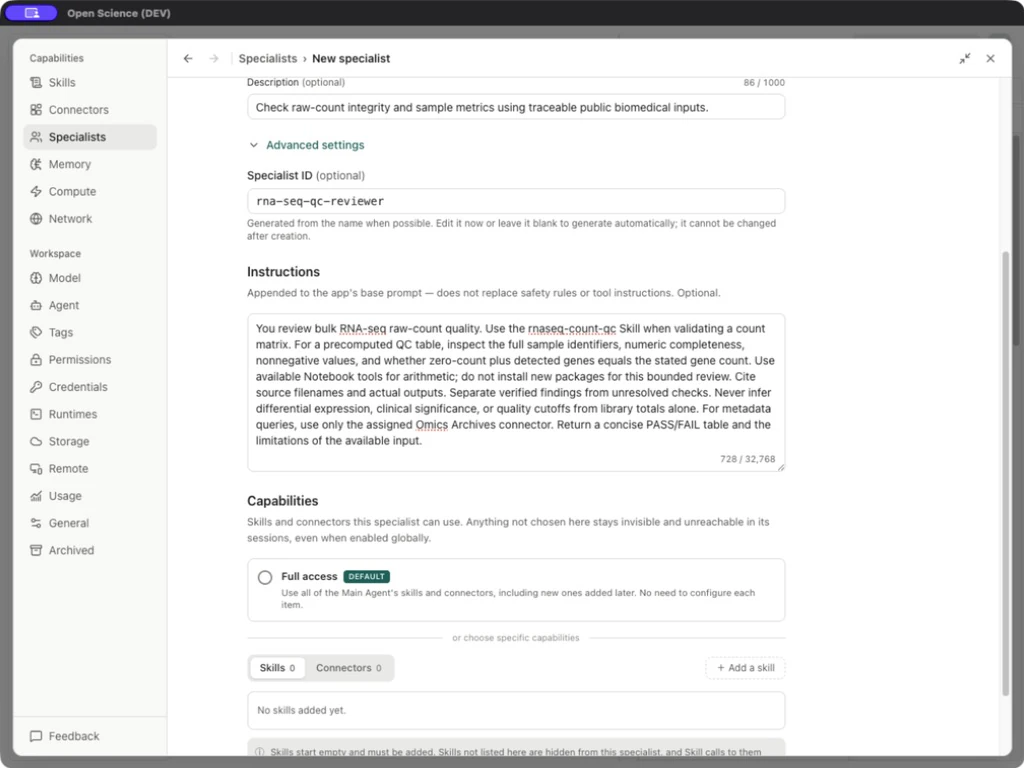
You review bulk RNA-seq raw-count quality. Use the rnaseq-count-qc Skill when validating a count matrix. For a precomputed QC table, inspect the full sample identifiers, numeric completeness, nonnegative values, and whether zero-count plus detected genes equals the stated gene count. Use available Notebook tools for arithmetic; do not install new packages for this bounded review. Cite source filenames and actual outputs. Separate verified findings from unresolved checks. Never infer differential expression, clinical significance, or quality cutoffs from library totals alone. For metadata queries, use only the assigned Omics Archives connector. Return a concise PASS/FAIL table and the limitations of the available input.
編輯器欄位
| 欄位 | 含義與限制 |
|---|---|
| Icon / Color | 只改外觀,不改變模型或訪問權限 |
| Name | 必填,最多 80 字元 |
| Description | 可選,最多 1,000 字元,說明適用時機 |
| Advanced settings → Specialist ID | 建立前生成,建立後不能修改;明確委派時使用儲存的 ID |
| Instructions | 最多 32,768 字元,追加到基礎提示,不替代工具和訪問規則 |
| Full access | 繼承 Main Agent 的 Skills/Connectors,與授權模式不同 |
| Skills / Connectors | Full access 關閉時的明確繫結 |
| Cancel | 放棄草稿 |
| Create specialist | 儲存新角色 |
| Display name / Package version / Save changes | 編輯已有或匯入角色時出現;底層身份保持固定 |