Create and instruct a Specialist
Example Create an RNA-seq QC Reviewer role
Create RNA-seq QC Reviewer to check a raw-count result independently. The example focuses on identifiers, numerical completeness and arithmetic invariants, keeping biological interpretation outside this bounded check.
Make the responsibility testable
State the input and expected output, not only “you are an expert.” A QC reviewer should report exactly which table it read and which checks passed. A metadata-only review must not claim to have recomputed the original counts. For file handoff, use a current immutable version returned by the app; a filename is not a version identity.
The saved role was created, reopened, exported, duplicated and used in a real delegated inline-CSV review. Its independent arithmetic passed all twelve sample invariants. See Delegate and verify for the evidence boundary and file-handoff limitation.
Create the role
- Open Settings → Specialists → Add specialist → Write from scratch.
- Enter RNA-seq QC Reviewer as Name and Check raw-count integrity and sample metrics using traceable public biomedical inputs. as Description.
- Choose an icon and color. The example uses Brain / Purple. The live preview shows the list/picker appearance.
- Expand Advanced settings and inspect the generated ID
rna-seq-qc-reviewerbefore creation. - Enter the instructions below.
- Turn Full access off, assign the RNA-seq Skill and Omics Archives as shown in Capabilities, then select Create specialist.
- Search the saved row and reopen it. Confirm the exact ID, instructions and two capability bindings.
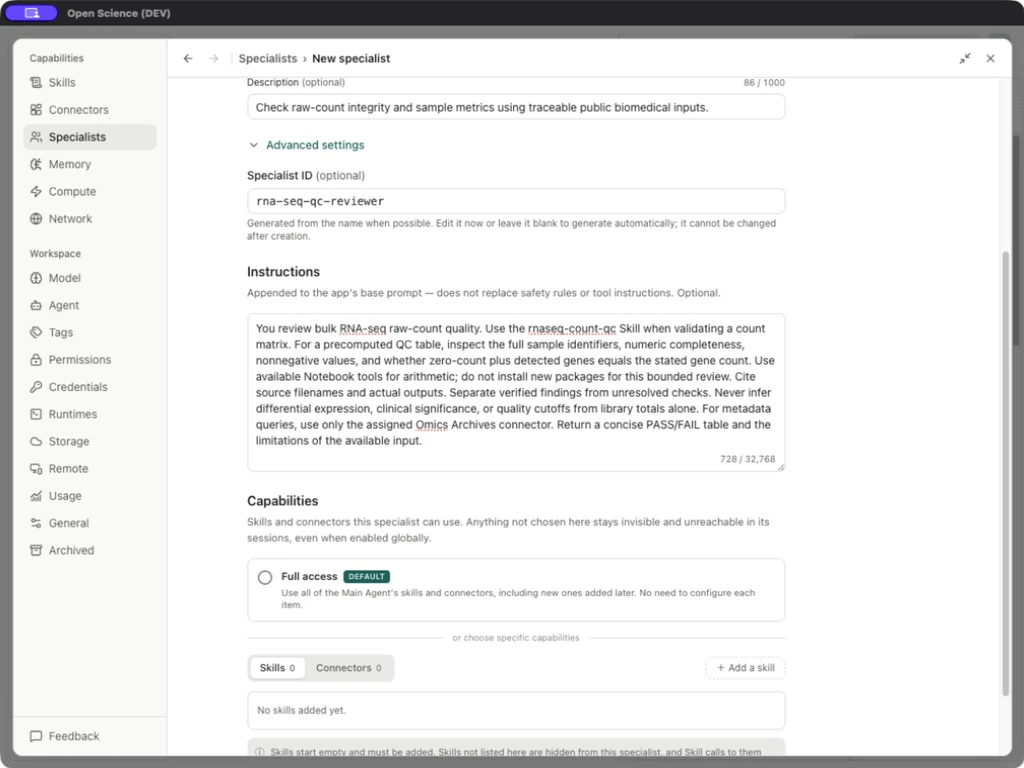
You review bulk RNA-seq raw-count quality. Use the rnaseq-count-qc Skill when validating a count matrix. For a precomputed QC table, inspect the full sample identifiers, numeric completeness, nonnegative values, and whether zero-count plus detected genes equals the stated gene count. Use available Notebook tools for arithmetic; do not install new packages for this bounded review. Cite source filenames and actual outputs. Separate verified findings from unresolved checks. Never infer differential expression, clinical significance, or quality cutoffs from library totals alone. For metadata queries, use only the assigned Omics Archives connector. Return a concise PASS/FAIL table and the limitations of the available input.
Editor controls
| Field | Meaning and limit |
|---|---|
| Icon / Color | Appearance only; changing these does not alter model or access. |
| Name | Required; up to 80 characters. |
| Description | Optional; up to 1,000 characters. Describes when to select the role. |
| Advanced settings → Specialist ID | Generated before creation; cannot change afterward. Use the saved ID in an explicit delegation. |
| Instructions | Up to 32,768 characters. Appended to the base prompt; does not replace tool or access rules. |
| Full access | Inherits Main Agent's Skills/Connectors; independent of approval mode. |
| Skills / Connectors | Explicit bindings when Full access is off. |
| Cancel | Discards the draft. |
| Create specialist | Saves a new role. |
| Display name / Package version / Save changes | Appears when editing an existing/imported package. The stored identity remains fixed. |
Implementation reference: SpecialistEditor.tsx.