Delegate and verify work
Delegation gives a separate child task to a role while Main Agent coordinates the conversation. Selecting a Specialist to speak in the main conversation and delegating a child task are different actions.
Prepare a bounded handoff
| Required information | Example |
|---|---|
| Role | RNA-seq QC Reviewer, saved ID rna-seq-qc-reviewer |
| Input | Complete GSE60450 sample-QC CSV, or a valid current immutable file version |
| Task | Check 12 non-missing unique full sample IDs and the per-sample gene-count identity |
| Deliverable | One check table plus every sample's arithmetic result |
| Boundaries | Read-only; no new packages; no differential-expression interpretation |
- Create/configure the role and confirm it is enabled.
- In the conversation's Agent controls, enable Delegation. Confirm the intended model and working authentication.
- Ask Main Agent to delegate explicitly, identify the role and provide the complete task. If using file handoff, let the app resolve current versions; do not invent IDs or pass filenames as version references.
- Watch the actual delegation activity and child status. A progress sentence from Main Agent is not the child record.
- Open the child chip / Subagents preview. Select the task in Subagent Frame and read its transcript, tool results and terminal status.
- Respond to any child permission request in the parent conversation after inspecting its scope. Then compare the returned result with the requested acceptance checks.
Check the handoff and returned result
Check a small inline table
Worked example Delegate a twelve-sample table check
Download the complete sample-QC CSV and paste its header and all twelve rows immediately below the request. Keep all columns and complete sample identifiers. The example uses the enabled role created in Specialist identity; Python must be enabled for its arithmetic. No extra Skill is needed for this bounded check.
Delegate to RNA-seq QC Reviewer. Use only the complete inline CSV below. Execute the arithmetic in Python, verify twelve distinct full sample identifiers, and check zero_count_genes + detected_genes_count_gt_0 = 27179 for every row. Return each result and state that this checks supplied summary data, not independent access to the original count matrix.
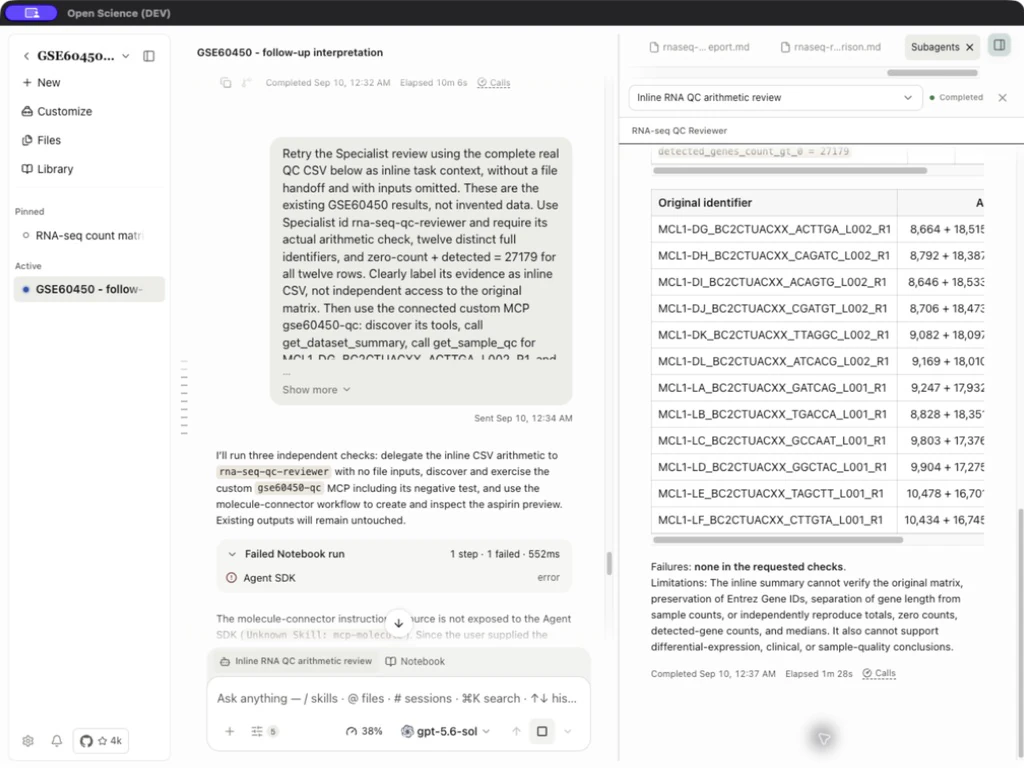
In this example, the child ran a Python Notebook and returned 12 rows, 12 distinct non-missing identifiers, and 12/12 sums equal to 27,179. For the first full sample ID, 8,664 + 18,515 = 27,179. Numeric fields were complete and nonnegative.
This verifies the supplied summary's consistency. It cannot independently reproduce totals/medians from the original matrix, validate sample conditions, or establish biological quality thresholds.
Choose a separate model
Set a child model independently of Main.
Choose a fixed model under Settings → Model → Subagent before delegating. Open the child record to verify its actual model; the main conversation's model label does not identify the child. In the exercised configuration, Main used gpt-5.6-sol and the child execution record used gpt-5.6-luna, both through Codex subscription authentication.
Pass a file to the child
Example Hand a sample-QC file to a child task
- Attach the source file through the conversation's attachment menu and wait for the upload to finish.
- Ask Main to pass that exact uploaded version to the child. Name the required checks and output; do not substitute a filename or a guessed version ID for the file.
- Open Subagents and select the child. In Notebook, select that child in the Agent filter and inspect the actual file read.
- Compare the child's row count, column names and checksum with the source. Open its saved output and check the requested calculation.
For the public sample-metrics CSV, expect 12 data rows and 269,027,617 as the sum of total_counts. The input checksum must remain unchanged. These checks concern the supplied sample summary; they do not recalculate the original gene-count matrix.
| Check | Required evidence |
|---|---|
| Version accepted | The app resolved the current immutable upload/artifact version in its owning session. |
| Child can read | The child's tool returned file content; a filename or staged path alone is insufficient. |
| Checks executed | The child ran the calculation and its saved result agrees with the source. |
If the app reports an unavailable input, reattach the file and retry using its current version. If the child reports PermissionError: [Errno 1] Operation not permitted, retain the exact error and report it if reattachment does not recover the read. Do not move files into internal application folders to bypass the error.
Make a Skill available to the child
Import or create the Skill first. For a Specialist, assign it under the role's Skills and Connectors; then start a new delegated task that explicitly names the method. Ask the child to read the installed instructions before using them.
Inspect the child's tool activity for the loaded Skill identity and content. For example, rnaseq-count-qc requires a raw gene-count matrix and describes descriptive QC; a twelve-row sample summary is not an interchangeable input. A successful package read does not mean the analysis has run. Check execution and saved results separately.
Read failures accurately
| Observed or supported state | Meaning and recovery |
|---|---|
| Delegation off | Turn it on for the intended conversation before retrying. |
| Role disabled / setup incomplete | Finish setup and enable the intended saved role. |
| Input unavailable in this Session | Obtain the exact current artifact version or immutable upload-version reference. A path, artifact ID and version ID are different values. |
| Waiting for permission | Inspect the named child's pending operation; Main Agent may be waiting rather than computing. |
| Child completed | Read the result and tool evidence; completion is not a guarantee of scientific correctness. |
| Cancelled / failed | Retain partial output and the actual error. Do not label a Main Agent replacement as a completed Specialist check. |
The inline route is appropriate only for a complete, bounded table whose evidence scope is stated; it is not a general replacement for file lineage.
Implementation reference: ComposerAgentControlsMenu.tsx, SpecialistSubmenu.tsx.