Troubleshooting and common questions
Find the error text below, follow the checks for the affected operation, then retry that operation. If the problem persists, report a bug or ask the community with the error and the steps that triggered it.
Diagnose by the point of failure
| Symptom | Check first | Action and success condition |
|---|---|---|
| App opens an empty workspace | Data location, profile and Archived | Return to the intended root/project; do not immediately create a replacement |
| No usable model | Provider login, active Agent, model compatibility | Provider setup: a small actual response succeeds |
| Login appears connected but task fails | Expanded provider error and selected model | Recheck authentication/entitlement and model identifier; UI presence is not access proof |
| Task appears stopped | Pending plan, approval or interaction card | Respond to the visible request; read its scope before allowing |
| Queued correction does not run | Not saved / Sending / deferred-delivery state | Composer: verify it became a user message |
| Module not found | Exact interpreter and package inventory | Runtimes: validate the import in the selected environment |
| Approved package install still fails | First network/proxy/certificate error | Network: retry the actual operation after fixing its cause |
| Notebook cannot read a file | Managed path, attachment, folder grant and version reference | Use the intended permitted input; do not expand unrelated filesystem access |
| Saved-file service rejects a working path | Whether it is registered for managed publication | Save through the supported artifact operation; reopen the resulting file |
| Table differs from an expected number | Source hash, delimiter, metadata columns and calculation denominator | Recalculate from the same input before changing the expected value |
| File visible but preview fails | File format/size, version and renderer error | Previews: download to distinguish rendering from file absence |
| Reference seems missing | Library view, filters, Inbox or Trash | Clear filters, inspect status and restore in the correct lifecycle |
| Full-text source found but attachment fails | Actual download result and PDF validation | Use another legitimate source/local PDF, then open the attachment |
| Side Chat disabled | Agent/provider compatibility message | Delegation: check the compatibility restriction shown by your selected framework |
| Remote job cannot run | Real host, authentication, scheduler and runtime prerequisites | Remote compute |
Restore a lost connection
When Desktop connection lost appears, stop submitting work until the current state has been restored.
- Select Reconnect. Restoring desktop connection… means the app is refreshing the original backend's state; wait for normal controls to return.
- Reopen the original conversation, Notebook run or file. A request sent before the interruption may already have completed, even if no response appeared. Inspect its state before submitting it again; reconnect does not automatically retry submitted operations.
- If the notice says the original backend is no longer available, use Quit app and reopen the app. Reconnect cannot restart a dead backend or switch to a replacement instance.
- Before quitting, preserve any unsaved work you can access and read the confirmation. Quitting while disconnected does not confirm that the backend stopped. For a CLI-backed instance, check the same profile with
open-science status --json; see backend ownership.
The browser interface restores missed updates while controls are paused. If Reload required appears, save a copy of unsent drafts before selecting Reload; if draft storage failed, confirm the copy first. Mentions return as text, and attachments need checking before sending. Pairing required instead means access authorization expired: reopen the host's Web link or follow remote pairing, rather than repeatedly submitting the task.
Recover a startup failure
| Notice | Action |
|---|---|
| Open-Science could not start the backend. | Use Open startup logs, identify the reported STARTUP_STAGE, and resolve its cause. Choose Retry startup when offered. If unavailable, the previous backend may still be running; inspect its status before reopening another copy. |
| Settings could not be loaded | Select Retry. If it repeats, use Report this error and include the displayed settings error code. |
| Credential-storage recovery error | Unlock the original OS credential store or restore the original key/profile as instructed. Keep existing encrypted data; reinstalling or creating replacement keys is not a recovery step. |
Recovery is complete when the expected projects and settings load. If the notice persists, keep its error code and sanitized logs for a report. For database-specific failures, use the checks below.
HTTP errors: 400, 403, 429 and 5xx
An HTTP status describes a response from a model provider, Connector service, local browser service or proxy. Identify the responding service before changing settings. Copy the status together with its error body: 403 alone does not tell you whether an API permission, proxy policy or resource restriction caused the rejection.
Request, authentication and access
| Status | Meaning | What to check in Open-Science |
|---|---|---|
| 400 Bad Request | The service rejects the request. | Read the named field or parameter. Check the provider endpoint, model identifier and supported request features. For a tool call, check its input schema. Try a small text-only request if attachments or an optional feature triggered the error. |
| 401 Unauthorized | Valid authentication is missing. | Check which account or credential the failing service uses. Reconnect the relevant subscription/OAuth account, or correct the API key in provider settings or Connector credentials. |
| 403 Forbidden | The service refuses access. | Check model/resource entitlement, organization/project permissions and the service's stated access restrictions. If the error says HTTP CONNECT 403, inspect the proxy or network policy, rather than assuming the model key is wrong. |
| 404 Not Found | The endpoint or resource is unavailable at that address. | Check Base URL, API path and model/resource ID. A browser website URL is not necessarily an API endpoint. A service may also use 404 to hide an inaccessible resource. |
| 405 Method Not Allowed | The endpoint does not support this request method. | Check the selected API protocol and Connector transport against the service documentation. Report a reproducible integration mismatch rather than guessing a different method. |
| 407 Proxy Authentication Required | The proxy requires authentication. | Check the proxy configuration with your network administrator. Model API credentials do not authenticate the proxy. |
| 413 Content Too Large | The request body exceeds a limit. | Reduce the attachment/batch size or use a supported smaller input. Confirm which service imposes the limit. |
| 422 Unprocessable Content | The request content cannot be processed as supplied. | Read the field-level validation message. Correct types, required fields or unsupported values in the tool/provider request. |
400 and 403 need different checks: for a 400 that names an unsupported parameter, correct that request feature. For a 403 that names a restricted model, check access to that model. If no precise cause appears, preserve the response and request ID for support; do not infer the cause from the number alone.
Quotas and temporary service failures
| Status | Meaning | Next action |
|---|---|---|
| 402 Payment Required | Provider-specific payment/access handling; HTTP reserves this status without a universal billing meaning. | Read that provider's error body and account page. Do not assume a top-up is required from the number alone. |
| 429 Too Many Requests | Rate limiting; some model APIs also use it for exhausted quota. | For a rate limit, reduce concurrent requests and wait for Retry-After or the documented reset. For a quota error, check that service's allowance/billing. A subscription limit and API credit balance are separate. |
| 500 Internal Server Error | The responding server failed. | Check its service status. Retry a small request after a pause if safe; report repeated failures with the request ID. |
| 502 Bad Gateway | A gateway received an invalid upstream response. | Identify the gateway/provider and check its status and configured upstream. A persistent custom-gateway failure may require its administrator. |
| 503 Service Unavailable | The service is temporarily unavailable. | Follow Retry-After if supplied and wait for recovery. For a local endpoint, check that the intended model server is running and ready. |
| 504 Gateway Timeout | A gateway timed out waiting upstream. | Check whether the operation already started or completed before retrying. For an analysis, job submission or artifact write, inspect the existing result first to avoid duplication. |
Some built-in Connector requests have bounded automatic retries for 429, 500, 502, 503 and 504. This does not apply to every model/framework or make repeated manual submissions safe. Follow the specific service's response.
No HTTP response, or still failing
ECONNREFUSED, ENOTFOUND, ETIMEDOUT and certificate errors are connection/TLS failures, not HTTP status codes. A request timeout is not automatically HTTP 408 or 504. Start with Network.
After changing a setting, test the same provider/Connector with a small request, then retry the affected operation. If it still fails, use the feedback instructions. Include the service name, endpoint host/path without secrets, status, error body, request ID if present, and time/time zone. Never paste an Authorization header or token-bearing URL into a public report.
Match the error message
Copy the exact code and accompanying message from the failed tool, dialog or log. Codes, Python exception names and OS messages are different kinds of identifiers; Open-Science does not assign one universal numeric code to every failure. A message can have several causes. For remote jobs, use the SSH and compute error table.
| Code or message | Meaning and next action | Confirm recovery |
|---|---|---|
ModuleNotFoundError: No module named '…' | The selected Python interpreter cannot import that module. Inspect Runtimes, install the required package in that environment through its supported package-management route, and follow any restart instruction. | Import the module in the same Notebook environment, then rerun the failed cell. |
ENOENT / No such file or directory | The requested path cannot be found. Check the filename and source location; attach the existing file again if its reference is stale. | Preview or read the intended input from the same task. |
EACCES / EPERM / Permission denied | The operation lacks filesystem access. Inspect both the OS permission and the project's folder grant; use Projects to grant only the directory the task needs. For SSH Permission denied (publickey), check authentication instead. | Repeat the original read/write within the intended permission scope. |
ENOTDIR / Not a directory | A directory operation received a file or an invalid parent path. Select the actual containing folder. | The directory listing opens. |
EISDIR / Is a directory | A file operation received a directory. Select the intended file. | The file opens or downloads. |
| Package request rejected for a non-public destination | Inspect the rejected host and resolved IP. A proxy or DNS configuration can supply an address the network policy blocks. See Network; fix the address resolution instead of widening access blindly. | The original package request and subsequent import both succeed. |
Database startup errors
These codes appear when the app cannot safely finish opening its data. Keep the existing data folder. Read the error detail before retrying; deleting the database is not a repair step.
| Error code | Meaning | Next action |
|---|---|---|
database_runtime_unavailable | The bundled database engine failed to load. | Reinstall the appropriate official app package, retaining the separate data folder. |
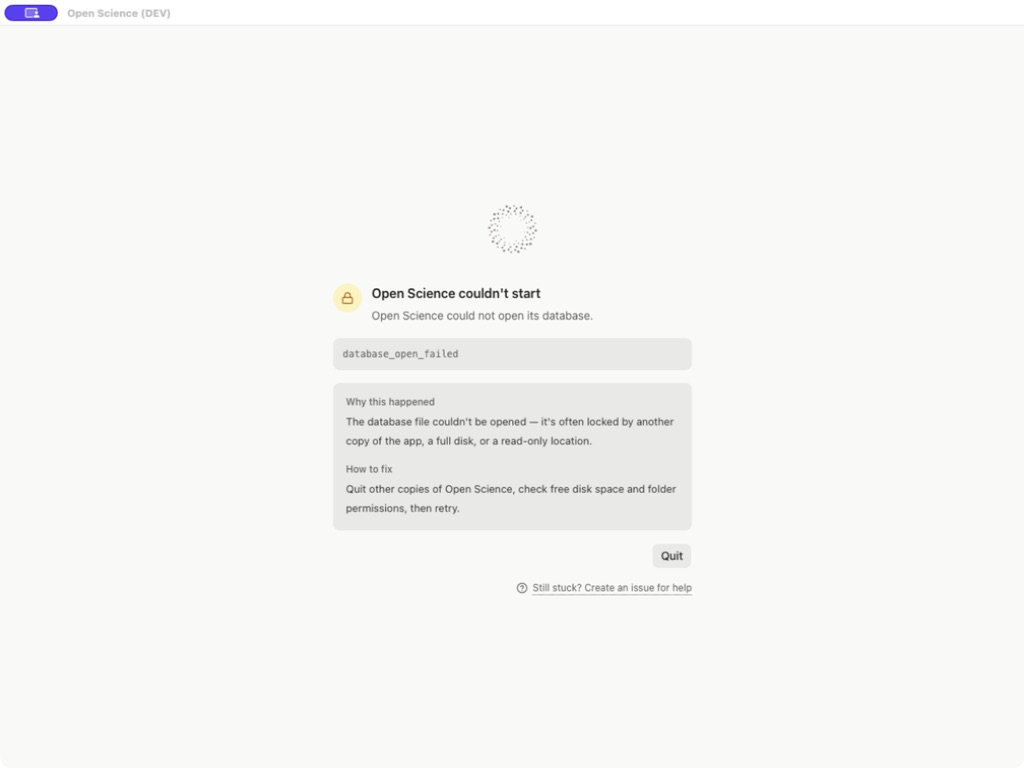
database_open_failed | The database could not be opened. Another app instance, insufficient disk space or a read-only location can cause this. | Quit other instances, check free space and folder permissions, then retry. |
database_newer_than_app | A newer app version wrote this data format. | Install a compatible newer release and reopen the same data folder. Do not attempt to downgrade its schema. |
database_history_invalid | The migration history does not match the app's expected history. | Preserve the folder and report the code. If you have a known-good backup, seek a recovery procedure before replacing data. |
database_migration_failed | A database update did not finish. | Check free space, other instances and permissions; use Retry when available. Include the migration ID if it fails again. |
database_validation_failed | Stored data does not meet the required structure. | Update the app and relaunch. If it persists, report the code rather than editing database rows. |
database_startup_unavailable | The database startup service did not respond or finish checking. | Retry; if it persists, fully quit and reopen the app, then report it. |
Recovery means the startup screen clears and the expected projects open. If a Still stuck? Create an issue for help action is available, use the review flow described below. These meanings follow the startup guidance.
If the startup screen only offers Quit, exit the app, resolve the reported cause, and launch it again. Use Retry only when the page provides it. After recovery, reopen your expected projects and files.
Recovery messages
| Symptom | Next action |
|---|---|
| Compute jobs remain queued after storage recovery | Read the affected-conversation notice, preserve the identified files, recover a valid copy and select Recheck saved conversations. Inspect the same job before submitting another. |
| PDF upload cancelled but the reference remains | Open the saved reference and check its attachment status; use the batch's Retry unfinished path where offered. |
| Collection save rejected after another client edited it | Reopen the latest collection and reconcile changes before saving again. |
| Windows update reports denied access | Read the exact file path and Windows error. Follow the notice's instruction to use the official installer as administrator. |
| Windows update reports a file in use | Close the process identified as using that installation file, then choose Retry, or Cancel to stop the update. |
Windows errors are operating-system codes, distinct from HTTP status codes. If recovery fails, include the installed version, exact message and sanitized file/job identity when you report the problem.
Reset local Windows data
Use the standalone reset utility only when you intend to discard the local installation's data and start over. It permanently deletes the listed data and saved credentials; it neither repairs nor backs them up. Copy needed research files and backups outside all listed directories first. Reinstalling the app alone retains this data.
- From the official reset guide, download both
reset-open-science.cmdandreset-open-science.ps1using Download raw file. Keep them together outside the app's data directories. - Quit Open-Science, including its tray process, and finish and close its agent, Notebook, headless and WSL processes. Use your normal Windows account; administrator mode is not required.
- In Command Prompt opened in the download folder, run
reset-open-science.cmd -Preview. Review every proposed data, configuration, profile and runtime-cache path. Preview does not delete data. - Only after reviewing and backing up those locations, double-click
reset-open-science.cmd. It asks you to typeRESET OPEN SCIENCEexactly before deletion; any other response cancels. - Read the final result before reopening the app. After a completed reset, choose the data location and configure providers and managed runtimes again.
If a process is running or cannot be inspected, or a path is unsafe, resolve the reported condition first. Do not bypass a refusal. If settings are corrupt or a custom data location is involved, use the official guide's explicit -DataRoot procedure. A deletion error can leave a partial reset, so read the error rather than assuming nothing changed. The utility does not revoke external provider accounts or remove separately installed Python/R environments.
Collect useful diagnostics
- Record app version, OS, active Agent/model, project/session and the time of failure.
- Copy the first relevant tool error and the operation that caused it. Include expected versus observed behavior.
- For input problems, include a public source link, filename, size and checksum; a minimal reproducible input is more useful than an unrelated screenshot.
- Open Settings → General → Diagnostics and use Open / Reveal for the runtime log when needed.
- Inspect logs before sharing; omit account tokens, private source content and unrelated paths. Opening a log does not send it automatically.
- State whether the same operation succeeds after the change. An enabled button is not the success condition.
Technical message meanings are collected in Diagnostics reference.
Export diagnostics for one session
- Open the affected session and choose Export diagnostics… in its header, or Export → Export diagnostics… in the session menu.
- Review the available sources. session.json and Session database records concern the selected session. main.log and historical application logs can also contain metadata from other sessions; select them only when relevant.
- Choose Export, select a local destination, and wait for Diagnostics exported. Use Show in folder to locate the archive.
- Inspect its manifest and export log before sharing. A missing or damaged source may be summarized or omitted; the archive's existence alone does not prove every source was captured.
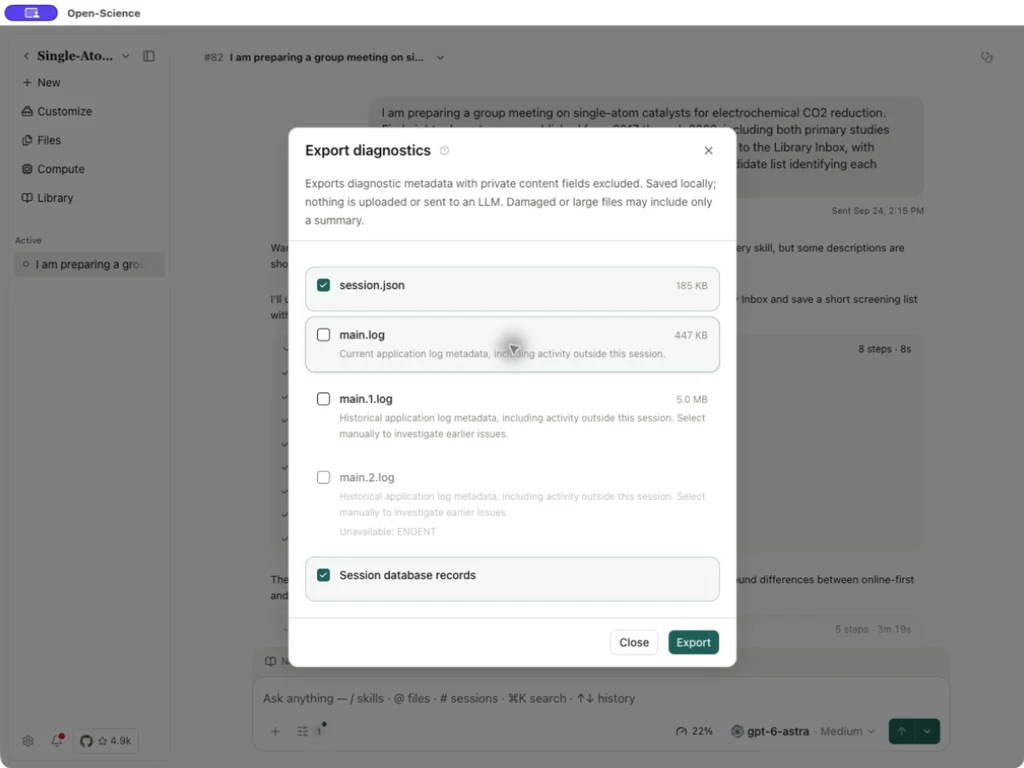
Ordinary metadata export excludes private content fields. v0.34.1 retains more bounded error context and run/Notebook diagnostic evidence. This does not mean every selected file is fully redacted. If a .science export triggers the sensitive-content check, the source list can also contain redacted scanner evidence and the original flagged files. Original sensitive files are unchecked by default; selecting one includes its original bytes in the archive. Select only the sources needed and inspect the archive and screenshots before sharing. Export stays local and makes no upload or model request. This is diagnostic evidence, not a research backup; use a .science package for a research handover.
Report a bug or ask the community
| You need | Channel |
|---|---|
| Help choosing settings or understanding an error | Join AIPOCH Official on Discord. Describe the operation, version and error so others can help. |
| A reproducible app failure tracked to resolution | Search existing issues, then open a Bug report. |
| A new capability or an improvement | Open a feature request and explain the research task it would support. |
Submit a useful GitHub issue
- Search existing issues using the error code or a distinctive phrase. If the same problem exists, add relevant reproduction details there.
- Sign in to GitHub and open Bug report. Use a title such as
[Bug]: database_open_failed when reopening a projectwith your actual error. - Fill in What happened?, Steps to reproduce, Operating system and App version. Add Provider / model when relevant, plus the active Agent framework.
- Under Relevant logs or screenshots, include the first error and a small amount of surrounding context. Add a public or minimal sample when the problem depends on input data.
- Review the report, then submit it. Keep the issue URL and post the result of any suggested check in the same issue. If GitHub does not offer issue creation for your account, use Discord for help finding the appropriate reporting route.
Use this checklist when preparing either an issue or a Discord question:
Open-Science version and installation method:
Operating system and architecture:
Agent framework / provider / model (if relevant):
Page and action:
Steps to reproduce:
Expected result:
Actual result:
Exact error code and full message:
Time of failure and time zone:
Public/minimal input (if needed):
Checks already tried and their results:
Relevant log excerpt or screenshot:
For a remote failure, also include execution mode, the app job ID, scheduler job ID when present, exit code and the relevant stdout/stderr. Use a neutral alias for a private host. Do not attach passwords, tokens, SSH private keys, patient data or an entire private research folder; replace sensitive details in a minimal example.
Prepare a report from an error
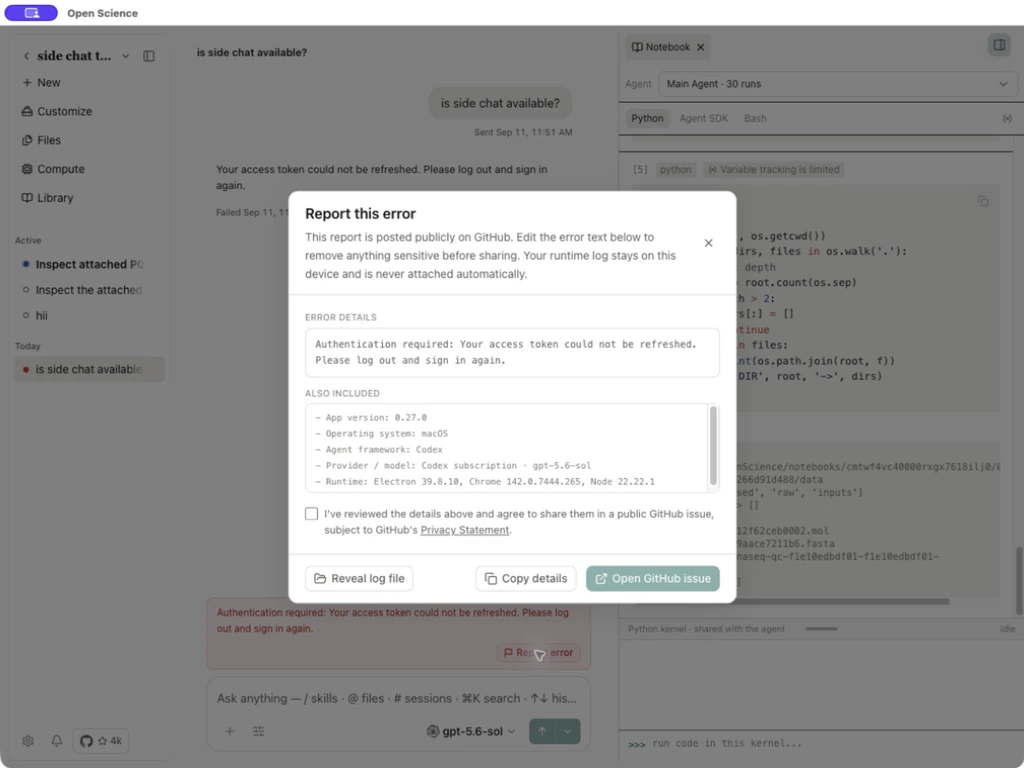
Select Report this error beside a conversation error. A startup screen can also offer Still stuck? Create an issue for help.
- Read Error details and remove private paths, identifiers or sensitive input before sharing.
- Check Also included for the application version, operating system, Agent framework, provider/model and runtime versions.
- Use Copy details to copy the edited text and environment information. Reveal log file locates the local runtime log; it is not attached automatically and needs a separate review before sharing.
- Check the public-sharing acknowledgment to enable Open GitHub issue. Editing the error text requires reviewing and acknowledging the revised content again.
- Open the GitHub form, inspect the prefilled fields, add useful reproduction steps, then submit when ready. Opening the report preview alone does not submit an issue.
Common questions
Do I need a model account for every operation? No. Local browsing, organization and many settings can work without a model. Agent responses, analysis planning and model-generated reviews need compatible model access.
Does local storage mean all processing stays on the device? No. Selected prompts, files or retrieved content may be sent to the configured model/service when used. Local files and model execution location are separate questions.
Can I work offline? Existing local files and available local views can remain usable. Hosted models, online databases and missing-package downloads need their respective connections. A remote/local endpoint also needs its own running service.
Is Usage a bill or subscription balance? No. It reports available telemetry. Missing usage is not zero; the service's billing/limits remain separate.
Does restoring an archive rerun the work? No. It restores navigation to retained work. A live kernel or failed operation may still require explicit restart/rerun.
Does a successful SSH test mean my analysis can run? No. Check the selected execution mode, scheduler permissions, runtime and resource request, then run a small job and inspect its output. See Remote compute.
Sources: HTTP semantics, 429 and Retry-After, OpenAI rate-limit versus quota errors, Connector retry policy.
Sources: queue recovery notice, PDF batch handling, collection conflict, Windows installer.
Source: bug report fields, startup report dialog.
Codex reports an incompatible version after an upgrade
If you see The installed Codex CLI is incompatible or its version could not be verified, open Settings → Agent and inspect the detected path and Codex CLI version. v0.34.0 requires CLI 0.157.1 or later. Update that managed or external installation, then Re-detect. Signing in to the model again does not replace a runtime update. Follow Update Codex.