Get started with AIPOCH Open-Science
Use Open-Science to organize research sources, work with an agent, run analyses and inspect saved results.
For a conceptual overview of the product, see What Is AIPOCH Open-Science?.
Start here
- Capabilities and supported inputs: choose a path for your files or research question.
- Installation and first-time setup: prepare the app, agent, model and runtime.
- Your first project and result: open a small public-data table and save a checked summary.
- Permissions: inspect requested actions and manage remembered access.
- Notebook and execution evidence: examine code, variables and result provenance.
Follow a real research task
| Goal | Walkthrough | Demonstrated result |
|---|---|---|
| Prepare a reading collection | Build a core reading list | Three PRISMA papers reviewed in the Library, a collection and an attached publisher PDF |
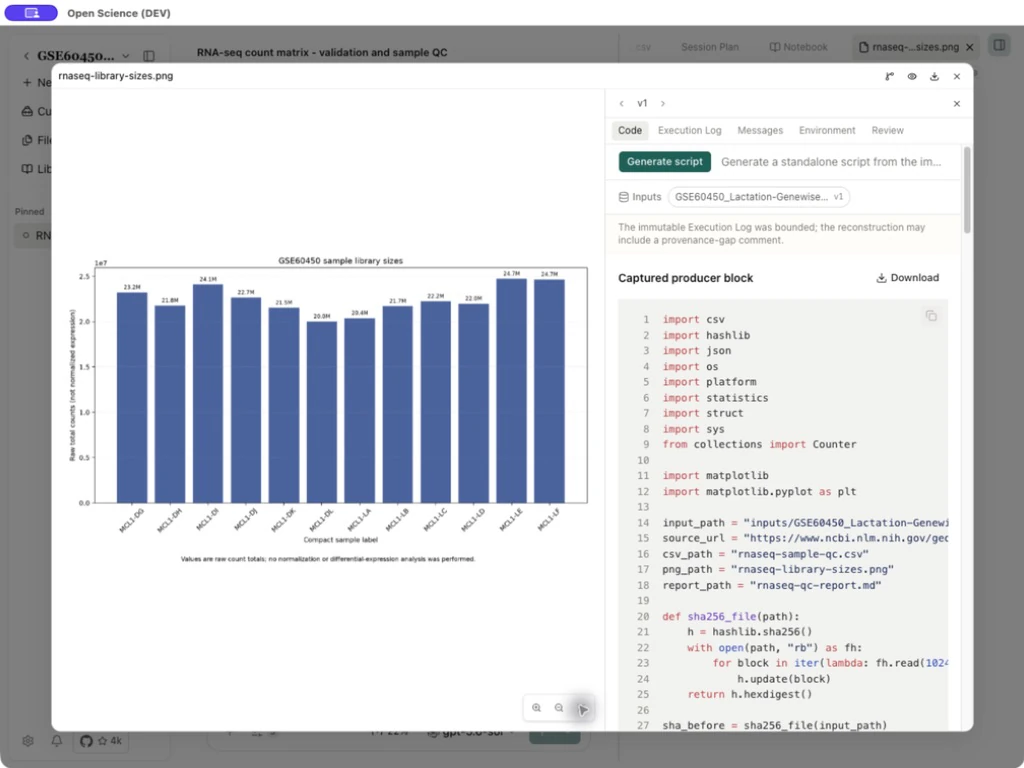
| Check and summarize a dataset | Turn raw data into a reproducible analysis | GSE60450 gene-expression matrix checks, twelve-sample QC CSV, raw-count figure and methods report |
Find the right level of detail
| Section | Read it for |
|---|---|
| Guides | Page controls, setup and everyday operations |
| Workflows | Research scenarios with inputs, decisions, deliverables and acceptance checks |
| Explore tools | Tool families, scientific services and integration choices |
| Skills | Reusable methods, the directory and package management |
| Specialists | Roles, assigned capabilities, delegation and review |
| Reference | Exact limits, configuration rules, package formats, CLI/API contracts and Changelog |
Use Search or ⌘K / Ctrl+K to search this documentation's titles, headings and body text. The application's own search has a different scope.
Before running an example
Local walkthroughs use public PRISMA papers and the GSE60450 RNA-seq matrix. Download the linked inputs and confirm the model, runtime and permissions required by each task.
Remote compute includes a completed Direct SSH RNA-seq analysis, output collection, restart recovery and cancellation. Slurm terminal monitoring needs working accounting; GPU inference needs a compatible software environment.
Use Reference for technical limits and configuration, and Changelog for release history.