Explore tools
Choose a tool by the result you need: retrieve a record, inspect a file, execute a calculation or connect an external service. The application combines these capabilities, but they have different setup and evidence requirements.
Choose a tool family
| Need | Start here | What must be ready | What to inspect afterward |
|---|---|---|---|
| Read files, plan work, calculate or publish results | Built-in research tools | Accessible project input and operation permissions | Tool response, output file and execution record |
| Find which scientific software a method uses | Scientific tool catalog | Check packages/weights separately from Skill installation | Actual executable/import and version |
| Run Python, R or a scientific workload | Scientific tools | Selected runtime, packages or Compute Host | Code, errors, output checks and provenance |
| Query biomedical/scientific records | Scientific databases | Enabled Connector, network and any required credentials | Source IDs, returned fields and truncation |
| Inspect CSV, TSV or spreadsheet data | Tables and datasets | Supported file and current input | Visible rows/columns, delimiter and full-data dimensions |
| Read papers, sequences, structures and other outputs | Scientific viewers | Supported format | Rendered content and any preview limitation |
| Connect an MCP server | Connectors and MCP | Server configuration and trust | Connected state and a real tool response |
| Configure a service identity/key | Service credentials | Correct service and usable account | Validation result or a bounded live query |
| Expose your own local data through a tool | Custom MCP tool | A working server with an input schema | Discovery, successful call and actual failure behavior |
Availability has several meanings
Listed means the application knows a resource. Enabled means the selected agent may use it. Connected confirms a Connector session, but does not prove that a particular query is valid. Executed means a tool actually returned a result or error. Verified means that result was inspected against the task.
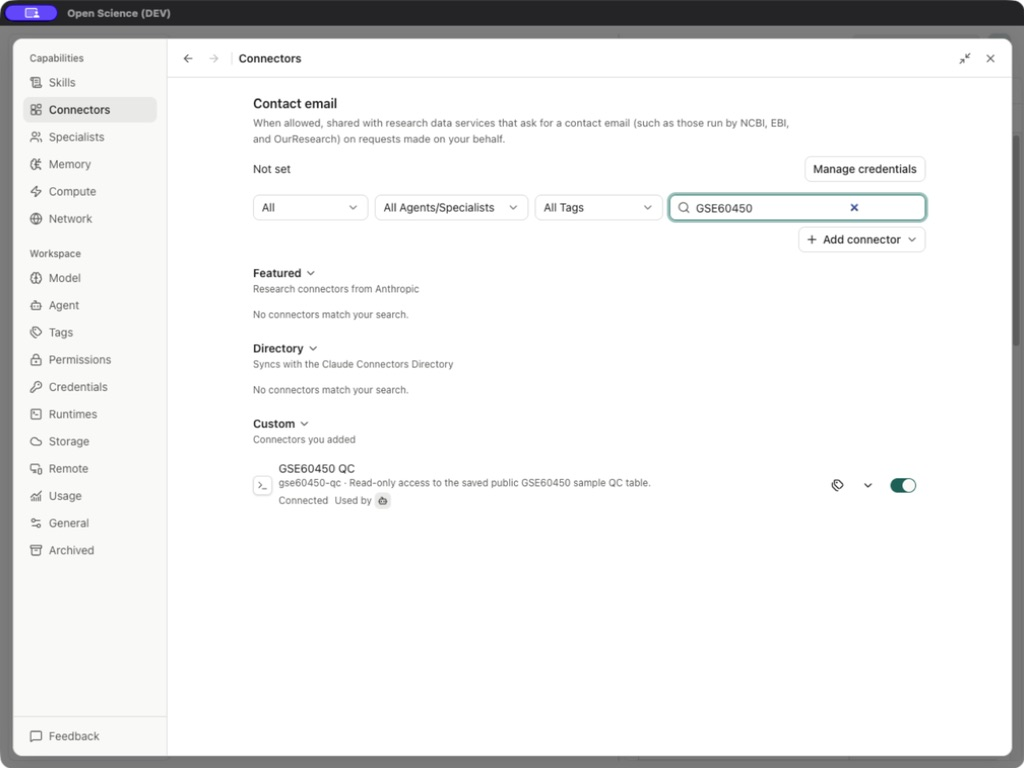
The local examples include real GSE60450 RNA-seq counts, a custom read-only QC server, an aspirin molecule artifact and public sequence/structure inputs. They use English application screenshots in both language editions. Remote GPU/SSH execution and credentials unavailable on this device remain explicitly distinguished from completed local operations.
Give the agent a bounded request
Specify the source, operation and expected output. For a database query, include the identifier namespace and a small result limit. For a computation, name the input, selected language and checks. Ask for the actual error if the tool cannot run; an answer reconstructed from model memory is not a successful tool call.
A Skill supplies the method; a Specialist supplies a reusable role. Neither automatically installs software, provides credentials or makes an inaccessible file available.
Implementation reference: ConnectorsPanel.tsx, preview-support.ts.