The right AI tool depends on what you need to have in hand at the end of the day. A literature review calls for papers and comparable study details. A manuscript revision may hinge on a single citation. A lab meeting needs a figure the audience can understand and files a colleague can inspect afterward. Use the table to find your task, then compare the features of the tools that fit.
Scientific research tools at a glance
| Tool | Focus | Key capability | Typical use |
|---|---|---|---|
| AIPOCH Open-Science | Research workbench for analysis and delivery | Model choice, Skills, data connectors, and Python/R notebooks | Run an analysis, present findings, and hand off the record |
| ChatGPT Deep Research | Scoping a research question | Clarification before a multi-source investigation | A cited research brief |
| Gemini Deep Research | Research with selected sources | Source controls and an editable plan | Assigned papers plus wider searches |
| Claude Research | Following an emerging lead | Connected rounds of investigation | Exploring disagreements between sources |
| Perplexity Deep Research | Surveying a new topic | Iterative search and report synthesis | An initial reading list |
| Elicit | Literature review | Screening and structured extraction | Comparing studies across common fields |
| Consensus | Academic evidence search | Study-level summaries and follow-up | Finding papers that address a question |
| Scite | Citation context | How later work cites a finding | Checking claims before submission |
| Gemini Notebook | Reading a selected collection | Source-grounded chat and inline citations | Journal clubs and document-heavy projects |
| Kimi Deep Research | Preparing a research deliverable | Multi-turn investigation and format selection | Reports, decks, and working documents |
10 AI tools for scientific research
AIPOCH Open-Science
AIPOCH Open-Science is a configurable research workbench. Researchers can choose a model for a project, reuse an analysis method through a Skill, retrieve scientific records through connectors, and run Python or R in a session notebook. Once the analysis is complete, a Research Film can walk an audience through the findings, while a .science package gives collaborators the underlying work to inspect. Open-Science documentation
Key features
- Model choice. Connect a supported provider or a custom gateway and select the main model for a session. Teams can assign a compatible model to a particular task, such as reviewing an analysis or interpreting an image. Models and task policies
- Reusable research Skills. A Skill specifies the inputs, procedure, and checks for a method. A lab could save its gene-count matrix quality checks as a Skill and apply the same procedure to the next batch of samples. Researchers can also find and install methods through the marketplace. Skills guide · Skill marketplace
- Scientific data connectors. Connectors give the agent tools for working with external services. For example, the Omics Archives connector can retrieve a GEO series’ sample records, platform details, and supplementary-file links, helping a researcher locate the table to analyze. Connector guide
- Python and R analysis. With a compatible runtime enabled, the session notebook shows the code, output, and completion state for each run. When a colleague asks how a figure was made, the file’s provenance links its version to available execution evidence. Notebook guide
- Research Film. Generate a narrated presentation from a completed conversation branch. Review it in the player, download the HTML player for browser playback, or export an MP4 to use in a talk. Research Film guide
- Research packages. Choose which session records and files to hand over. Recipients can inspect an imported record and create a writable copy if they want to continue the analysis. Research package guide
Best suited to
- Researchers who want database queries, Python or R analysis, and output inspection in one project.
- Labs that want to use an existing model provider and reuse the same methods across projects.
- Teams preparing a lab presentation and handing the figures and underlying records to a collaborator.
How to use AIPOCH Open-Science
Step 1. Enter the research question. Open a research session and describe the sources and deliverable you have in mind. Here is the original prompt from the public NHANES example. Select Research brief and reproducible analysis, review the plan, and run the analysis.
I'd like to understand how physical activity is associated with diabetes among US adults using public NHANES data. Could you help me investigate how the picture changes when the survey design and relevant participant characteristics are taken into account, and explain what the data can and cannot tell us?
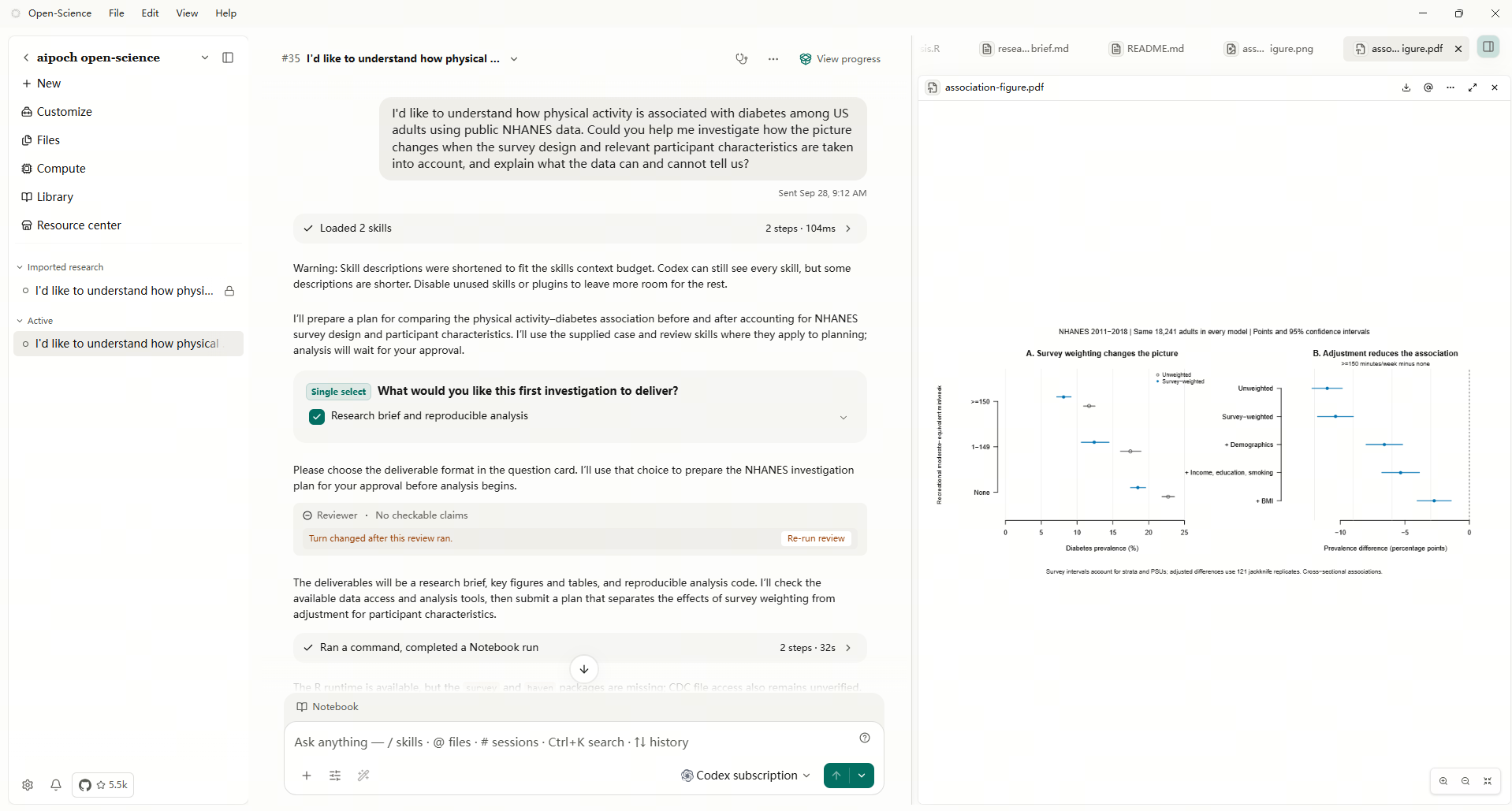
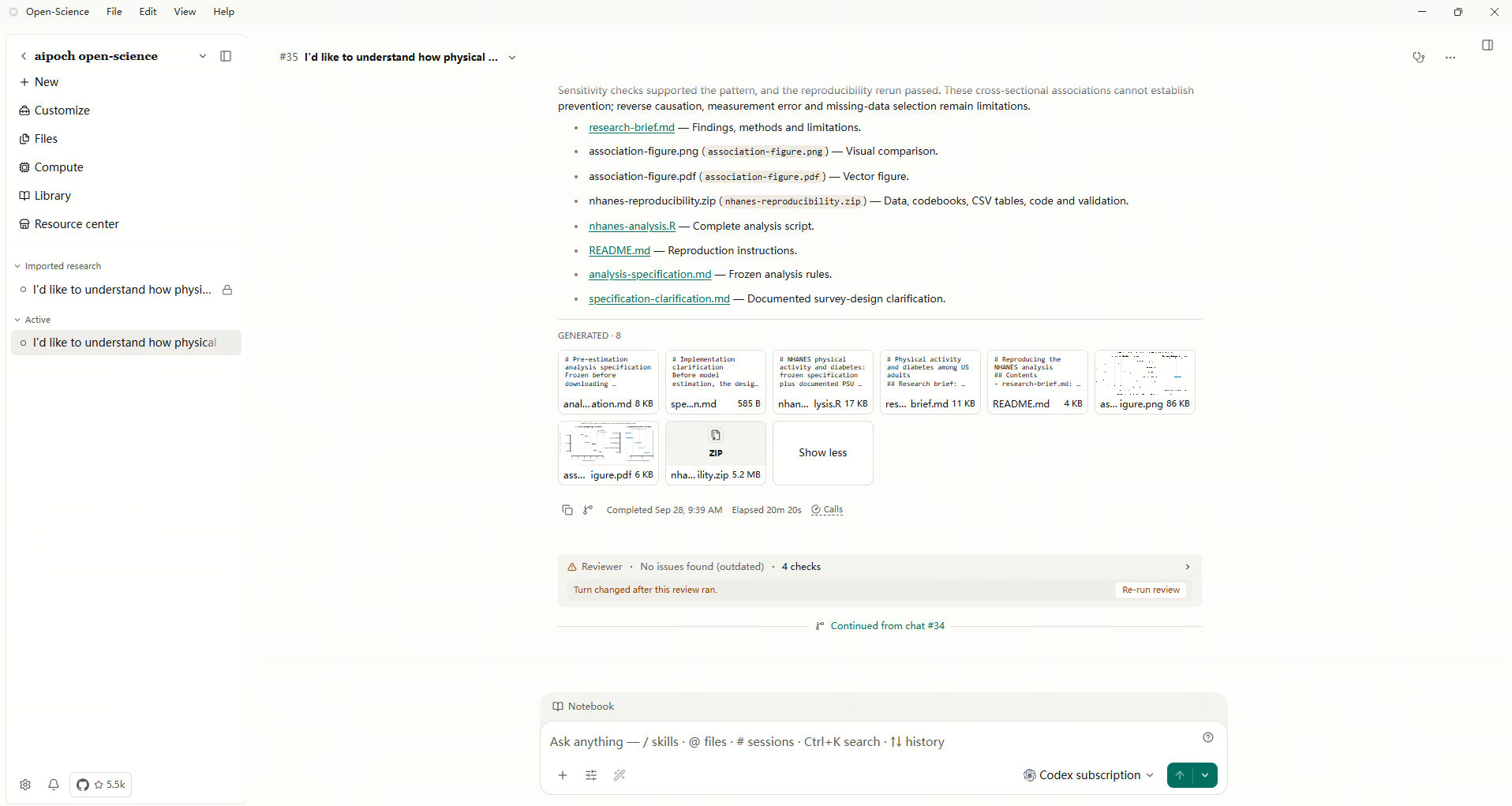
Step 2. Preview the outputs. Open the brief or figure from the generated files. To see how the figure was produced, open the R script from the same session. For a handoff, keep the README alongside the files your colleague will need.
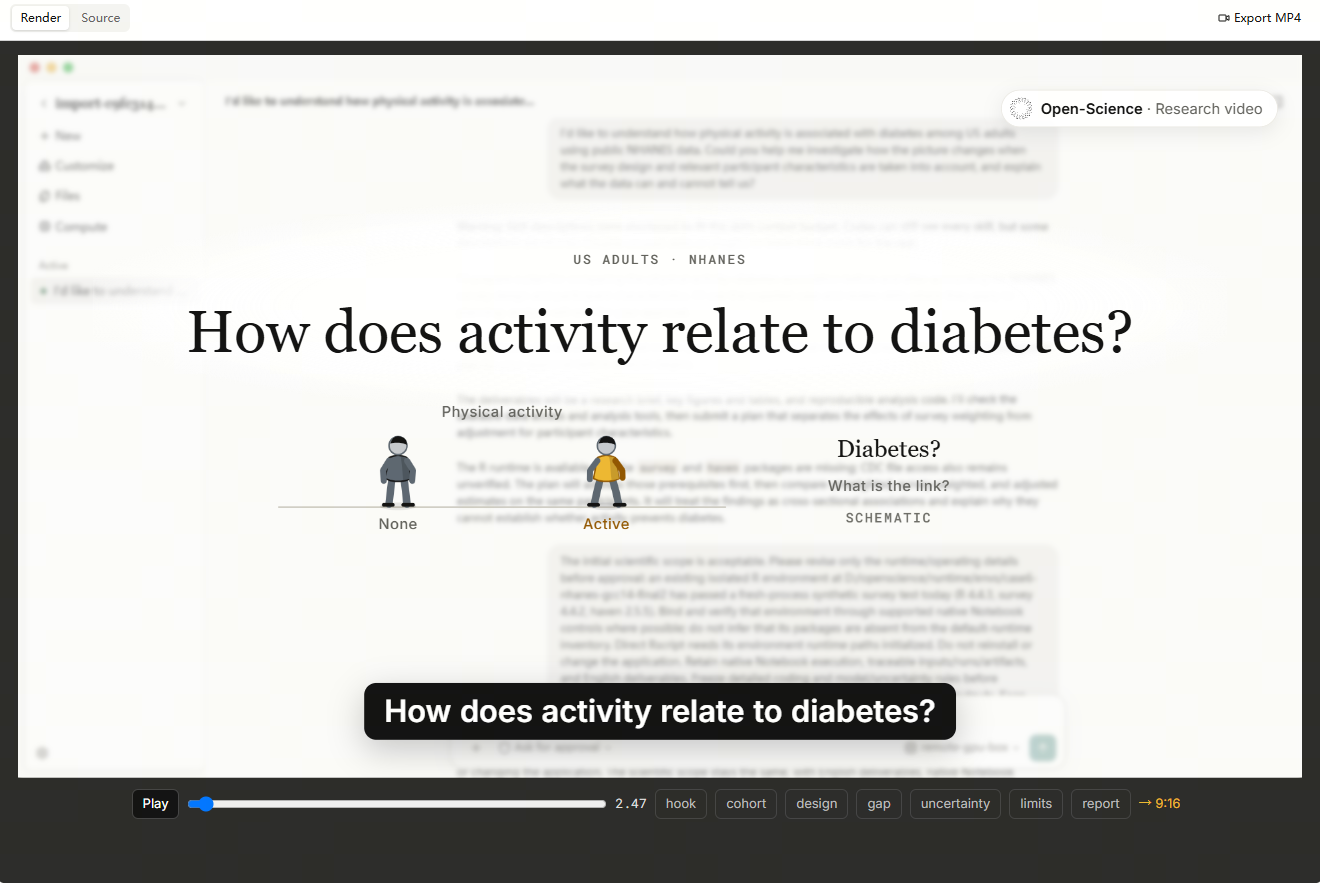
Step 3. Play the film and export the package. Select Generate research film on the completed conversation branch. Open the player to check the visuals, narration, and captions. Export an MP4 from the preview if you need an offline copy for the meeting.
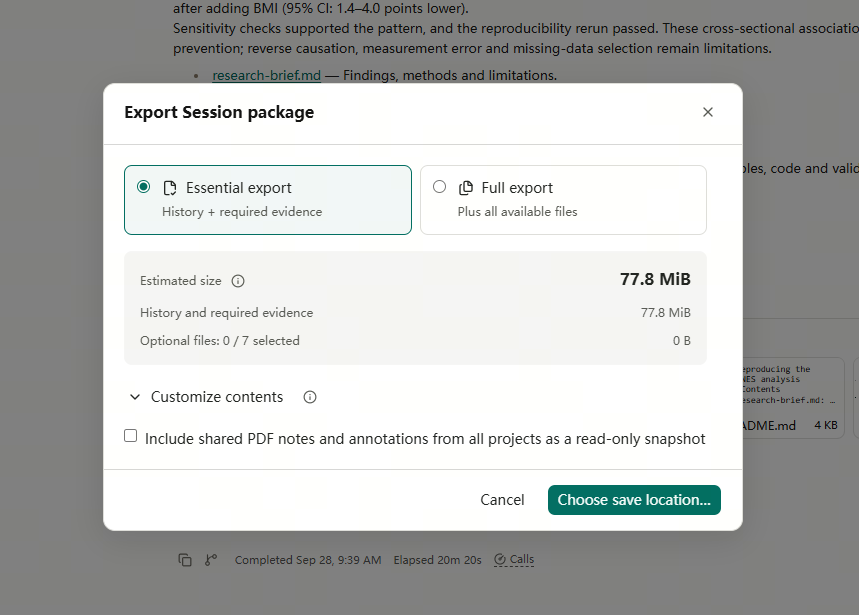
To share the underlying work, open Export Session package. Choose Essential export for the history and required evidence, or review the full and custom options for additional files. Check the selection, then choose a save location. Open the NHANES example and download the research package
ChatGPT Deep Research
ChatGPT Deep Research is OpenAI’s research tool for investigating questions across sources and producing a documented report. It is useful when you know what decision a review should inform but have not settled on the comparison. A question about a measurement method, for instance, may require different sources depending on whether the audience wants an introduction or evidence for adopting it. OpenAI guide
Key features
- Clarifying questions. ChatGPT can ask about your goals and constraints before it starts researching. Use that exchange to specify the population, the comparison, and which kinds of study belong in the answer.
- A defined deliverable. Ask for an evidence table, a structured brief, or a comparison organized by method. Specifying the desired fields up front gives you a practical way to check whether the investigation answered the question.
- Traceable findings. Use the report’s citations to follow an important claim back to its source. For a numerical comparison, check what was measured and in whom before carrying the number into a manuscript.
Best suited to
- Researchers framing a new interdisciplinary question.
- Teams commissioning a brief with explicit inclusion criteria.
- Writers who need a report with references they can inspect.
Gemini Deep Research
Gemini Deep Research is Google’s research-report tool. It brings a useful control to the beginning of a review: you can decide whether this round should use the open web, selected materials, or a combination. That matters when a supervisor has assigned a reading list and wants its findings distinguished from evidence gathered afterward. Google guide
Key features
- Source selection. Google Search is included by default and can be deselected. Available inputs include uploaded files and supported Google materials. Drive and Gmail depend on having the appropriate Workspace connection.
- Plan editing. Gemini proposes a plan before the report runs. Add required sources, specify the comparisons you need, and correct a question that has drifted beyond the assignment.
- Repeatable reading tasks. Run one pass over the assigned sources, then bring in web material for a follow-up question. Keep the two reports so you can explain which additional evidence changed your interpretation.
Best suited to
- Research groups working from a prescribed reading list.
- Reviewers combining approved project materials and public sources.
- Researchers who want to inspect the plan before the search begins.
Claude Research
Claude Research is Anthropic’s research mode for investigating a question through successive searches. A finding in one round can determine what Claude examines next. That makes it useful for exploratory work where the most informative follow-up is difficult to predict before reading the first sources. Anthropic guide
Key features
- Iterative investigation. Start with a specific disagreement between two papers and ask Claude to find their definitions. The next search can follow a difference in measurement or study population that emerges from those passages.
- Connected material. On the web or desktop, Claude can use connected tools enabled for the conversation alongside web search. If a particular project document matters, check that the resulting answer actually cites it.
- Cited answers. Follow the sources behind each explanation. A citation can establish that two studies used different instruments while leaving open whether that difference caused the results to diverge.
Best suited to
- Researchers exploring a question with several plausible explanations.
- Teams investigating public and authorized workspace material together.
- Readers who want leads for the next search. Research started on mobile is web-only.
Perplexity Deep Research
Perplexity Deep Research is a search-based research tool that gathers material, refines its investigation, and organizes the results into a report. Its launch announcement describes how the system moves between searching and reading as the question develops. A useful first assignment is to identify a field’s terminology and the original papers behind it. Perplexity announcement
Key features
- Broad discovery. Ask for competing definitions, measurement approaches, and representative primary studies. This gives you useful search terms even when the first phrase you tried belongs to only one part of the field.
- Report synthesis. Specify a structure that helps with the next task. A table of concepts, definitions, and original publications makes a better reading queue than a list of general links.
- Source follow-up. Trace an important number through the report to the original publication. Several articles may report the same study, so keep one primary record when building your bibliography.
Best suited to
- Researchers entering an unfamiliar field.
- Students assembling a first reading list.
- Writers locating the papers behind frequently repeated claims.
Elicit
Elicit is a scientific research tool for finding studies, screening papers, and extracting information into comparable fields. It is a good fit when a review has reached the stage where every paper needs to answer the same questions: who was included, how an outcome was measured, and what the authors reported. Elicit product overview
Key features
- Semantic paper search. Start with a research question even if you do not yet know the vocabulary every author uses. Inspect the search results and refine the question when neighboring topics begin to dominate.
- Screening and extraction. Use consistent criteria across a candidate set, then organize extracted details into a table. Verify ambiguous cells against the paper, especially when an outcome is defined in the methods but reported under a shorter name in a table.
- Customizable reports. Choose which papers and information to cover, and keep relevant sources in the library for later work. A saved set can serve as a starting point when a colleague asks a related question.
Best suited to
- Teams screening studies for a review.
- Researchers comparing methods or outcomes across papers.
- Review leads who need an extraction table that another person can audit.
Consensus
Consensus is an AI academic search engine focused on peer-reviewed literature. It is useful when you can phrase a question clearly and want to see which scientific papers address it. The practical value is being able to move from a short synthesis to a particular study and examine how closely that study matches the population or outcome you care about. Consensus
Key features
- Research-focused search. Use a focused question to find relevant studies, then inspect the source papers before deciding which ones belong in your review.
- Study snapshots. Use information about findings and methods to identify papers worth reading in full. Two papers answering a similar question can differ considerably in study design.
- Questions about a paper. Use the paper-level conversation to investigate a detail such as the outcome definition. For a yes-or-no question, the Consensus Meter can orient the reader to agreement across results; the methods still determine how much weight to give each study.
Best suited to
- Researchers looking for evidence on a specific question.
- Students learning to compare study designs.
- Readers deciding which papers warrant full-text review.
Scite
Scite is a research search and citation-analysis service that lets you examine how a publication is discussed in later work. It is particularly helpful when a manuscript hinges on a widely cited claim. Citation counts alone say little about why authors referred to a paper. Reading the surrounding text helps explain whether later research supports, disputes, or simply references the finding. Scite
Key features
- Citation context. Find where later publications discuss an earlier result and read the relevant passage. Check whether the citing author addresses the finding you intend to cite or another part of the paper.
- Full-text search and assistance. Search for language used inside research papers and use the assistant to explore a question grounded in the literature. This can surface discussions that would be easy to miss when reading titles alone.
- Collections and integrations. Organize papers for follow-up. Scite also lists integrations for Zotero and browser use, useful for researchers who want citation information while reviewing an existing bibliography.
Best suited to
- Manuscript authors checking a consequential claim.
- Reviewers looking for subsequent supporting or conflicting work.
- Research groups monitoring a small set of influential papers.
Gemini Notebook
Gemini Notebook is Google’s AI research notebook for working with a collection of sources. It suits a different starting point from an open-ended research report: you have already chosen the papers, slides, or recordings and want help navigating them. The notebook can answer questions using the selected material and point back to the passages behind an answer. Google notebook guide
Key features
- Mixed source formats. Bring together PDFs, websites, slides, documents, or supported audio and video sources. Give files clear names so participants can recognize the source when a citation appears.
- Grounded questions. Ask how two authors define the same concept and follow the inline citations. If a method is described only in a supplement, include that supplement before expecting a complete answer.
- Study materials. Turn the collection into a briefing, study guide, mind map, or audio overview. For a journal club, a short briefing can orient participants before they read the selected papers themselves.
Best suited to
- Journal clubs reading the same source set.
- Students revising from approved course materials.
- Researchers organizing a document collection for repeated questions.
Kimi Deep Research
Kimi Deep Research is a research agent that takes a question and optional uploaded files and develops a sourced report. It is relevant when the audience already knows what form the result should take. The same investigation might need a document for reviewers and a presentation for a meeting, with a follow-up question addressed before either version is circulated. Kimi feature guide
Key features
- File-informed investigation. Provide the question and reference materials together. Explain which documents set the scope and which are background, so a reader can later check how they contributed to the report.
- Multi-turn refinement. Follow up within the research session to explore an overlooked finding or change the angle of the investigation. Keep track of which sources support the revised answer.
- Choice of deliverables. Kimi describes support for reports and formats including Word, PowerPoint, Excel, PDF, and interactive HTML. Choose the format your collaborators will actually edit or present, then review citations in that deliverable.
Best suited to
- Teams preparing a report for a meeting or review.
- Researchers who expect several rounds of questions.
- Authors who need a research deliverable in a particular format.
How to choose an AI tool for scientific research
- Name the deliverable first. For a reading list, compare Perplexity and Consensus. For a review with the same fields extracted from every study, start with Elicit. If the job involves connecting to a data source, running your own analysis, and handing over the result, look at AIPOCH Open-Science.
- Set the source boundary. A supervisor might ask for a synthesis of eight assigned papers. Check whether you can restrict the source set, add missing supplements, and follow answers back to those papers. If the assignment is to find what an existing bibliography missed, prioritize discovery and citation context instead.
- Try one real task in two tools. Give both assistants the same question and source constraints. Open the reference behind a consequential claim. Record the time you spend correcting extracted fields, locating missing evidence, and preparing something a colleague could use. The fastest first answer may require the most work at the end.
- Check the account you will use. If adoption depends on a connector, export format, or the ability to run several investigations at once, test that requirement in the intended workspace. A successful search of public material tells you little about whether an assistant can access an authorized project document.
Where AI tools help in a research workflow
Deciding what deserves a full read. A first pass can give you vocabulary, candidate papers, and a few promising leads. Open a review for orientation and then follow its references to original studies. Several articles repeating one finding should contribute a single primary record to your reading queue.
Making studies easier to compare. Put the population, outcome definition, measurement method, and follow-up period into the same columns for each paper. An empty field can be informative: it tells a reviewer where to look in the methods or supplement before treating two results as comparable.
Handing work to the next person. A presentation and an inspectable analysis serve different readers. Play the film once on the device you will use for the meeting. Afterward, ask a colleague to open the research materials and locate the input behind the figure. That short exercise tests whether the handoff contains enough context to be useful.
Conclusion
Start with the work you need to do: discover papers, check an individual claim, or turn data into an analysis someone else can inspect. For a project that brings together data access, reusable methods, code execution, and a presentation, the AIPOCH Open-Science example shows how a research question becomes an inspectable set of outputs. Explore the public research session
FAQ
Which AI research tool lets me check how a figure was produced?
AIPOCH Open-Science is a good choice when you need to inspect the calculation behind a figure. Open the relevant run in the session notebook to see the code that executed, its output, and its completion status. If you already have the saved figure, open its Provenance view to find the execution evidence associated with that file version. Notebook and execution guide
How can my lab reuse the same quality checks for each new dataset?
Use a Skill in AIPOCH Open-Science to capture the procedure. From a completed research branch, choose Save as skill and specify the inputs, steps, and output checks. For the next batch, use the same Skill and check that the new data meet its input requirements. This also gives a new lab member a concrete record of which checks the team applies. Skills guide
What should I share if my audience wants a presentation and my collaborator wants the analysis?
Use AIPOCH Open-Science to prepare both from the completed session. Play a Research Film at the meeting to walk the audience through the question and findings. Send a .science package afterward so a collaborator can import the read-only record and inspect the file version behind a figure. They can fork the record if they need to extend the analysis. Research Film guide · Research package guide
Which tool should I try first for a literature search?
Choose Consensus when you have a focused question for the scientific literature. Try Perplexity when you still need terminology and a broad reading list. Once you know your screening criteria and need comparable data from each study, evaluate Elicit for the next stage.
How should I check a citation suggested by AI?
Open the original paper and verify that the population, outcome, and result support the sentence you intend to write. If you want to know how later work treated that finding, use Scite to find the citation context, then read the relevant passage in the citing paper.