.science research packages
A .science research package brings conversation branches, files and recorded evidence together for a handover. A colleague can import it into a project and inspect the research record. Imported sessions are read-only. From v0.31.0, use Fork in the desktop app to create a writable copy and continue the research.
Choose what to share
| What the recipient needs | Export to use |
|---|---|
| Read or edit the conversation text | Conversation PDF or Markdown. |
| Use selected original files | File downloads or an artifact ZIP. |
| Inspect the conversation branches, files and evidence together | A .science research package. |
A package can contain uploaded research materials, conversation text and generated results. Review its contents before sharing. It is an independent copy: deleting local work does not remove packages already sent to others.
Side Chat conversations, private reading bookmarks and their notes are excluded from the package. Put information the recipient needs into a saved report or the conversation before exporting.
Check the recipient’s version
Packages exported by v0.33.0 include RO-Crate 1.1 metadata in ro-crate-metadata.json. It describes the final exported snapshot and selected immutable files, including filenames, media types and their relationships. Re-export rebuilds those references for the new snapshot.
Use v0.33.0 or a later compatible reader to open these new exports: they declare the required ro-crate capability. Update an older receiving app before importing; renaming or removing the metadata is not a compatibility fix. Existing older packages remain readable without migration.
This metadata travels inside the .science package. It does not rerun calculations, grant credentials or replace the reproducibility checks on an artifact version.
Export a research package
- Finish or stop work in the session. Open its menu and choose Export → Export Session package.
- Review the export scope and any omitted contents or size limits.
- Confirm the export and save the
.sciencefile to the intended folder. - Follow progress until it completes, then use Show in folder to locate the file.
| Export option | How to choose |
|---|---|
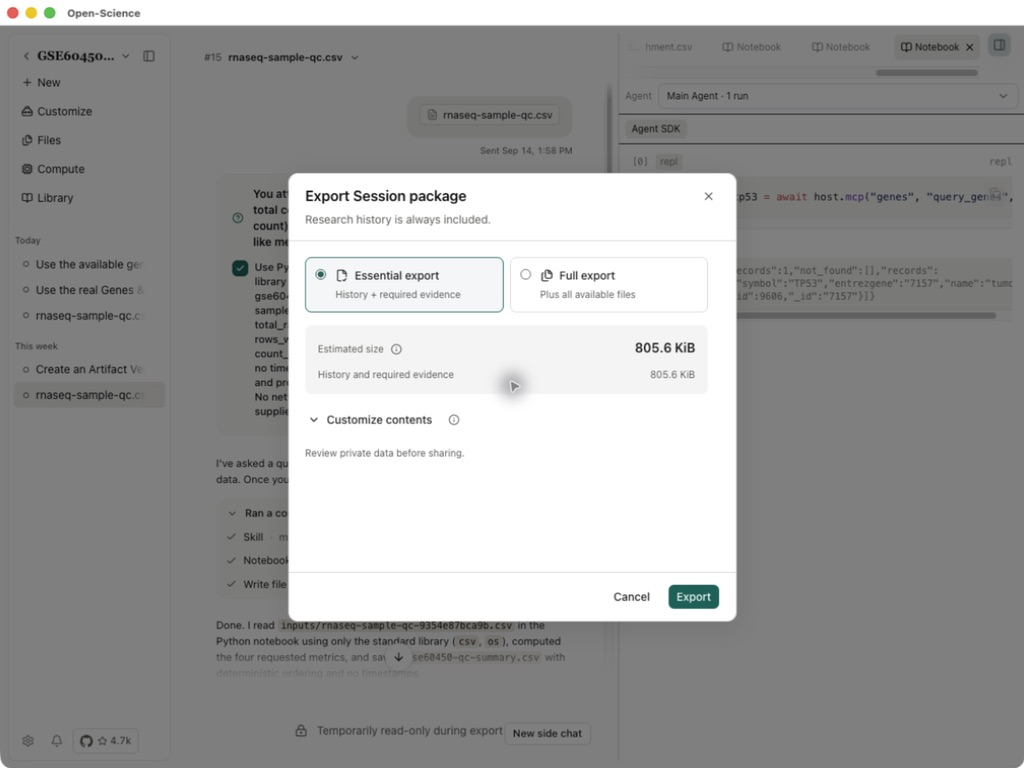
| Essential export | Keep the essential record and literature metadata; omit optional literature PDFs. |
| Full export | Include available literature PDFs and the additional contents shown in the preview. |
| Customize contents | Select individual literature PDFs, optional files and versions; required evidence remains included. |
Literature metadata is always included. If a literature PDF is required evidence, Essential export is unavailable; use Full export or Customize contents and retain the required file. The exporter does not retrieve missing full texts. Check the listed PDFs and size before confirming; Full export does not remove every size or content limit.
Worked example Hand over a sample QC session
This example in Open-Science v0.31.1 exports a session that summarizes the GSE60450 sample QC table, imports it into another project on the same Mac, and continues from a Fork using Codex subscription. Start with the completed session containing gse60450-qc-summary.csv; the input table alone is not the research package.
Choose Essential export, check the contents and estimated size, then Export. This session's preview estimated 805.6 KiB. Wait for Package operation completed before importing the saved file; your session's size will differ.
Import into a project
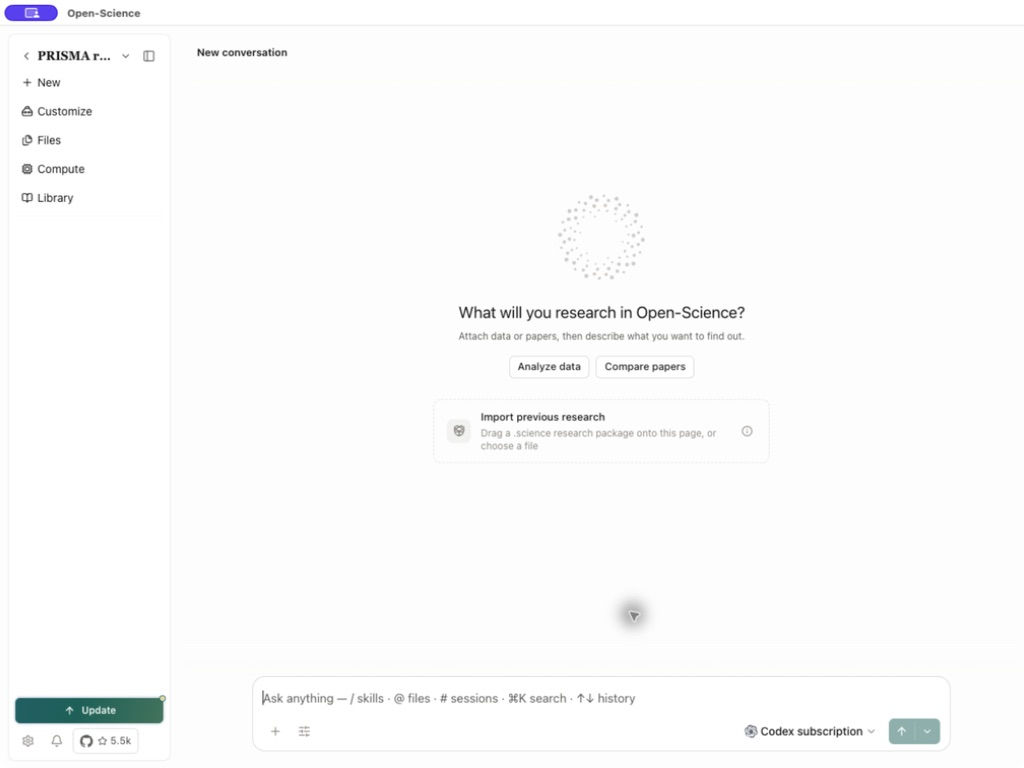
On a project's empty New conversation page, choose Import previous research and select a .science file, or drag the file onto that page. Attaching a file to an existing conversation is not the research-package import flow. Review the target project and contents in the import preview, confirm, and wait for completion before opening the read-only record.
- Open the destination Project menu and choose Import Session package…, or drop one
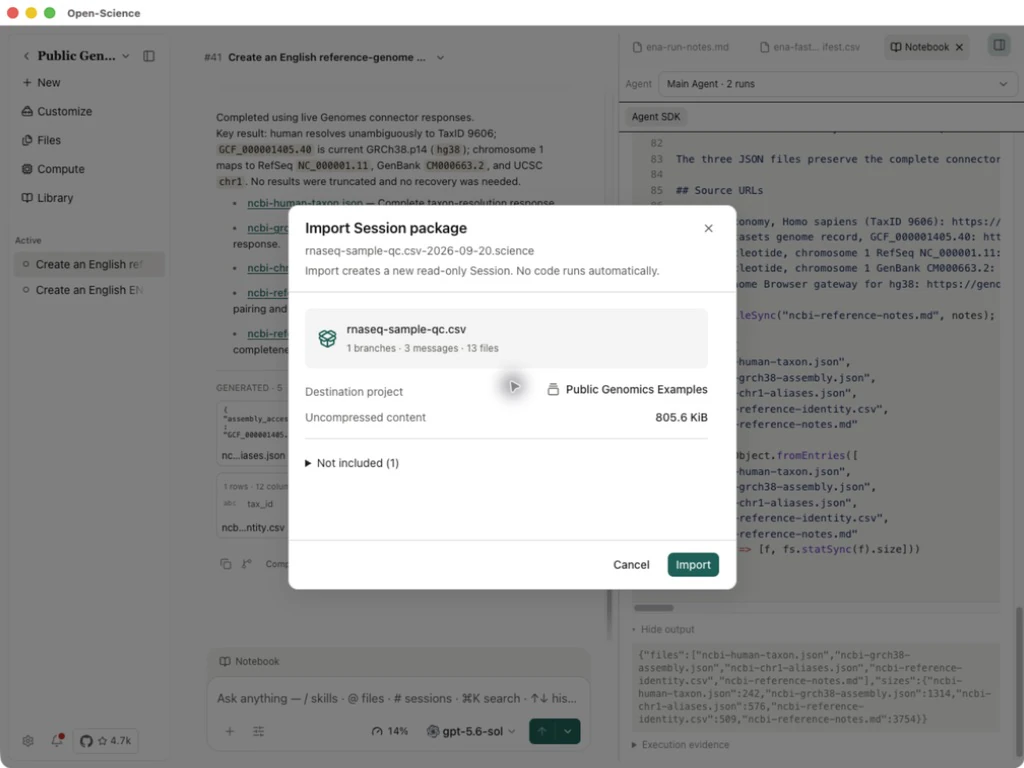
.sciencefile into that project. Opening an associated file directly asks you to choose the destination project. - Review the package preview, destination and included or omitted contents, then confirm import.
- Wait for completion and choose Open imported Session.
- Inspect the conversation branches and open the files needed for the handover. Check that you can find the inputs and results relevant to your next task.
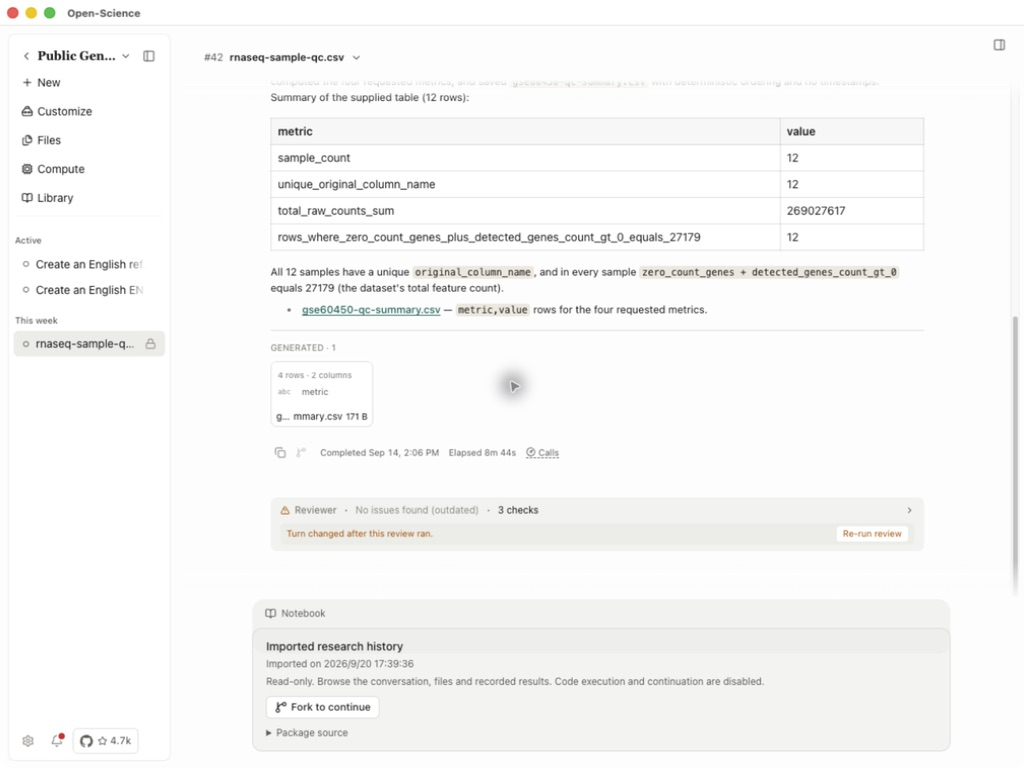
For this example, select the destination project Public Genomics Examples. The import preview lists 1 branch, 3 messages and 13 files. It also says account credentials, permission grants and provider continuation identities are excluded. Check those details before selecting Import.
Open the imported session and its summary CSV. The Imported research history notice confirms that this copy is read-only and cannot execute code or continue a conversation directly.
Use the received research record
- Select Fork to continue in the imported session, or Fork from its session menu. Wait for Fork completed and open the new session. Code does not run automatically.
- Inspect the inherited summary, choose an available model and confirm a Python runtime is ready. This example used Codex subscription / gpt-5.6-sol. Imported credentials and permissions do not provide authorization on the receiving installation.
- Send the following prompt. If a Python approval appears, inspect the requested calculation and approve it to continue.
Use Python in Session Notebook with the standard library only.
Read the inherited gse60450-qc-summary.csv. Do not modify inherited files.
Compute total_raw_counts_sum divided by sample_count using decimal.Decimal
with precision 28. Save research-package-continuation.csv with metric,value
rows in this order: sample_count, total_raw_counts_sum,
mean_raw_counts_per_sample. Save research-package-continuation.md with the
input filename, calculation and result. Do not use the network or delegate.
Keep everything in English and return links to both new files.
- Open both new files. This run returned 12 samples, a total raw count of 269027617, and a mean of 22418968.08333333333333333333. The mean summarizes the supplied QC table; it is not normalized expression or a differential-expression result.
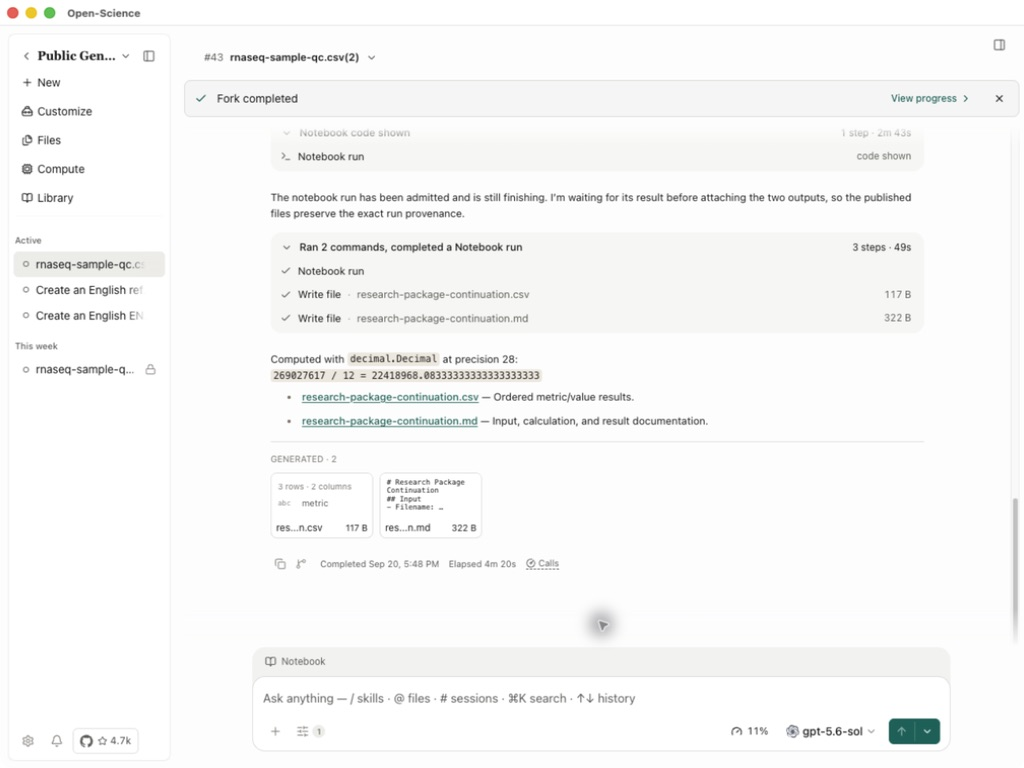
Inherited summary · New calculation · Calculation notes
The two new files are saved in the Fork; the source and imported summary remain unchanged. See Fork an existing session for general usage. Imported usage is excluded from local activity totals.
A received verification record describes checks supplied by the sender. It does not mean this computer has rerun them. Read the file version, comparison criteria and outcome; see Reproducibility for how those checks work.
Adjust transfer speed and follow background progress
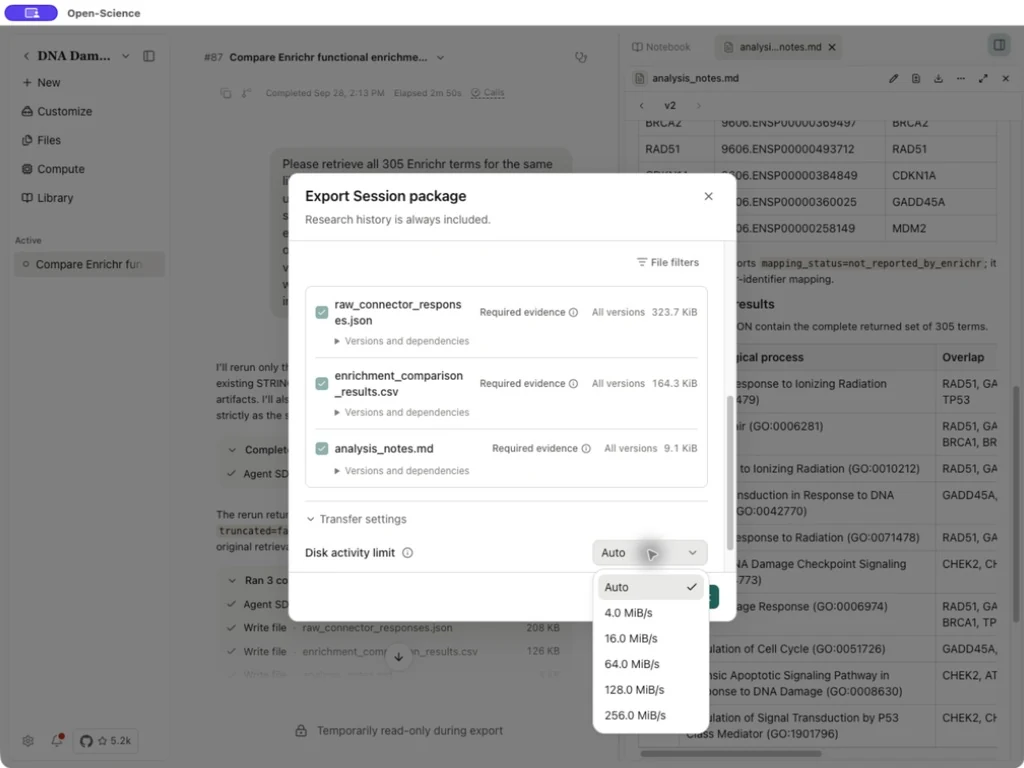
Before exporting, choose Customize contents → Transfer settings. During an export or import, expand Transfer details. Set Disk activity limit to Auto for automatic adjustment or choose a fixed limit. Lower limits reduce disk activity and take longer. Reads and writes share this limit; it is not an Internet upload speed.
Choose Run in background to continue the operation with the dialog hidden. Reopen details from the background progress entry in the window to inspect the current file, progress and disk activity. Wait for completion before checking the exported file or opening the imported session.
When the export flags sensitive content
If export stops at the sensitive-content check, expand Sensitive-content evidence and inspect the flagged files. Remove credentials or private material from the source, then start a new export when they should not be shared.
If the flagged material is intentionally part of an authorized handover, the failed export offers I understand the risk and want to export anyway, followed by Export anyway. This includes flagged content without redaction; it is not a privacy filter. The acknowledgment belongs to that export attempt and must be selected again after a failure. Review the resulting package before sharing it. For troubleshooting evidence instead, use Export diagnostics.
Cancel or retry a transfer
Run in background hides the progress window while the transfer continues. Use Cancel to stop; hiding the window does not cancel the operation.
If cleanup is incomplete, use Retry cleanup before trying again. After a failure, Try again retries the same file and destination. Choose another package separately if that is your intent. Check the existing operation before starting a second import, then inspect the imported session and files when it completes.
Replay a received research record
After import completes, choose View replay to inspect the recorded steps or Discuss to ask about them in a writable conversation. The imported source remains read-only. A discussion reference does not recreate its original runtime; use Fork to continue for a working copy. See Session replay.
Import into a new project
If an older version fails while adopting a package into a new project's catalog, update to v0.37.0 or later, inspect whether the destination already exists, and use the import dialog's recovery action before starting another import. Check the resulting session and files. The fix does not make imported sessions writable: use Fork to continue analysis.
Import a package from a website
Use an installed desktop app on the same computer as the browser. The website must offer Open-Science package transfer; an ordinary download link alone does not provide it.
- On a trusted package page, select its Open-Science import/open action. Allow the browser to open the desktop app. If asked for local-network access, grant it only to the site you intend to use.
- Keep the page open while the app shows Receiving package… and Validating package…. A website receipt message only confirms delivery to the app.
- In the app, review the package, select the destination project and confirm the import. Wait for completion, then open the imported session.
- Inspect its files and evidence. The research record remains read-only; use Fork to continue for new research. Editing its title does not make the imported research writable.
If handoff is unavailable or blocked, download the .science file and use the existing import control. You can also drop it onto the project home. A normal folder drop into the Composer does not import a package. If an import reports a partial failure, check the destination for an existing session before retrying; do not create another project just to repeat the same transfer.
For website authors, the browser-import SDK guide requires HTTPS (or a loopback development origin), a same-computer desktop handoff and a nonempty package no larger than 2 GiB. Local receipt never replaces the user's final import confirmation.
Use packages from the CLI or local web app
From v1.0.5, the authenticated local Web workspace uses browser upload and download controls for .science packages. Remote web sessions do not gain this capability. The website-to-desktop handoff remains a separate flow.
Upload or download in local Web
- Open the intended local workspace. Wait until the source session is idle, then choose Export → Export Session package from its menu. Select the package contents and choose Choose save location… to prepare the package.
- Wait for the package to finish preparing. Select Download beside the completed package filename, then save it through the browser. A prepared backend package is not yet a saved browser download; check the downloaded
.sciencefile before sharing it. - For import, use the project's package import control and select a
.sciencefile from your computer. Wait for upload and validation, review the package and destination project, then confirm the import. - Open the imported session and inspect its files. The research record is read-only. To continue it, open the same workspace in the desktop app and choose Fork to continue; Fork is not available in Web.
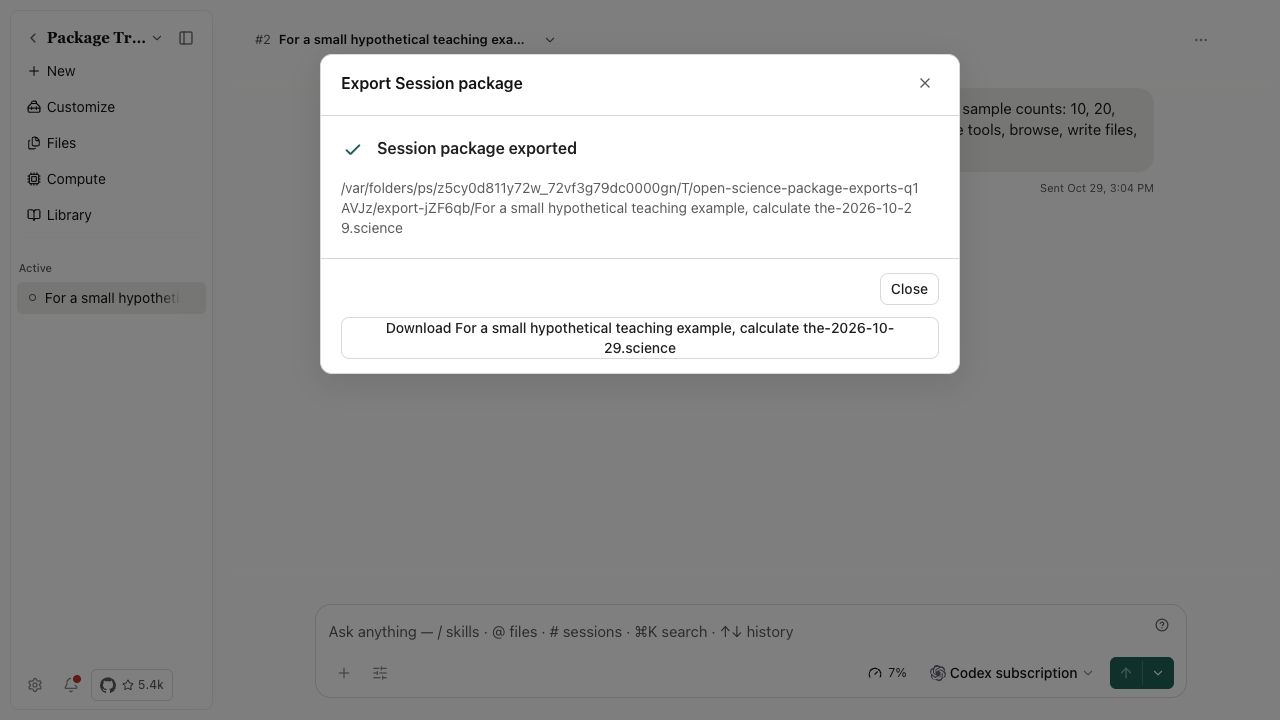
If upload, download or import fails, inspect the displayed result and destination before retrying. Do not treat a received file or successful upload as a completed import.
Use the CLI
Start the intended local profile first and wait until the source session is idle. Replace these IDs and paths with your own:
open-science session export SESSION_ID --project PROJECT_ID --output ./session.science --json
Export requires an explicit .science output path. The default deadline is one hour; use --timeout-ms for a large transfer and check the returned file path. In v1.0.5, use the local Web upload or desktop import control to import a local file. The CLI session import path can be rejected before package validation.
Start from a home-page research case
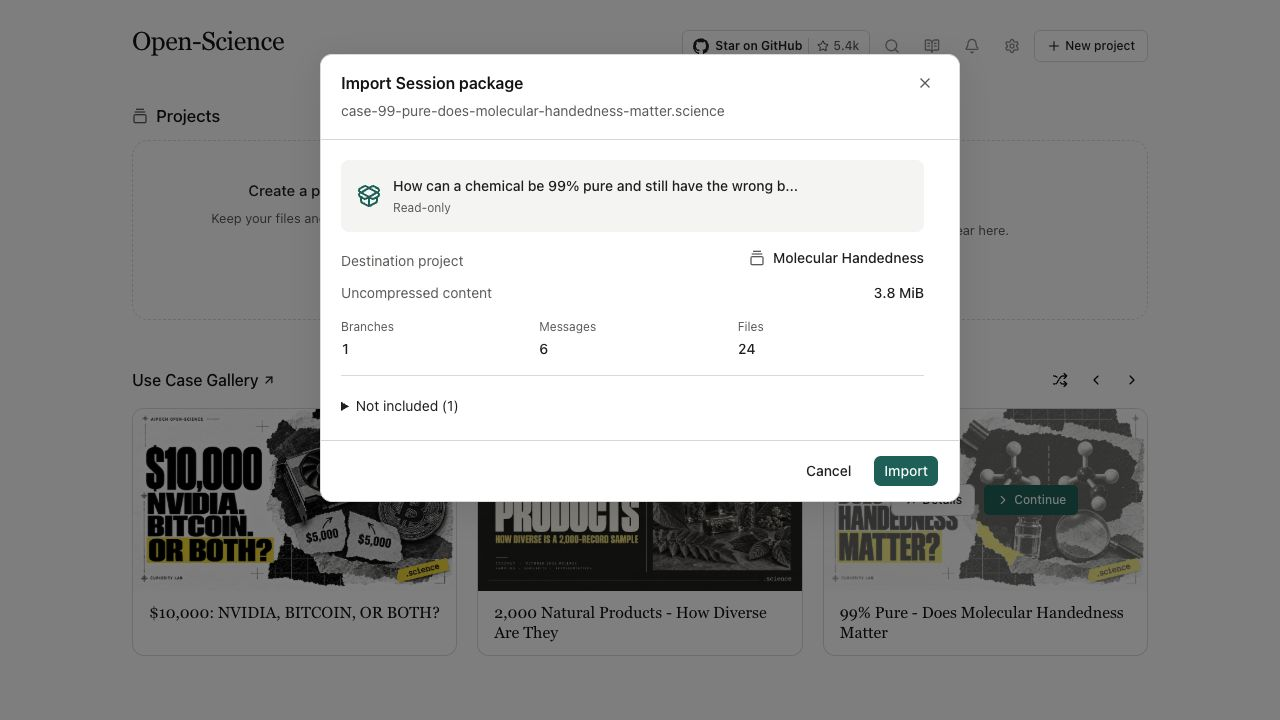
On the home page, choose Details on a case card to read its official case page. Choose Import to download its research package. Follow preparation, download and verification progress; Cancel stops an unwanted transfer. If the package is waiting for a destination, Continue reopens the import dialog.
Review the destination project and confirm import. Open the result, inspect the inputs and outputs, then use Fork to continue in the desktop app for your own question. Download verification checks the package transfer; it does not validate the case's scientific conclusions or supply its model credentials.