Connect a custom MCP tool
Worked example Query a public QC table through a local MCP server
This example exposes an existing public RNA-seq QC table through a small local MCP server. It reads a fixed CSV and offers two operations; it does not query the network, install packages or modify the dataset.
Download the actual example
Save both files locally and note their full paths. The server uses Python's standard library. It reads the selected CSV at startup, so restart/reconnect it deliberately if you replace that input.
Add it in Open-Science
- Open Settings → Connectors → Add connector → Local command.
- Set Display name to
GSE60450 QC. - Choose python3 — script file as Command, or Other… with the actual Python executable path on Windows.
- Open Advanced settings. Set the connector name/ID to
gse60450-qcand describe it as read-only access to the saved QC table. - In Arguments, put the script's absolute path on the first line and the CSV's absolute path on the second. Each line is a single argument. Do not add shell quotes around a path merely because it contains spaces.
- Leave Environment empty for this example. Review the server script, check I trust this connector, then Add.
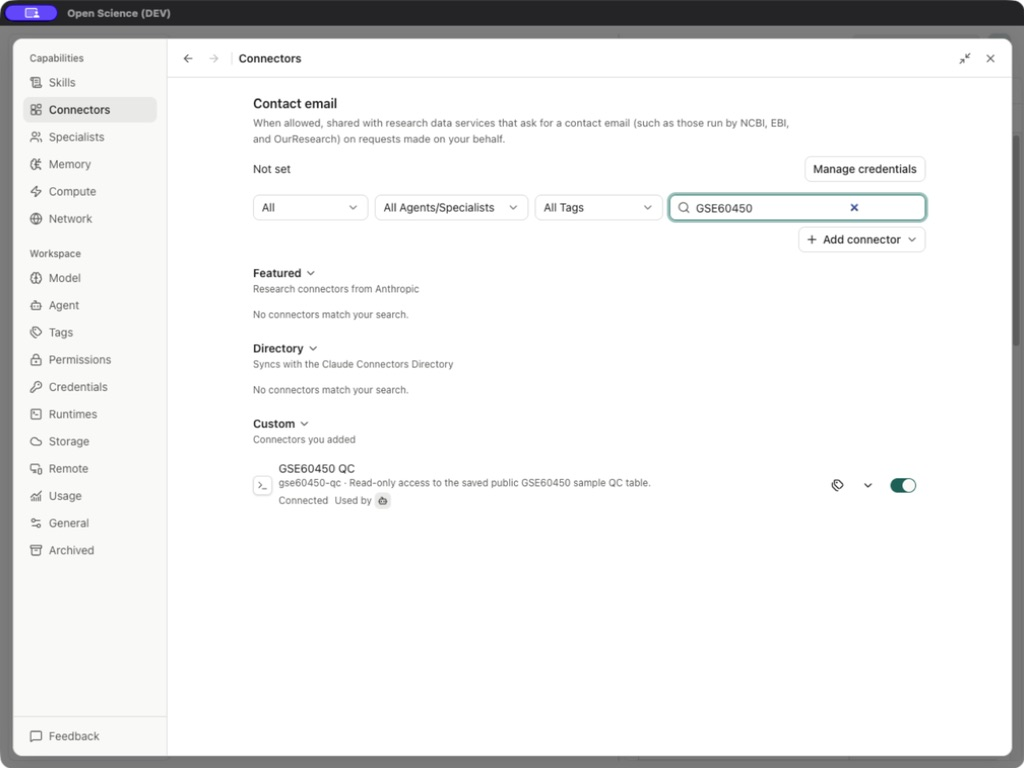
- Search
GSE60450and confirm Connected and availability to Main Agent.
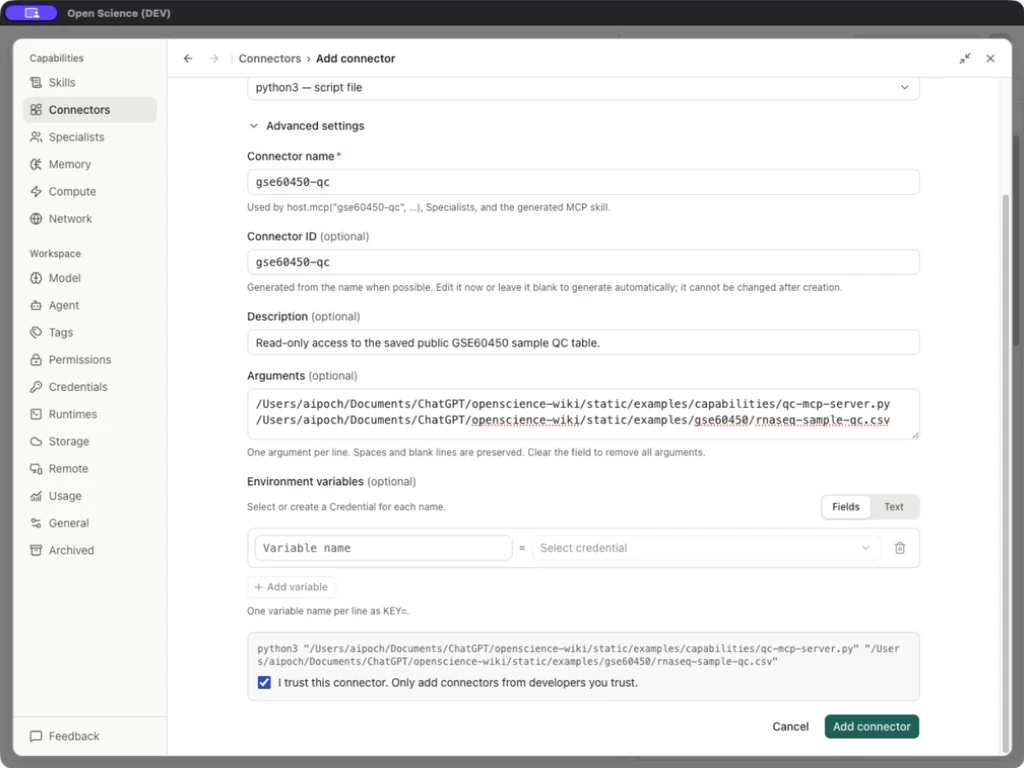
/absolute/path/qc-mcp-server.py
/absolute/path/rnaseq-sample-qc.csv
/absolute/path/qc-mcp-server.py
/absolute/path/rnaseq-sample-qc.csv
C:\Research data\mcp test\qc-mcp-server.py
C:\Research data\mcp test\rnaseq-sample-qc.csv
These two lines are a path template, not literal paths to paste unchanged. If python3 is unavailable to the app, choose Other and the actual executable path. The selected launcher must exist on this computer.
On Windows, use Other… to enter the full path to an installed python.exe; the python3 preset does not establish that the command exists. Confirm the interpreter path in Runtimes. Keep the script and CSV paths on two separate Arguments lines, even when their folder names contain spaces. Do not combine the executable and arguments into one shell command.
Tool inputs and verified outputs
| Tool | Input | Actual expected content |
|---|---|---|
| get_dataset_summary | Empty object | GSE60450, source URL, input filename, 12 rows and full sample identifiers |
| get_sample_qc | sample_id string | The selected sample's four numeric QC metrics |
Ask the agent:
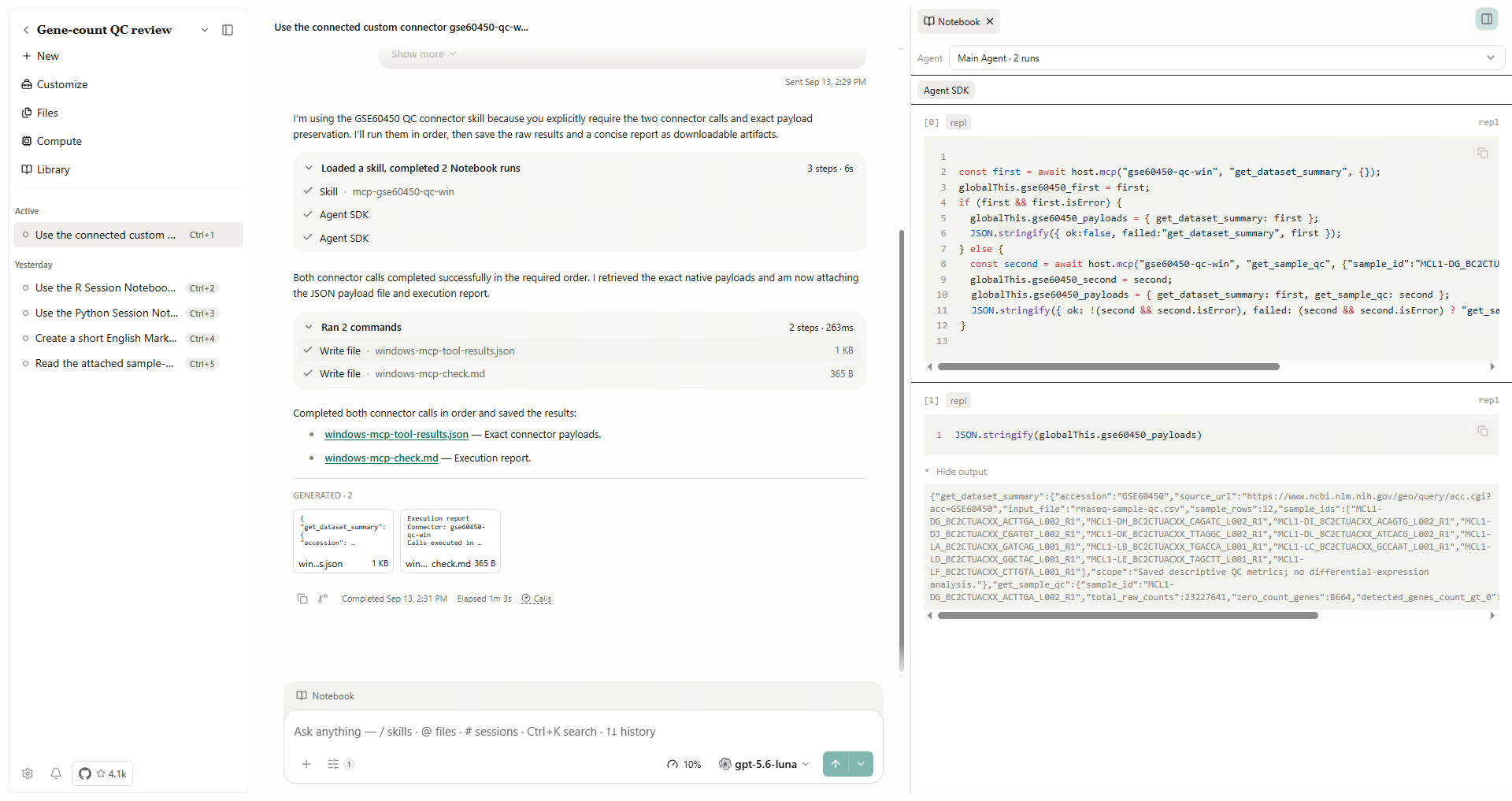
Use the connected gse60450-qc Connector. Call get_dataset_summary, then get_sample_qc for MCL1-DG_BC2CTUACXX_ACTTGA_L002_R1. Report only actual responses and preserve the CSV.
In this example, the native application returned 23,227,641 total counts, 8,664 zero-count genes, 18,515 detected genes and median 237 for that sample. The dataset-summary call returned 12 rows. These match the original saved QC table.
Open the Notebook activity for both tool calls, then reopen the saved JSON and compare its sample IDs and metrics with the CSV. The Windows run below uses the connector ID gse60450-qc-win; use your own configured ID in the request.
Inspect the server and error behavior
The server implements MCP initialize, ping, tool discovery and calls over stdio. Its two tool schemas are defined in the downloadable script. Standard output is the protocol channel; adding ordinary debug prints there can break the connection. Local diagnostics belong on standard error.
Known error mapping: an invalid sample name can surface as connector_unavailable in the app even when the custom server returns a domain-specific error. Check the server log and validate the sample identifier before reconnecting. Report persistent mismatches using Troubleshooting.
The application discovers server tools during connection. Use the discovered operation names when calling through host.mcp; protocol tools/list is not a business tool. Inspect the downloadable script for the input schema.
Export and move to another computer
Choose the row's Actions → Export, select the desired format and inspect the configuration preview. The real export warned that both argument paths were local. Save configuration exports the settings, not the Python interpreter, script or CSV. Copy those files separately, update paths, confirm local trust and repeat both successful calls.
For MCP client config, inspect mcpServers: this example exports one server with a command and two args. JSON displays escaped backslashes in Windows paths. On another computer, update all three paths to real files and retry both calls. An exported configuration does not establish that the destination computer is connected.
| Failure | Check |
|---|---|
| Command cannot start | Executable path, script path and file permissions |
| CSV cannot be read | Second argument and actual file location |
| Connected but tool unavailable | Agent assignment, current catalog and exact tool name |
| Bad input | Required sample_id and the original full identifier, not the compact plot label |
| Connector error after a failed call | Inspect server/application error details and reconnect when appropriate |
| Works in a terminal but not the app | App-visible executable/environment and protocol-only stdout |
To extend the example, define a small input schema, return source identifiers and test normal, empty and invalid inputs before exposing the tool. Keep these operations narrow enough that a user can inspect what the call will read or change.
Implementation reference: ConnectorAddForm.tsx, service.ts.
For managing the same custom MCP configuration from scripts, use Connector CLI commands or SDK methods. A successful connection test discovers tools; verify a separate bounded business call before calling the integration operational.