Scientific databases
Use this page to choose a data source, understand what it can return, and make its tools available in Open-Science. For step-by-step research examples with screenshots and output files, see Research workflows.
Supported databases
Open-Science v1.0.5 includes 48 built-in Connectors with 418 operations: 47 data-source Connectors provide 416 operations, and the offline Molecule Connector provides two. Connector names below match Settings → Connectors; each family can expose several databases. Listing a source does not mean every feature of its website is available.
The count covers all built-in entries, including disabled ones; custom MCP Connectors are additional. Connector count, underlying database count and operation count measure different things.
| Connector | Sources | Operations | Use it for |
|---|---|---|---|
Chemistry · chemistry | PubChem, ChEBI, Rhea, BindingDB, LIPID MAPS, UniChem | 14 | Small-molecule chemistry via PubChem, ChEBI, Rhea and BindingDB. |
Literature Graph · literature | OpenAlex, arXiv, Crossref, DataCite | 13 | Papers, authors, citations, DOI updates and dataset/software records. |
PubMed · pubmed | PubMed, PMC, Europe PMC, PubTator 3 | 9 | Biomedical literature via NCBI E-utilities, the PMC ID Converter and Europe PMC — search, metadata, related articles, citation lookup, ID conversion, full text and copyright. |
Genes & Ontologies · genes | HGNC, MyGene, UniProt, OLS, QuickGO, Reactome, g:Profiler, Enrichr | 20 | Gene/protein identifiers, UniProt sequence discovery, GO and Reactome annotations, and g:Profiler and Enrichr gene-set enrichment. |
Genomes · genomes | NCBI Datasets, NCBI BLAST, EMBL-EBI Job Dispatcher, Ensembl, UCSC | 22 | Genome annotation, homology and sequence; NCBI taxon/assembly/sequence identity; BLAST search and Clustal Omega multiple sequence alignment; population-specific LD and proxy variants. |
Variants · variants | gnomAD, ClinVar, dbSNP, MaveDB | 22 | Population frequencies, clinical records and assay-specific functional scores, mappings and experiments. |
Clinical Trials · clinical-trials | ClinicalTrials.gov | 7 | Trial discovery, protocols and posted outcome measurements, group denominators, statistics and adverse events. |
Clinical Genomics · clinical-genomics | ClinGen, CIViC, Open Targets, ClinPGx, DGIdb | 32 | Clinical genomics knowledge bases: ClinGen curations, CIViC clinical evidence, and the Open Targets Platform, plus ClinPGx pharmacogenomic records. |
Structures & Interactions · structures | PDB, PDBe, AlphaFold, EMDB, Complex Portal, IntAct, OmniPath | 20 | Structures and molecular interactions — PDB structures, AlphaFold predictions, EMDB cryo-EM entries, Complex Portal complexes, IntAct interaction networks. |
ChEMBL · chembl | ChEMBL | 7 | Bioactive compounds, drugs, targets, bioactivity, and mechanisms via the ChEMBL REST API. |
bioRxiv · biorxiv | bioRxiv, medRxiv, ROR | 7 | bioRxiv/medRxiv preprints — search by date/category, metadata by DOI, journal-publication links, funder listings, and platform statistics. |
Drug Regulatory · drug-regulatory | openFDA | 11 | Drugs@FDA, labels, FAERS adverse-event reports and drug recalls. |
Human Genetics · human-genetics | GWAS Catalog, eQTL Catalogue, PheWeb | 15 | Human genetic association evidence — GWAS Catalog, eQTL Catalogue, and PheWeb PheWAS portals (FinnGen, BioBank Japan). |
Expression · expression | GTEx, Bgee | 16 | Human GTEx tissue expression and eQTLs; Bgee cross-species baseline expression. |
Protein Annotation · protein-annotation | InterPro, Pfam, Human Protein Atlas, STRING | 14 | Protein domain architecture, family/clan membership, expression atlas and interaction networks via InterPro/Pfam, the Human Protein Atlas and STRING, including network interaction enrichment. |
Cancer Models · cancer-models | cBioPortal, DepMap / CCLE | 15 | Studies, mutations, copy number, samples, patients, clinical attributes and molecular-profile expression. |
RNA · rna | Rfam, RNAcentral | 11 | Non-coding RNA family data (metadata, alignments, models, structures) via Rfam. |
Omics Archives · omics-archives | ArrayExpress, GEO, ENA, MetaboLights, Metabolomics Workbench, MGnify, PRIDE | 28 | Omics study/run metadata and file inventories; metabolomics samples, factors, analyses and compound records. |
CellGuide · cellguide | CELLxGENE | 5 | Cell-type identity, marker genes, source datasets, and tissues via CELLxGENE CellGuide. |
Regulation · regulation | ENCODE, JASPAR, UniBind | 16 | Gene-regulation functional genomics — ENCODE experiments/biosamples/files, JASPAR TF binding profiles, and UniBind ChIP-seq TFBS. |
Research Resources · research-resources | Grants.gov, Antibody Registry | 5 | Funding-opportunity search (Grants.gov) and antibody catalog lookups (Antibody Registry). |
BioMart · biomart | Ensembl BioMart | 8 | Ensembl BioMart attribute queries and identifier translation. |
ZINC · zinc | ZINC | 5 | ZINC22 purchasable chemical space (CartBlanche22) — compound lookup by ZINC id, SMILES exact/similarity search, supplier-code resolution, random sampling, 3D structure locations for docking. |
GDC · gdc | Genomic Data Commons (GDC) | 5 | Cancer projects, cases, file metadata, open/controlled labels and transfer manifests; no download or access grant. |
Zenodo · zenodo | Zenodo | 2 | Public dataset, software and publication discovery, version-specific metadata and file inventories; no upload or download. |
HMMER · hmmer | HMMER3, EMBL-EBI | 3 | Program-specific protein/profile/alignment search, job status and results. |
InterProScan · interproscan | InterProScan, EMBL-EBI | 3 | Submit protein sequences, check annotation-job status and retrieve TSV reports. |
Pathway Commons · pathway-commons | Pathway Commons, Reactome | 4 | Pathway search, top pathways, graph queries and BioPAX submodel exports. |
Alliance Genome Resources · alliance | Alliance of Genome Resources | 8 | Human and model-organism genes, orthologs, disease models, phenotypes, alleles and expression. |
CELLxGENE Discover · cellxgene-discover | CELLxGENE Discover | 9 | Single-cell collections and datasets, published versions, file formats, sizes and download URLs. |
Cellosaurus · cellosaurus | Cellosaurus | 6 | Find cell-line names and synonyms, then inspect accession identity and quality annotations. |
Monarch Initiative · monarch | Monarch Initiative | 2 | Disease/gene-to-phenotype associations with organism and supporting evidence. |
IEDB · iedb | IEDB | 8 | Epitopes, antigens, T-cell, B-cell and MHC assays, TCR/BCR evidence, and source publications. |
PDC · pdc | PDC | 5 | Cancer-proteomics study versions, specimen links, public case clinical metadata and file inventories; no download. |
ENCORI · encori | ENCORI | 10 | miRNA/RBP targets, RNA interactions, ceRNA, motifs, binding sites, reference tables and bulk files. |
Orphadata · orphadata | Orphadata, Orphanet | 2 | Rare-disease gene associations and HPO phenotype frequencies; disabled by default. |
TCIA · tcia | TCIA, NBIA | 3 | Public imaging collections, access conditions and series metadata. |
KEGG · kegg | KEGG | 3 | Pathway/compound entries and gene mappings; license restrictions apply. |
RxNorm / RxNav · rxnorm | RxNorm, RxNav | 2 | Drug-name resolution and active concept properties. |
DailyMed · dailymed | DailyMed | 2 | Drug-label identities and version history. |
BioSamples · biosamples | EMBL-EBI BioSamples | 2 | Public sample metadata and cross-references. |
WikiPathways · wikipathways | WikiPathways | 2 | Pathway metadata, species and revisions. |
Europe PMC · europepmc | Europe PMC | 1 | Direct literature search, abstracts and pagination. |
Research Datasets · research-datasets | NHANES, CHARLS, CHNS, SEER, MIMIC, eICU, GBD | 3 | Dataset access requirements and public file discovery. |
ChEA3 · chea3 | ChEA3 | 2 | Transcription-factor enrichment rankings and GMT links. |
bioDBnet · biodbnet | bioDBnet | 6 | Identifier conversion, ortholog mapping and pathways. |
CTD · ctd | CTD | 1 | Official public report entry points and terms. |
The offline Molecule tools are covered in Scientific viewers. For the exact operations exposed by each data source, use the Connector operation reference.
What you can do
| Research task | Start with | Typical output |
|---|---|---|
| Find papers, trace citations and check DOI relationships | Literature Graph, PubMed, bioRxiv | Literature records, identifiers, citation links and full-text availability |
| Find genes or proteins and compare sequences | Genes & Ontologies, Genomes | Identifier mappings, protein records, FASTA and BLAST reports |
| Discover public omics data and inspect available files | Omics Archives | Study/run metadata and file inventories with source locations, sizes and available checksums |
| Interpret a gene list or inspect an interaction network | Genes & Ontologies, Protein Annotation | Enrichment tables, ontology annotations and network records |
| Check variants, expression and regulatory evidence | Variants, Clinical Genomics, Human Genetics, Expression, Regulation | Source records with organism, tissue, reference build and relevant evidence fields |
| Retrieve compound, structure or clinical-study records | Chemistry, ChEMBL, Structures & Interactions, Clinical Trials | Chemical identifiers/properties, structure records and trial metadata |
For batch identifier conversion, Genes & Ontologies adds submit_uniprot_id_mapping, get_uniprot_id_mapping_status and get_uniprot_id_mapping_results. Save the job ID, poll at least three seconds apart, then retrieve every result page. Preserve one-to-many mappings and explicit failed_ids; missing from one page does not mean unmatched. The service accepts up to 100,000 identifiers and expires results after up to seven days. See exact mapping fields.
Zenodo exposes public record metadata without authentication. Keep the version-specific record ID and access/license fields with the file inventory. GDC exposes public metadata; a manifest is not download authorization, and controlled files require GDC permission. GDC operations · Zenodo operations.
A database response can support a research step; it does not automatically download data, add every paper to the literature library or run a complete analysis. Specify which records and files you want to save.
RNA regulatory evidence with ENCORI
Find ENCORI in Settings → Connectors, enable it and make it available to Main. This built-in source needs no custom MCP URL or API key. With a working Main model selected, specify the organism/assembly, RNA or target gene, cell type and evidence thresholds in the conversation.
| Task | Result and boundary |
|---|---|
| miRNA, RNA–RNA, RBP-target and ceRNA queries | Retain applicable CLIP, degradome, prediction-program, p-value and FDR evidence; binding or association does not establish causal regulation. |
| RBP disease evidence, motifs and binding sites | Preserve assembly, tissue/cell context, upstream order and original coordinates; do not mix species or coordinate systems. |
| Reference tables and bulk data | List exact table paths or filenames first. Bulk download is separate: specify the file, destination and required storage before requesting it. |
Worked example Query miRNA evidence for PDCD4 in HeLa
Use ENCORI to find human miRNA interactions targeting PDCD4 in HeLa cells,
using hg38, mRNA targets, at least one CLIP experiment and TargetScan support.
Show at most two rows. Preserve the exact filters, total count and full raw
response in the session data folder. Explain the evidence limits in English.
Do not download bulk datasets.
This query returned 19 records; the first two were hsa-miR-23a-3p and hsa-miR-181a-5p. The screenshot shows the saved complete raw response and the evidence limits. These are example-specific results and can change as the database updates.
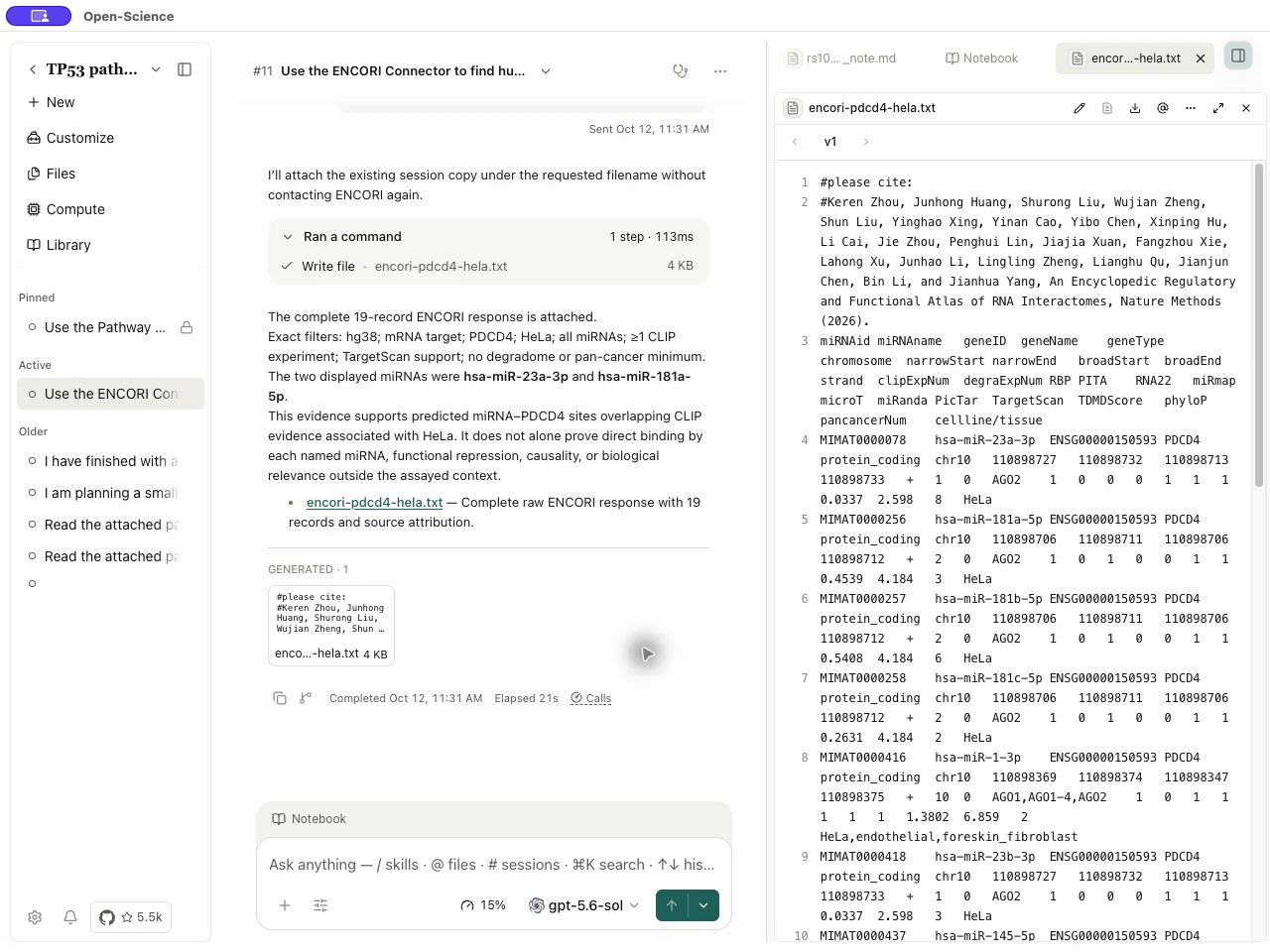
Distinguish total_records from returned_records, and inspect is_complete, result_scope and completeness_note. A preview is not a complete target distribution. The full response's raw_response_path is a local file path, not automatically a downloadable session artifact. To share it, ask the agent to save it in an accessible session data directory and attach the file; open the attachment to check its contents.
A query can return a genuine empty result or ok:false; do not silently broaden filters to obtain a hit. After a bulk download, check the actual path, size and verified_gzip. Reading reference tables or listing datasets does not download the bulk files. See ENCORI operations for exact parameters.
Assay context and individual submissions
| Entry | Procedure | Interpretation boundary |
|---|---|---|
| ChEMBL | Enable the Connector; no API key is needed. Take assay_chembl_id from a bioactivity record, inspect method, organism, cell/tissue and target with get_assay, then retrieve get_bioactivity for the same assay ID. | Target-assignment confidence is not measurement quality. Compare conditions, units and relation operators before combining IC50/Ki values. |
| Variants → ClinVar | Configure a real NCBI contact email in the Connector; the API key is optional. Call clinvar_get_submissions with a VCV accession or positive Variation ID, then follow the version-pinned next_page arguments. | Preserve SCV, submitter, condition, evaluation date, method and citations. Compare germline, somatic clinical impact and oncogenicity separately. |
ChEMBL pages are ordered by activity_id. Keep filters unchanged and pass next_offset as the next offset until has_more:false; this can retrieve more than 1,000 records. The summary covers only the current page, so its strongest activity is not necessarily the strongest in the full query. After ClinVar resolves a latest-version first page, retain the returned versioned VCV for continuation; do not substitute an RCV, SCV or rsID input.
ChEMBL assay fields · Bioactivity pagination · ClinVar submission fields.
Single-cell, model-organism and variant-effect data
Search for the entries below in Settings → Connectors, enable availability for Main, then describe the organism, research question and records to retain in your conversation. These new operations read public data without a custom MCP server, API key or NCBI contact email. Other services in the same Connector can have different requirements.
| Entry | What it can do | How to use the results |
|---|---|---|
| CELLxGENE Discover | Find single-cell datasets by organism, tissue, disease, assay or cell type; inspect versions and file inventories | Ontology filters use exact labels or IDs and are combined with AND. Retain dataset_version_id for a fixed publication; dataset_id resolves to the current version. Returns available download URLs, without downloading files or querying Census expression matrices. Use the separate CellGuide for cell-type descriptions and markers. |
| Alliance Genome Resources | Query human, mouse, rat, fly, worm, zebrafish, yeast and frog genes, orthologs, disease models, phenotypes and expression | Search and confirm the organism before following returned gene IDs. Retain evidence and orthology stringency; a model-organism phenotype is not a human disease conclusion. |
| Variants → MaveDB | Find variant-effect score sets, assay methods, CSV score pages and existing VRS mappings | Keep the URN, license, assay methods and score calibration. Functional scores are not clinical pathogenicity classifications. CSV uses start/limit pagination and returned text still needs saving to a file. Mapping retrieval does not perform liftover. |
| Omics Archives → Metabolomics Workbench | Search studies; inspect samples, factors, analyses and metabolites by ST accession; look up compound structures and cross-references | Select summary, factors, analysis or metabolites with section. Resolve compound names through PubChem into supported identifiers first. These operations do not download raw measurement matrices. |
CELLxGENE filtering and pagination run locally over the upstream catalog fetched for each request; the catalog may change between requests. Use version IDs to retain a publication. An unreported file size is -1, not zero bytes. Preserve missing values and assay definitions in MaveDB and Workbench results as well.
See exact inputs for CELLxGENE Discover, Alliance, MaveDB and Metabolomics Workbench.
Cell lines, phenotypes and immune evidence
Enable Cellosaurus, Monarch Initiative or IEDB in Settings → Connectors and make it available to Main. These operations query public records without a custom server or API key.
| Entry | What to request | What to preserve |
|---|---|---|
| Cellosaurus | Search a cell-line name/synonym, then retrieve the returned CVCL accession or RRID | Species, identity, synonyms and contamination/misidentification annotations. Search takes a literal phrase, not a raw Solr query. Missing quality annotations do not certify the cell line. |
| Monarch Initiative | Disease or gene phenotype associations using canonical CURIEs, such as MONDO:0007254 or HGNC:11998 | Organism, phenotype, source and evidence. Aliases are not automatically converted; resolve identifiers first. A direct match concerns identifier matching, not experimental confirmation. |
| IEDB | Epitopes or antigens, or a specific T-cell, B-cell or MHC assay | At least one biological/evidence filter is required; pagination alone is insufficient. Use either antigen_iri or uniprot_accession, not both. Preserve assay method, outcome, units and publication; an MHC elution observation is not an affinity measurement. |
An aggregated epitope/antigen record can combine observations from different experiments. When filters must be satisfied by the same experiment, query the corresponding assay operation. Zero matches do not establish a negative biological finding. Cellosaurus parameters · Monarch parameters · IEDB parameters.
Find GEO matrices and sequence-matched structures
Omics Archives → geo_get_matrix_files discovers official GEO Series Matrix and NCBI-generated count/FPKM/TPM/annotation files. It returns file locations; it does not download their bytes. geo_get_series remains a metadata lookup.
After obtaining a matrix, geo_preflight_matrix checks already-read, decompressed text up to 8 MiB. It has no network or filesystem access. Keep GSM identifiers and platform metadata so samples can be mapped by ID rather than column position. Set complete: false for a preview; only pass complete: true for the entire file. A preview cannot establish whole-file dimensions. Do not feed a compressed archive, sparse matrix or HDF5 file into the text checker. See matrix discovery and text preflight.
Structures & Interactions → pdb_search_sequence accepts one protein sequence of 25–10,000 residues, as raw sequence or one FASTA record. Identity and query-coverage thresholds are fractions from 0 to 1. Returned query coverage describes alignment to the query; it is not experimental structure coverage. The upstream total precedes local coverage filtering, and a bounded scan can omit later matches. The operation finds structure records without downloading coordinates. See exact inputs and scan limits.
Connect and start using a database
1. Enable the built-in Connector
- Open Settings → Connectors and search for the family listed above, such as Omics Archives.
- Open its detail and expand Tools. Read the chosen operation's inputs, result limits and third-party requirements.
- Enable availability for Main and check Used by. Use Manage access on the resource to adjust Main Agent and Specialist associations. Availability and per-tool approval policies are separate controls.
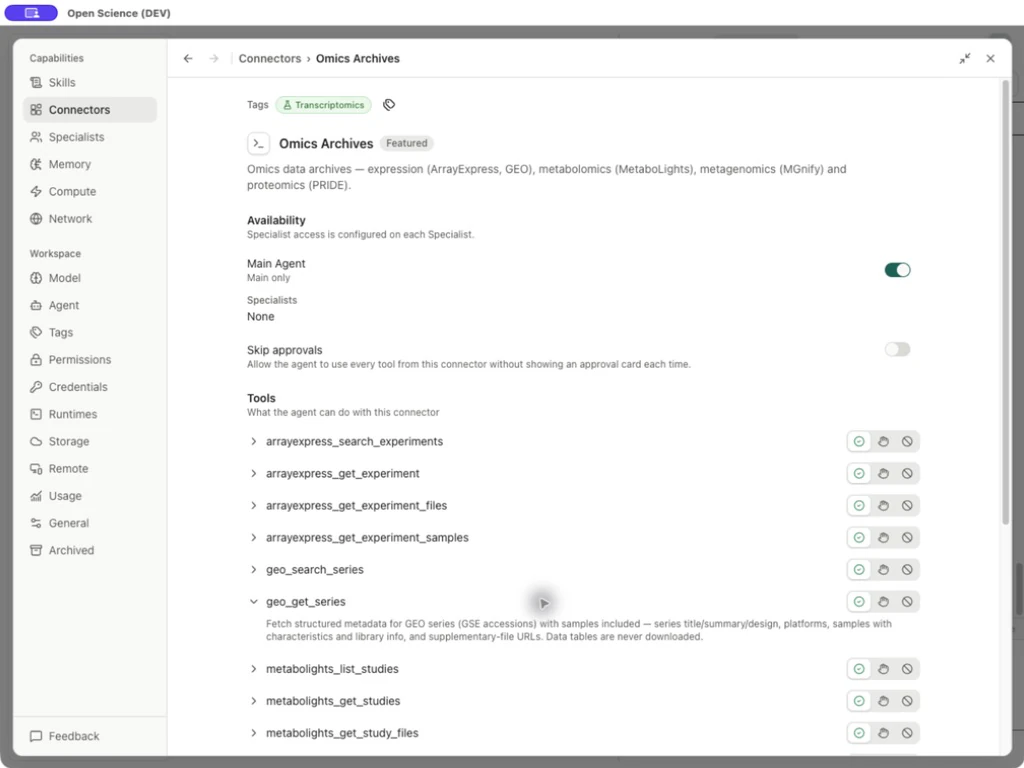
These Connectors are built in; you do not need to add a custom server for them. For an external service you operate yourself, see custom Connector setup. A listed or enabled Connector is not proof that authentication or a query succeeded.
2. Add credentials when the operation requires them
| Service or condition | Where to configure it |
|---|---|
| OpenAlex | Optional key. To configure one, open Settings → Connectors → Literature Graph → Manage credentials → OpenAlex, validate it, then save. |
| Direct NCBI variant queries requiring contact information | Settings → Connectors → Manage credentials → Literature access. Fill in Contact email and select Save. An NCBI API key is optional. |
| Another operation with a credential requirement | Follow that tool's requirements and the credentials guide. Bind the credential to the intended service. |
Enter keys in the credential form, not in a research prompt or a shared output file. Configure requirements for the selected operation; the contact-email requirement above does not mean that every NCBI tool has the same requirement.
Literature Graph also offers crossref_get_work, crossref_get_updates, datacite_search_records and datacite_get_record. These four public methods do not require the OpenAlex key. For OpenAlex citation directions, openalex_citations finds works citing a work, while openalex_references finds the works it cites. Literature Graph parameters.
3. Confirm access with a small query
Enable Genes & Ontologies, open a conversation with a connected model, and send:
Example Check a known human gene identifier
Use Genes & Ontologies query_genes to resolve TP53 with scopes="symbol",
species="human" and fields="symbol,name,entrezgene". Return the input query,
matched records and any unmatched identifiers. Keep the response in English.
Inspect the actual tool result. For human TP53, check query, symbol, Entrez Gene 7157 and the name tumor protein p53. Retain multiple matches until you have confirmed the organism and record. A successful query confirms this particular operation; it does not establish access to all sources. Exact fields.
Follow a research workflow
Each article below includes the inputs, steps, actual English-interface screenshots and downloadable example outputs.
Find public omics data
Find public omics data and build a file inventory: start with a known run or a topic, inspect ENA and PRIDE records, and save source locations and checksums. Downloading the data remains a separate step.
Compare a protein sequence
Find a protein sequence and complete a BLAST search: retrieve UniProt FASTA, retain the BLAST job ID, then inspect the completed alignments, identity and query coverage.
Analyze a candidate gene set
Run functional enrichment for a candidate gene set: choose the organism, identifiers and background, run g:Profiler, and interpret corrected probabilities with source versions.
Confirm a reference genome
Check species, reference genome and chromosome identifiers: resolve the taxon, versioned assembly and chromosome aliases before joining records.
Inspect a pathway network
Inspect a pathway and its interaction network: find a human Reactome pathway through Pathway Commons, preserve its returned URI, export the interactions and distinguish a selected network from evidence of pathway activity.
For other tasks, follow structured PubChem records, cross-checking scientific records or literature discovery for a group meeting.
Use the returned data correctly
- Retain the query, source, organism, tissue, units and accession versions. Database records, predictions and generated summaries are different kinds of evidence.
- Check returned counts, pagination and truncation flags before treating a response as complete. Zero matches, a partial response and a request error need different follow-up actions.
- A file inventory provides locations and metadata. Downloading bytes, checking checksums and analyzing the data are separate operations.
- If a request needs credentials, complete the relevant form before retrying. For rate limits, follow the service's delay; for timeouts, reduce the request size. See Troubleshooting.
Population frequencies and interaction networks
For get_variant, set include_populations: true only when population details are needed. Retain the dataset and reference build. Exome and genome observations remain separate. An unavailable value is null, not zero; overlapping population or sex strata must not be summed. These are observed frequencies, not filtering allele frequencies. gnomAD parameters
From v0.31.0, get_string_network.nodes includes returned neighbors and isolated mapped inputs. A single mapped input requests neighbors; multiple mapped inputs are not expanded. Filter is_query to recover input nodes, and use queries for all mapped aliases. n_nodes counts the graph; n_mapped counts input mappings. Update scripts that equated the two before reusing them. STRING parameters
Find operation parameters
The Connector operation reference lists required inputs, allowed values and exact calls. Use this page to choose a source and connect it; use the reference for a particular tool's fields.
Catalog source: catalog.ts, registry.ts.
Sequence searches and alignment
HMMER provides program-specific protein-sequence, profile-HMM and alignment searches. Choose the program and database together, retain the job ID, and retrieve results only after SUCCESS. HMMER operations.
InterProScan supports protein-sequence submission, job status and TSV annotation retrieval from v0.35.1. Follow InterProScan submission for setup and steps.
Genomes → Clustal Omega aligns at least three uniquely named protein, DNA or RNA FASTA records. Configure the contact email requested by the service, submit once, retain the job ID, then check status and save the returned alignment. Multiple sequence alignment workflow.
Enrichr, STRING and ClinPGx
- Genes & Ontologies → Enrichr: list current libraries, then query gene-set enrichment for functions, transcription factors, perturbations, drugs, diseases, tissues or cell types. Select a library appropriate to the organism and question, and retain its name, background and adjusted P values.
- Protein Annotation → STRING: test whether a protein network has more interactions than expected from its background. This asks a different question from pathway over-representation; its network P value is not a pathway test. Follow the gene-set enrichment workflow.
- Clinical Genomics → ClinPGx: retrieve drug, gene or variant annotations, guidelines, regulatory labels and population frequencies. Resolve identifiers first, supply the fields required by the operation, and retain original sources and evidence levels. This retrieves research records; it does not automatically produce an individual treatment plan.
Enable the relevant Connector for the active agent in Settings → Connectors. These built-in entries do not require a custom MCP server. See the operation reference for exact fields and conditional requirements.
Pathways, expression and clinical data
Enable the corresponding family in Settings → Connectors, then tell the agent the organism, source, identifiers and intended scope. These additions use built-in Connectors; no custom MCP server is required.
| Entry | What it can do | Connection and interpretation |
|---|---|---|
| Pathway Commons | Search pathways, list top pathways, query paths between genes or export a submodel | Public service; retain the returned URI, organism and source. Graph queries differ from enrichment tests. Follow the pathway interaction workflow. |
| Expression → Bgee | Cross-species present/absent calls, normalized scores, bounded SPARQL queries and download links | Discover species first and retain the NCBI taxonomy ID. SPARQL requires gene, species and tissue. Healthy wild-type baseline calls are not differential expression; download links are not downloaded files. |
| Cancer Models → cBioPortal | List samples/patients and query clinical attributes or mRNA/protein expression | Select a study, discover its profiles and choose measurement/normalization. Supply IDs matching the clinical sample/patient level; molecular data needs explicit genes and exactly one of sample_ids or sample_list_id. Missing rows are not zeros. |
| Drug Regulatory → openFDA | Search/count FAERS reports and search drug recalls | Bound dates and products and retain truncation information. Report counts are not incidence or causal evidence. Multi-valued buckets may overlap; their sum is not a unique report total. |
| Omics Archives → MGnify | List result files by MGYA analysis accession | Returns type, category, upstream URL and size when reported. No file bytes are downloaded; missing sizes or URLs stay null. |
See the Connector operation reference for exact required fields, conditions and examples.
Interpret Bgee species availability
Start with bgee_species to identify the species. Its taxon_id is the organism's NCBI taxonomy ID, not the species supplying its reference genome. In a list response, has_expression_data: null means availability was not determined. Query again using the returned taxon_id as species_id to load that species' data-source metadata. Keep null as unknown when metadata is absent; only an explicit false is a negative availability result. These fields describe atlas coverage, not whether a particular gene is expressed in a tissue.
Find GWAS summary-statistics files
Enable Human Genetics for Main in Settings → Connectors. Ask for summary-statistics discovery with the study's GCST accession, and retain the returned original/harmonised file URLs, metadata and declared reference genome. The public lookup does not require an API key.
gwas_get_summary_statistics lists study files and reads available YAML metadata; it does not download large association tables. Its GWAS-SSF column definitions describe the standard, not an inspected file header. Download the intended file separately and check its actual columns, genome build, effect allele and units before analysis. Significant association hits are not a substitute for complete summary statistics. Parameters and output.
Submit a protein sequence to InterProScan
- Enable InterProScan for Main in Settings → Connectors. In Settings → Credentials → Literature access, save the valid contact email used for EMBL-EBI jobs; no API key is required.
- Supply a protein sequence or uniquely named protein FASTA records and request submission once. The sequence and contact email are sent to EMBL-EBI. One request accepts up to 1,000 records, 10,000 residues per sequence and a 4 MiB encoded request body.
- Retain the returned job_id. SUBMITTED with ready: false is a receipt, not an annotation result. Check status at least ten seconds apart; polling is not automatic.
- After FINISHED, request results and save the complete TSV before the remote result expires. A response over the 2 MiB retrieval limit fails rather than silently returning a truncated report.
- Check the protein identifiers, source applications and 1-based inclusive coordinates. Scores from different member applications are not interchangeable; no hit does not prove that a protein lacks a function.
Avoid duplicate submission after a timeout: recover a known job ID first. Cancelling a local request does not cancel a submitted remote job. See submit, status and results parameters.
Find TCR and BCR evidence in IEDB
Enable IEDB for Main and request search_tcrs or search_bcrs with at least one biological or evidence filter. Pagination alone is insufficient. Use sequence for the epitope sequence; chain1_cdr3 and chain2_cdr3 filter receptor CDR3 sequences. These public searches need no API key.
Keep the receptor-group ID, chains, reported assay IDs and source publications. Host and outcome filters apply to aggregated groups and can be satisfied by different experiments. To establish that conditions occur in the same assay, follow the reported assay IDs into the corresponding assay operation and apply the required filters there. Pagination covers receptor groups, not completeness of every embedded export. These records are evidence retrieval, not a prediction of receptor binding. IEDB parameters.
Discover cancer proteomics with PDC
Enable PDC in Settings → Connectors. Its public metadata API needs no API key. Use it to find studies and versions, inspect assay and specimen counts, map case–sample–aliquot associations, and list quantitative files such as Protein Assembly reports. It does not return treatment/outcome data or download files.
Start with a study accession such as PDC000127, or search study identifiers and version names. PDC keyword matching is not a clinical disease filter. Retrieve the study, then use its returned study_id UUID to pin subsequent calls; pdc_study_id selects the latest version. Provide exactly one of these selectors.
For specimen lists, upstream pagination counts cases; expanding samples and aliquots can produce more rows than the case limit. The default local mode pages received associations and has a 1,000-association upstream cap. A final local page does not prove completeness when that cap is reached. Keep PDC IDs and named external GDC references separate. File listings include names, byte sizes, MD5 values and storage paths; a listed path is not an authorized download URL.
See PDC operations and pagination. Before combining sources, check the study version, assay, specimen identity and each source's access and citation requirements.
Check population-specific LD
Enable Genomes in Settings → Connectors. Its Ensembl LD tools use the public API without a key. Supply two variant IDs for ensembl_ld_pairwise, or one for ensembl_ld_proxies, together with the complete population name, such as 1000GENOMES:phase_3:KHV. The tools do not discover the population or infer ancestry; choose a reference population appropriate to the study.
Pairwise results report r² and D′. Proxy queries default to r² ≥ 0.8 and a 500 kb total window, approximately 250 kb on either side. max_records caps the returned list after sorting, not the upstream work. Keep the population and retrieval metadata with the result; this endpoint does not report the reference assembly or Ensembl release. Empty results mean no qualifying data returned, not zero LD. High LD establishes neither causality nor functional equivalence. See pairwise fields and proxy fields.
Preserve sample, expression and assembly context
| Query | Interpretation in v1.0.2 |
|---|---|
arrayexpress_get_experiment_samples | samples contains relationship rows from the first SDRF file sorted by path. n_rows_total / n_rows_returned count rows; n_samples / n_samples_returned count distinct identifiers, preferring Sample Name, then Source Name. They are not independent biological replicate counts. Missing identifiers can make sample counts null. An empty file or no_sdrf response does not establish that the experiment has no samples. |
metabolights_get_studies with include_samples | Use the returned headers order when exporting sample_table. Repeated column names have unique #2, #3, … suffixes without overwriting original names. Retain all columns; an empty string in a short row is missing metadata. Check rows_truncated. |
bgee_expression_calls | Keep anatomical_entity_id/name together with cell_type_id/name. A missing cell type is null, not a negative expression call. Keep the expression state, quality and condition together. |
| dbSNP variant lookups | Retain each placement's assembly, assembly_full, seq_id, position and alleles. One sequence can be associated with more than one assembly; do not collapse those associations or use the first placement as an automatic liftover. |
These corrections change how returned evidence should be read. Check the operation reference before comparing an older saved response with a new lookup.
OpenAlex credential prompts
v1.0.2 remembers a declined OpenAlex credential prompt for the current session, avoiding repeated prompts there. If you later need that source, configure it explicitly in Settings → Connectors → Literature Graph → Manage credentials → OpenAlex and retry the intended query. Declining the prompt neither supplies a key nor guarantees access or quota.
Connect the new sources and preserve their meaning
In Settings → Connectors, find the entry below and allow it for Main or the intended Specialist. HGNC, PubTator 3, DGIdb and RNAcentral are tools within existing entries. Orphadata is a separate entry and is off by default. These new tools use public endpoints without their own API key; other tools in the same entry can have different credential requirements.
| Source | Settings entry | Request and check |
|---|---|---|
| HGNC | Genes & Ontologies | Query an approved human symbol or resolve an exact alias. Keep every ambiguous match and the approved/withdrawn status before selecting a gene. |
| PubTator 3 | PubMed | Retrieve annotations by PMID or search entities/relations. Annotation retrieval covers titles/abstracts; it does not submit your raw text or prove full-text support for a claim. |
| DGIdb | Clinical Genomics | Query a gene or drug name, preserve sources and publications, and follow the returned cursor. A drug–gene interaction is not a treatment recommendation. |
| RNAcentral | RNA | Look up a URS accession, then page through expert-database cross-references. Preserve taxonomy, sequence MD5 and accession versions. |
| Orphadata | Orphadata | Enable access first, then supply an ORPHAcode for genes or HPO phenotypes. Keep association types and frequency categories; they are not patient-specific probabilities. |
Exact calls: HGNC, PubTator, DGIdb, RNAcentral, Orphadata.
Link cancer metadata and interpret a variant
- PDC: request public demographics and diagnosis fields with
pdc_list_clinical. Use eitherpdc_study_idfor the latest version orstudy_idfor a fixed version. Retain missing/obfuscated values and named external references; PDC and GDC UUIDs are not interchangeable. - GDC: filter files by
case_ids,sample_typesandworkflow_types. Keep each file's sample, aliquot and tumor/normal workflow associations instead of merging all files under one case. Filters are OR within a field and AND across fields. Metadata access does not authorize controlled-file downloads. - Ensembl VEP: pass
hgvs_notationon its own, withoutvariant_id,region,alleleorallele_orientation. Keep the reported assembly, transcript versions and truncation flags. Input reference versions are passed through, not validated;matcheddoes not establish a version match. This is consequence annotation, not clinical interpretation or liftover. - Clinical Trials: use
get_trial_resultsfor posted outcome measurements, denominators, statistical analyses and adverse events. Match group IDs only within the same result module/outcome. Missing results are not zero events or proof of no effect.
See PDC fields, GDC filters, VEP modes and posted trial results.
Imaging, pathways, lipids and cancer models
In Settings → Connectors, enable the intended source and make it available to Main. TCIA, KEGG, RxNorm / RxNav, DailyMed, BioSamples and WikiPathways are separate entries, disabled by default. The operations below use public services without a custom MCP server or API key. Enabling a Connector does not grant a data license or restricted-data access.
| Entry | Request | Keep with the result |
|---|---|---|
| TCIA | Find collections; inspect a collection or an existing DICOM series UID | License, access conditions and download requirements. Returned links can be Data Retriever manifests, not image files. |
| KEGG | Search pathway/KO/compound/reaction entries; map an organism-qualified gene | Academic-use eligibility and license terms; one-to-many mappings and truncation. This is not gene-set enrichment. |
| Chemistry → LIPID MAPS / UniChem | Look up an exact LMID or PubChem CID; map an InChIKey or ChEMBL ID | Resolve names first with PubChem. Preserve distinct matches and source attribution; these are not similarity searches. |
| Structures & Interactions → OmniPath | Query upstream/downstream regulation for a canonical human UniProt accession | Direction, conflicting stimulation/inhibition evidence and complex identifiers. Aggregated relations are not tissue-specific causal proof. |
| Structures & Interactions → PDBe / PDB | Inspect experimental structure validation or find similar deposited protein chains | Method and missing metrics; use label_asym_id, not an author chain ID. Similarity scores are not a computed structural alignment or RMSD. |
| Cancer Models → DepMap / CCLE | Resolve a cell line to ModelID, then query a gene or compound profile | Dataset release and scale: Chronos is not a probability; PRISM AUC is not IC50; RNA is log2(TPM+1); copy number is relative to ploidy. |
| RxNorm / RxNav · DailyMed | Resolve drug names to RxCUIs; inspect SPL label identities and version history | Keep ambiguous identities. Matching names does not establish clinical equivalence; a DailyMed listing does not establish FDA approval. |
| BioSamples · WikiPathways | Find sample metadata or pathway metadata and revisions | Accession, species, source dates and linked evidence. These lookups do not download linked sample files or pathway graphs. |
Use the operation reference for exact inputs and pagination. Preserve nulls and truncated-result markers; a bounded result is not the entire database.
Discover official research data and file lists
In Settings → Connectors, enable only the entries needed for your question. The new Europe PMC, Research Datasets, ChEA3, bioDBnet and CTD entries use public services without a required API key. Requests still send the supplied search terms, identifiers or gene lists to those services. Connection controls.
| Need | Entry and result | Next step |
|---|---|---|
| Search biomedical papers directly | Europe PMC returns core records, available abstracts and a next-page cursor | Save identifiers and continue pagination; a full-text URL is not retrieved full text |
| Find survey or clinical demo files | Research Datasets lists NHANES files with cycle/documentation links and fixed-version public MIMIC/eICU demos | Check cycle, version, license and documentation before downloading from the official source |
| Understand dataset access | Research Datasets explains entry points for NHANES, CHARLS, CHNS, SEER, MIMIC, eICU, FAERS and GBD | Complete the source's own registration, training or export process where required |
| Discover public reports | Drug Regulatory, CTD and Cellosaurus list official file locations | Check the current source page, release and terms; discovery does not download or import files |
| Normalize gene identifiers | Genes & Ontologies adds HGNC service fields, field queries and file lists; bioDBnet adds conversion and ortholog mapping | Discover supported fields/types first; retain ambiguous, unmapped and one-to-many results |
| Rank candidate regulators | ChEA3 returns per-library transcription-factor rankings and GMT library links | Treat rankings as hypotheses; a downloaded GMT library may differ from the library behind an online result |
| Inspect cell-line evidence | Cellosaurus adds RDF, bounded SPARQL and STR similarity | Preserve accession and marker settings; similarity alone does not certify sample identity |
File listings return official URLs and source metadata, not downloaded files or a ready analysis database. NHANES analysis still requires the correct survey design and weights. MIMIC/eICU demo access does not grant access to their full datasets. FAERS reports cannot be interpreted as incidence rates. For exact fields and examples, use the operation reference.