Service credentials
Configure credentials in Settings → Credentials for the service actually making the request. A working Codex subscription supplies model access; it does not supply OpenAlex, GitHub or a custom MCP account.
Built-in service entries
| Service | Fields and purpose | How to check |
|---|---|---|
| GitHub | Personal access token for Skill discovery/imports | Use Connect/Manage and the token controls; then test the intended repository operation. |
| Literature access | Contact email and optional NCBI API key | Save contact information; NCBI key is optional for supported requests. |
| OpenAlex | Optional API key for OpenAlex operations in Literature | Validate the entered key, save it and make a bounded query. |
| Unpaywall | Contact email for full-text location searches | Uses the configured literature contact email; no invented address. |
Connect opens an unconfigured service; Manage opens an existing one. Desktop only means that credential operation needs the desktop context. A stored-key indicator is not the secret value itself.
Configure an optional OpenAlex key
From v0.33.1, OpenAlex queries no longer require an API key. Start with a small query; the service's rate limits, authentication and access policies still apply. Allowing a keyless request does not promise unlimited use or a successful response.
To use your own key, open Settings → Credentials → OpenAlex (also available from Literature Graph through Manage credentials), enter API key, choose Validate, then Save after successful validation. The key is used only for api.openalex.org. Remove key removes an existing key; the replacement field does not reveal the stored secret.
Resolve system credential-storage errors before saving. For 429 responses, inspect the service's quota and retry guidance instead of assuming a key is mandatory.
Credentials for custom Connectors
Create the credential here, then select its name in the Connector configuration. Inspect the consumers before changing or removing a shared credential.
New credential
| Field or button | Operation |
|---|---|
| Name | Give the credential a recognizable local label. |
| Type | Choose API key, Access token, or OAuth. |
| Value | Enter a secret in the masked field for a key/token. Empty required fields keep Save disabled. |
| OAuth → Resource URL | Supply the exact resource endpoint. Connector matching depends on resource URL, transport, and registration. |
| Advanced → Transport | Choose the transport required by the OAuth service; Streamable HTTP was the inspected default. |
| Scopes | Enter scopes separated by spaces or commas. |
| Use a pre-registered client | Reveal Authorization server URL, Client ID, Callback URL, and Client secret. |
| Callback URL / Copy | The inspected default was http://127.0.0.1/oauth/callback; copy it for service registration or expand the custom-callback option. |
| Discovery | When applicable, discover server metadata; this is not a successful sign-in by itself. |
| Cancel / Save | Discard the draft or store a valid credential configuration. |
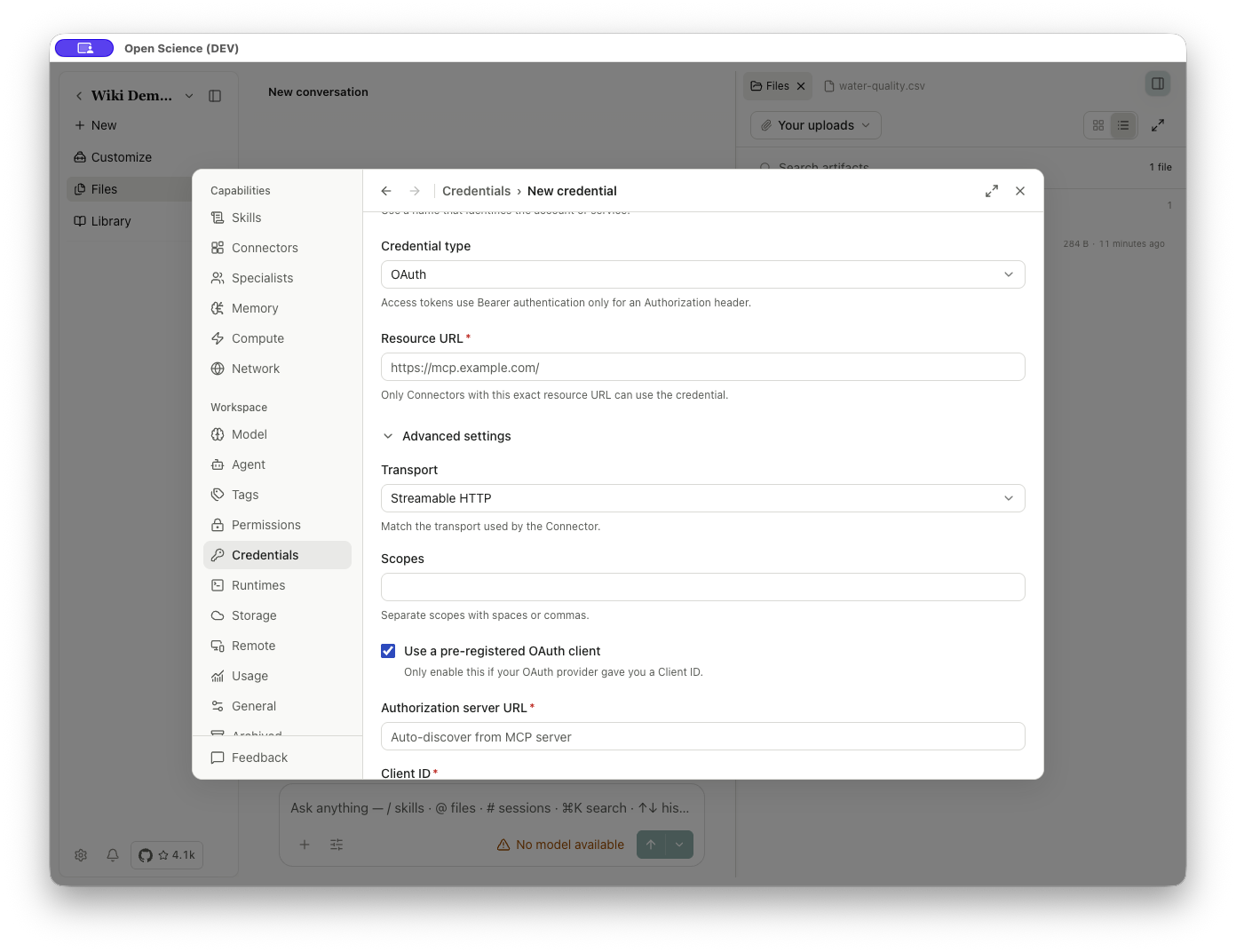
In a custom Connector, bind the credential to a header, environment variable, or OAuth selector. The name is the reference; do not place secret values in descriptions or project instructions. Exported portable configurations replace secrets with placeholders. A saved credential still needs an actual service/Connector test to establish that it works.
Verify and troubleshoot
After saving, repeat one small operation and inspect its response. Use credential_required for a missing configured secret, 401 for an authentication failure to investigate, and 403 for denied access/policy to investigate; a 403 is not universally fixed by replacing the key. 429 concerns rate/usage limits. Read the service's actual body and see Troubleshooting.
Removing a credential can affect every Connector bound to it. Connector and Specialist exports deliberately exclude ready-to-use secrets/trust; configure them again on the receiving device. Never paste a secret into a Skill, prompt, screenshot or issue report.
An OpenAlex key is optional. OAuth Connectors still require completing the named service's sign-in. Resolve the displayed authentication error before retrying the same small query.
Implementation reference: CredentialsPanel.tsx, ConnectorAddForm.tsx.
CLI/SDK credential management can create/update shared credentials through authenticated local access. Linux headless installations can explicitly choose unencrypted file storage; desktop credentials retain their normal OS-storage behavior. This option does not solve Compute password storage or initiate first-time OAuth login.
Open the official API key page
The OpenAlex and NCBI credential forms link to their official key pages. Complete account steps with the service, return to the form, then validate and save the intended key. Opening a link does not save a key or execute a query; whether a key is required depends on the service and operation.