Align multiple sequences and inspect conserved positions
Worked example Compare human, mouse and bovine hemoglobin alpha chains
Retrieve three reviewed UniProt sequences, align them with the remote Clustal Omega service and check which columns contain the same amino acid in all three. The example produced a 142-column alignment with 116 fully conserved columns. These are results for this small three-species set, not a functional annotation or phylogenetic tree.
1. Prepare the session and sources
Connection setup is described in Scientific databases.
- Create Hemoglobin Sequence Alignment and open a new conversation with a connected model. This example used Codex subscription.
- In Settings → Connectors, make Genes & Ontologies and Genomes available to Main. Clustal Omega belongs to Genomes; it is not a separate Connector.
- Configure the valid research-service contact email requested by Clustal Omega in Settings → Privacy → Share contact email with research data services. Use your actual contact, not an invented address. Sequence inputs are sent to EMBL-EBI.
- Send the prompt below. Use public or otherwise authorized sequences.
Which positions are conserved among human, mouse and bovine hemoglobin
alpha chains? Retrieve the reviewed canonical sequences from UniProt,
record their accessions and organisms, and align the three FASTA records
with Clustal Omega through the Genomes Connector in Session Notebook.
Follow the submitted job through completion, then save the input FASTA,
raw alignment, submission receipt and a short English report with
conserved-column counts and a few clearly mapped examples. Explain why
sequence conservation alone does not prove function.
Check the returned records before alignment:
| Organism | Reviewed accession | Taxon | Canonical length |
|---|---|---|---|
| Human · Homo sapiens | P69905 | 9606 | 142 aa |
| Mouse · Mus musculus | P01942 | 10090 | 142 aa |
| Bovine · Bos taurus | P01966 | 9913 | 142 aa |
The FASTA names are human_P69905, mouse_P01942 and bovine_P01966. All names must be unique. Human P69905 is associated with HBA1 and HBA2; a protein entry is not necessarily a unique gene. Keep the accession and organism with each sequence.
2. Submit once and follow the job
The agent calls Genomes → clustalo_submit with the combined FASTA, stype: protein and outfmt: clustal_num. The service requires at least three records and accepts at most 4,000 records or 4 MiB. Keep the returned job_id, requested format and submission receipt.
- Inspect the Notebook submission response. A job ID and QUEUED mean accepted, not completed.
- Query
clustalo_statusfor that same ID, waiting at least ten seconds between checks and following any longer service guidance. Do not submit another copy because the queue is slow. - After FINISHED, call
clustalo_resultswith the same ID and format. Save the returned content as an.alnfile; receiving a suggested filename does not itself save a file. - If the session stops, retain the job ID and continue the same job later. An uncertain submission response can still correspond to an accepted job; avoid automatic resubmission. ERROR, FAILURE and NOT_FOUND require investigation, not an empty alignment interpretation.
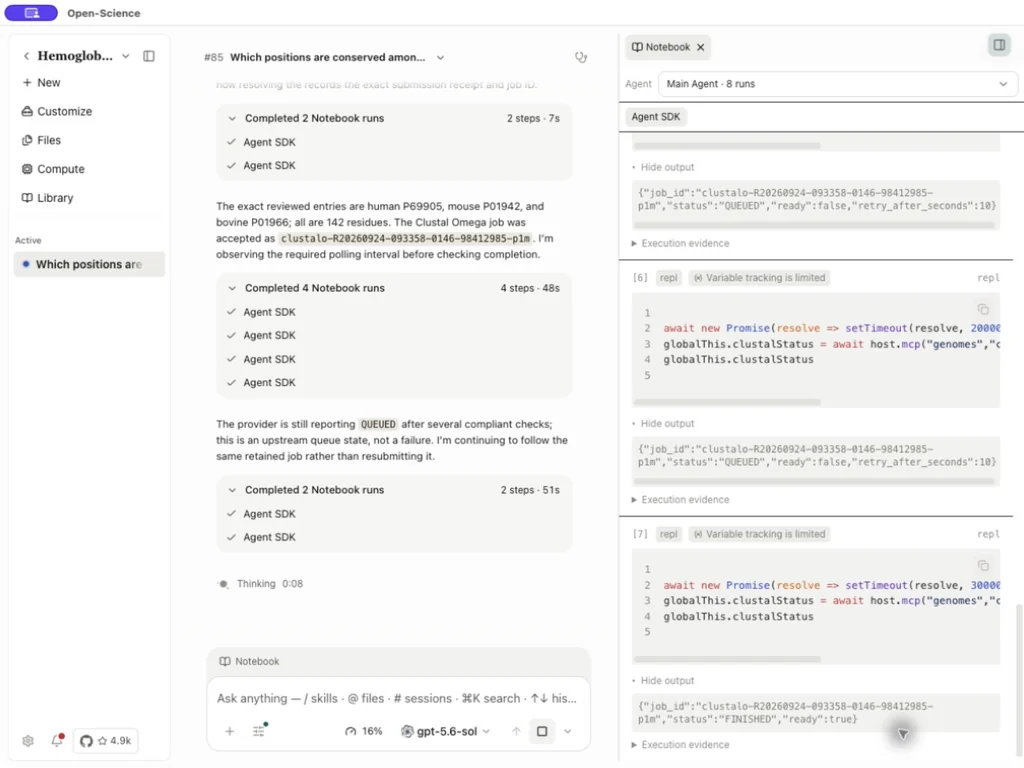
This example's receipt initially records QUEUED. The later Notebook result reported FINISHED and returned a Clustal O(1.2.4) alignment. Results have a provider-controlled retention period, documented as up to a week; save the report promptly. The result size limit is 8 MiB. See the operation fields.
Original submission receipt · Raw alignment
3. Check the alignment and count conserved columns
Open the generated hemoglobin_alpha_conservation_report.md. Compare its accessions and sequence lengths with the input FASTA and the raw alignment. Remove gaps from each aligned sequence and confirm that the remaining residues exactly match its input; this catches accidental sequence substitution or truncation.
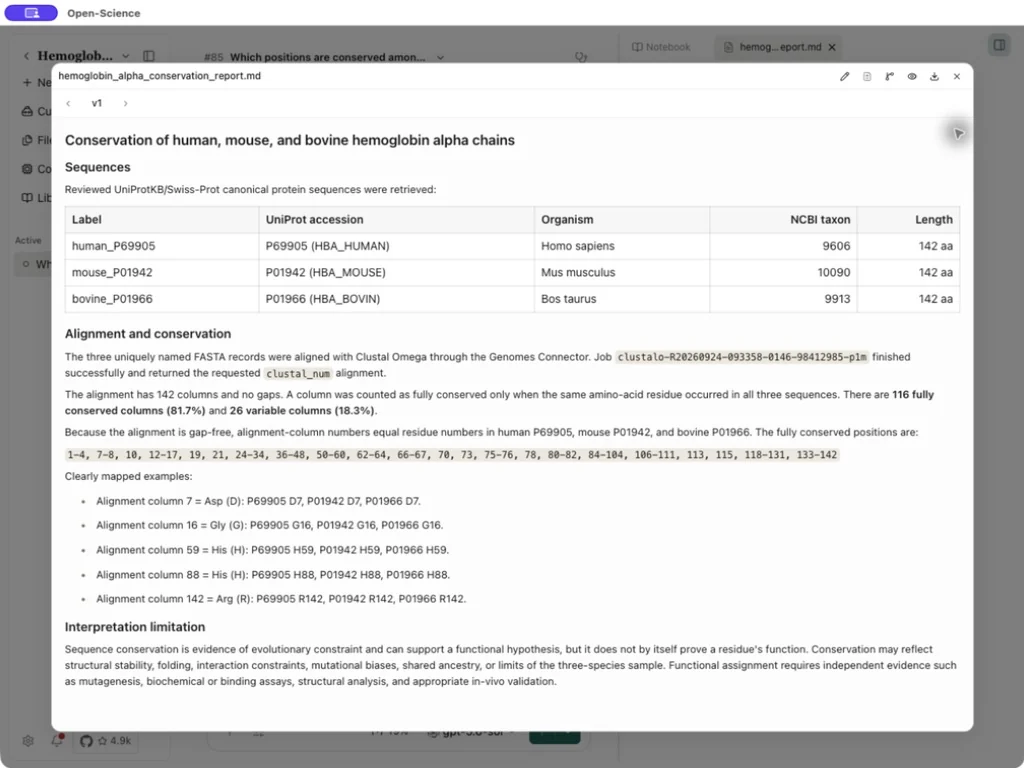
For this run:
| Check | Result |
|---|---|
| Input and aligned sequences | Three, each 142 residues |
| Alignment columns | 142 |
| Gap-containing columns | 0 |
| Identical residue in all three sequences | 116 columns |
| Variable columns | 26 |
| Fully conserved fraction | 116 / 142 = 81.7% |
In Clustal output, * marks a fully conserved column; : and . describe groups with similar properties, not identical residues. Count only identical non-gap columns for the fraction above. Examples include D7, G16, H59, H88 and R142. Here the alignment is gap-free, so columns equal the canonical sequence residue numbers. With gaps, map each sequence separately and do not confuse alignment columns with residue numbers or mature-protein numbering.
4. Keep the interpretation within the evidence
Conservation across these three related mammals supports a hypothesis about constraint, but does not prove a residue's function. Folding, stability, shared ancestry and the chosen sample can all matter. Broader taxon sampling, structural context and experimental evidence are separate next steps. A multiple sequence alignment is not a BLAST search or a phylogenetic tree.
Keep the input FASTA, raw alignment, receipt and report together. To start with one unknown sequence, use protein discovery and BLAST. For program-specific profile searches, see HMMER and InterProScan capabilities.