Screen papers with a smart collection
Worked example Select primary studies on single-atom catalysts for CO₂ electroreduction
Turn a candidate list into a reviewed reading set using inclusion and exclusion criteria. This example retrieves eight papers, runs a smart collection on their titles and abstracts, checks the decisions and exports five primary studies. It is a targeted group-meeting selection, not an exhaustive systematic review or a full-text quality assessment.
1. Find and accept the candidates
Create the project Single-Atom Catalysis Screening and open a conversation with a working model. This run used Codex subscription. Enable the relevant literature Connectors and configure their credentials if required. Send:
I am preparing a group meeting on single-atom catalysts for
electrochemical CO2 reduction. Find eight relevant papers published
from 2017 through 2022, including both primary studies and review
articles so I can screen them. Propose the references to the Library
Inbox, with verified titles, DOIs, abstracts and source links. Save a
short candidate list identifying each paper's study type.
Keep the output in English.
Open Library → Inbox, check each title, DOI and source, select these eight records and choose Accept. Confirm that they are linked to this project. Other pending Inbox records need their own review; do not accept them just to clear the Inbox.
The saved candidate list records five primary studies and three reviews/Accounts, including differences between online-first and journal-issue years. For an exact repeat, add the eight DOIs in that list to the project. A new topic search can return different candidates.
2. Bind the screening model
Open Settings → Model → Classification models. Under Smart collections, select a configured classification service and its model. Use Check model on the service card and confirm Check passed. This example uses TypeSafe AI / Jev Latest; Main continues with Codex.
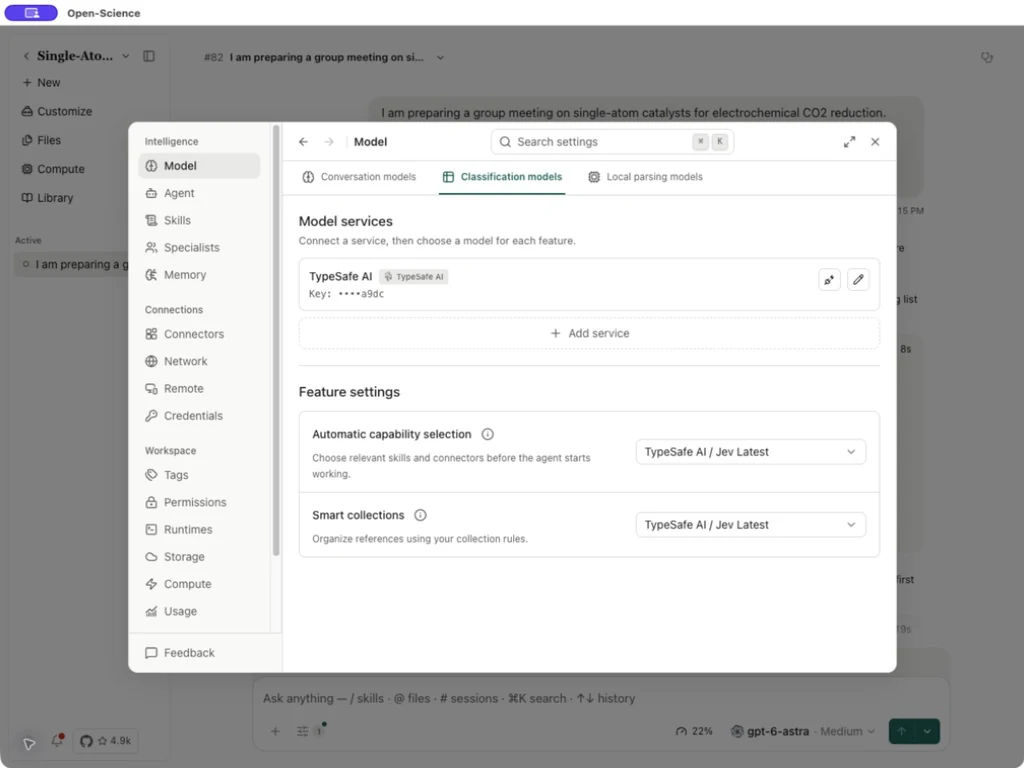
Smart collections have no default model. The Automatic capability selection binding is a different feature and cannot substitute for this one. All smart collections share the screening binding. See classification setup.
3. Define scope and rules
In the Library, choose New collection, enter CO2 Reduction - Primary Studies, and turn Smart collection on. Set Scope to the Project named Single-Atom Catalysis Screening, so only the eight project references are evaluated.
| Field | Text used in this example |
|---|---|
| Description | Select primary experimental papers for a group meeting on single-atom catalysts for electrochemical CO2 reduction. |
| Inclusion criteria | Published from 2017 through 2022 inclusive. Reports original experimental research on atomically dispersed metal catalysts used for electrochemical CO2 reduction. |
| Exclusion criteria | Exclude reviews, Accounts, perspectives and purely computational studies. Exclude studies limited to thermal CO2 conversion or reactions other than CO2 electroreduction. |
All inclusion criteria must be met and no exclusion criterion may apply. Keep Use available full text and Update automatically off for this title-and-abstract pass, then choose Create collection. The screenshot shows the saved rules reopened through Collection rule → Edit rule.
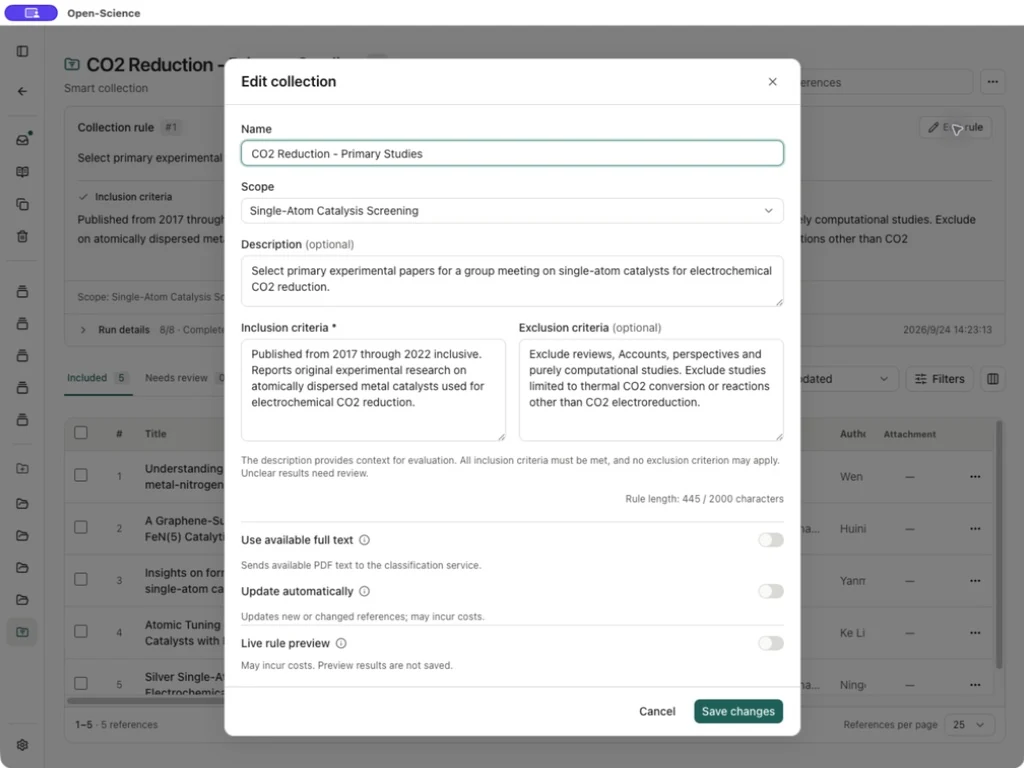
Live rule preview can help adjust a draft, but its results are not saved. Use available full text sends available PDF text to the classification service; long PDFs use relevant passages and unavailable PDFs fall back to title and abstract. Check the actual evidence shown for a decision before treating it as a full-text assessment.
4. Run a small screening pass
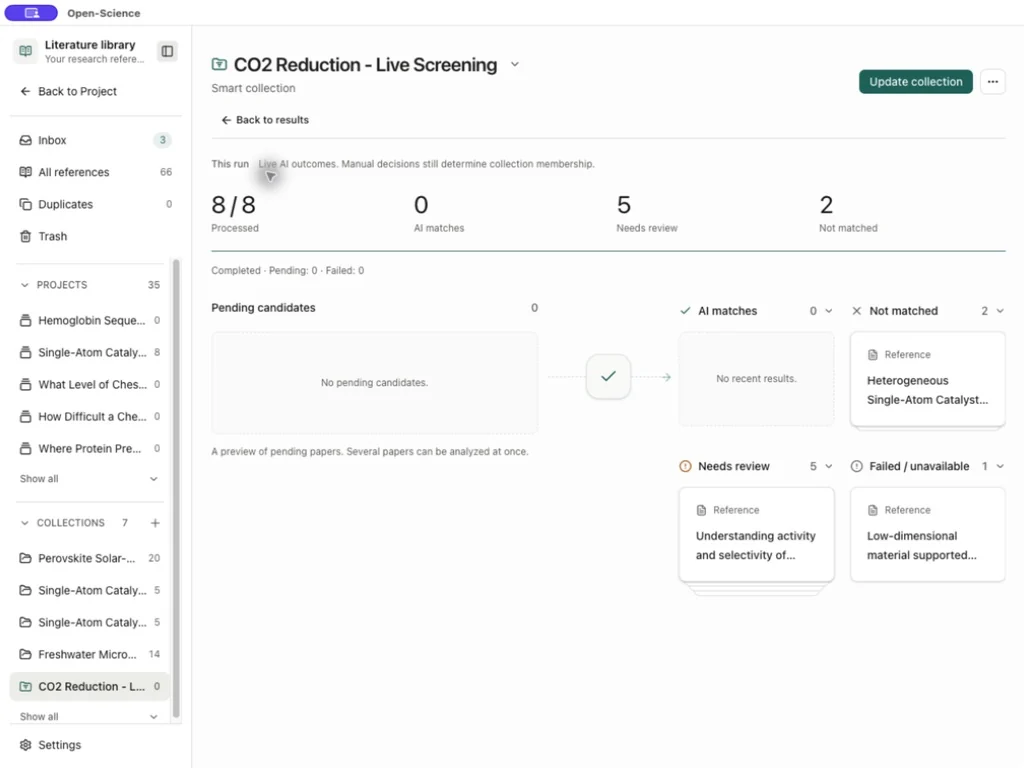
Open Collection actions → Trial run (up to 20 references), review the scope and choose Start trial run. The trial saves decisions and opens Screening process. Follow the processed count, pending candidates and incoming outcomes. AI matches describes this run's model decisions; manual decisions still determine collection membership.
To interrupt a running pass, choose Pause (labelled Pause analysis), wait for Paused, then use Resume analysis. A run may no longer be resumable after its rules, candidate papers or saved progress change; check the current rule before starting a new pass. Back to results returns to Included, Needs review, Excluded and Not evaluated. Run details shows information about the pass.
| View | How to use it |
|---|---|
| Included | Read the matched papers and confirm eligibility. |
| Needs review | Resolve uncertainty or an outdated evaluation against the actual source. |
| Excluded | Check that the exclusion reason agrees with your criteria. |
| Not evaluated | Check missing evidence or a reported evaluation error before retrying. It is not an exclusion decision. |
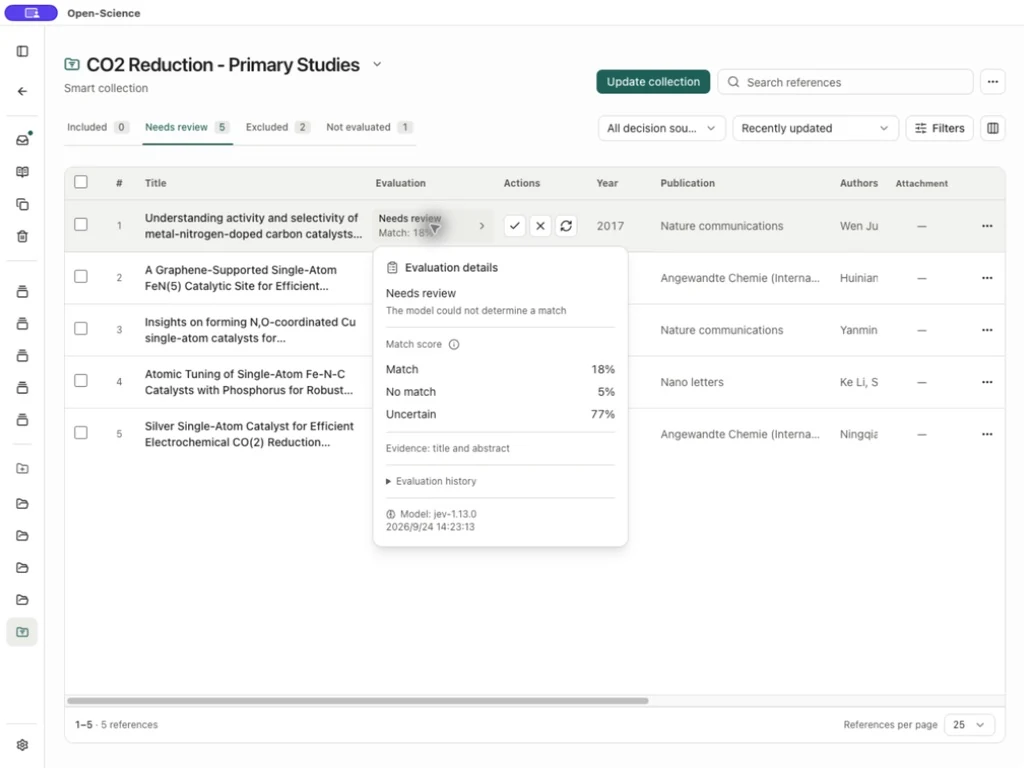
Click a row's Evaluation details to inspect its decision, match scores, evidence and model history. Scores describe rule matching; they are not measures of study quality or effect size.
5. Review and confirm the reading set
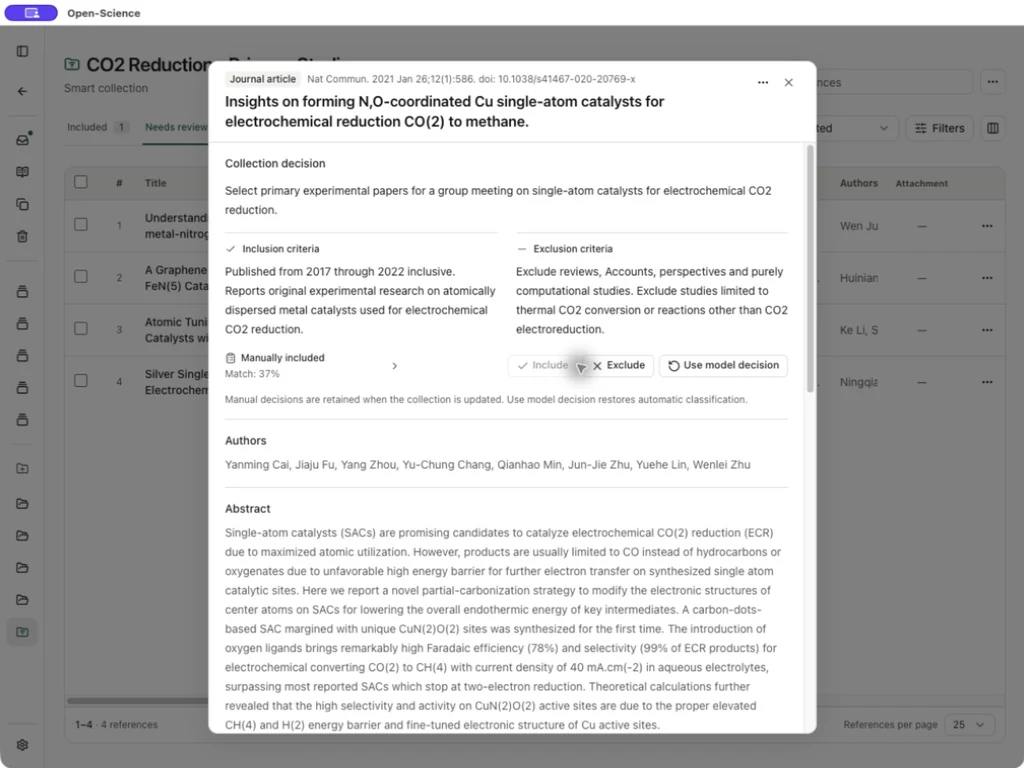
Open the paper title, read its abstract and follow its DOI/source link as needed. Compare the publication date, study type, catalyst and reaction with the rules. Choose Include or Exclude only after that check.
In the example, the first pass excluded two reviews, left five primary studies in Needs review, and could not evaluate one record with insufficient readable evidence. The five primary studies were then manually included; the remaining review was manually excluded after checking its study type. This is the review step, not five automatic inclusion decisions.
| Reviewed record | Final decision | Basis |
|---|---|---|
| Ju, 2017 · 10.1038/s41467-017-01035-z | Include | Experimental comparison of metal–nitrogen–carbon CO₂ electrocatalysts. |
| Zhang, 2019 · 10.1002/anie.201906079 | Include | Preparation and electrochemical testing of FeN₅ sites. |
| Cai, 2021 · 10.1038/s41467-020-20769-x | Include | Experimental Cu-site catalyst study for CO₂-to-methane conversion. |
| Li, 2022 · 10.1021/acs.nanolett.1c04382 | Include | Experimental phosphorus tuning of Fe single-atom catalysts. |
| Zhang, 2021 · 10.1002/anie.202014718 | Include | Experimental preparation and CO₂ testing of supported Ag sites. |
| Su, 2019 · 10.1021/acs.accounts.8b00478 | Exclude | Account; outside the primary-study rule. |
| Li, 2020 · 10.1002/adma.202001848 | Exclude | Review; retain separately as background reading. |
| Wang, 2022 · 10.1002/smm2.1101 | Exclude | Review, manually classified after checking the source. |
Manual decisions remain when the collection updates. Use model decision removes an individual manual override; Reset manual decisions in the collection menu has a broader scope. Review that scope before using it.
6. Export and use the selected papers
Confirm Included 5, Excluded 3, and zero remaining Needs review or Not evaluated entries. The inclusion rows should say Manually included for this example. Your model's first-pass scores may differ.
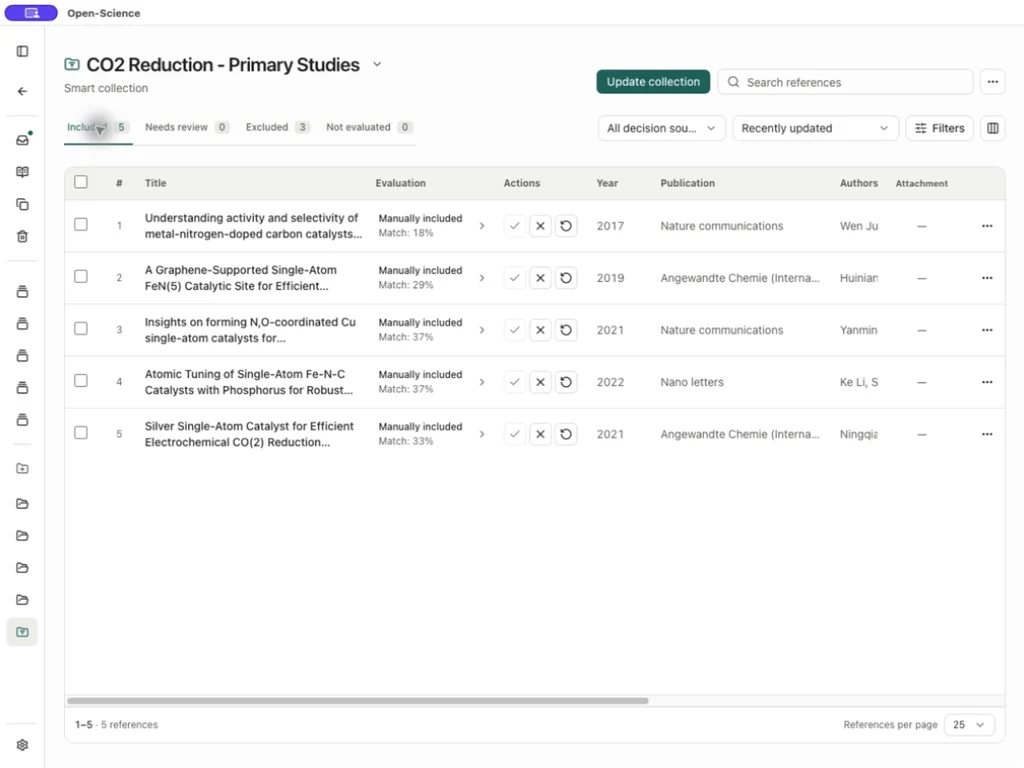
Choose Collection actions → Export included references → BibTeX or RIS, save the file, and check that it contains five DOI records. The example BibTeX preserves the exported citations with abstracts removed for redistribution. It is a bibliography, not a screening-decision log or PDF bundle. Keep the reviewed decision table alongside it when handing over the selection.
Use the selected set for a group-meeting reading pack. Obtain and inspect the full texts before extracting detailed results or comparing catalyst performance. Update automatically can evaluate new or changed records in the chosen scope and may incur service costs; it does not search external databases for new papers.