Find public omics data and build a file inventory
Start with a known accession or a research topic, inspect public run metadata, and save a file inventory with source locations and available checksums. The examples below produce inventories; downloading and analyzing the data are separate tasks.
Before starting, follow Scientific databases to enable the required Connectors. Use a connected model and an available Notebook runtime.
1. Resolve a known run and inspect its files
- Enable Omics Archives under Settings → Connectors. Supply a public ENA/INSDC accession to
ena_search_runs, such as a PRJ study or SRR run. A GEOGSEidentifier must first be linked to its INSDC study; keywords are not accepted. - Inspect
run_accession, organism, library strategy/layout andtruncated. The maximum is 1,000 runs. There is no offset or continuation token; narrow the accession if the response is truncated. - Pass one returned run to
ena_get_run_files. Checkfound,fastq_availableand every entry infastq_files. The inventory supplies URL, compressed-file size and upstream MD5; it does not download files or verify their contents. - Before a separate download, check storage and retain the manifest. Verify the downloaded bytes against the listed checksum. A paired library need not have exactly two files; do not infer read-mate identity from
file_index.
Worked example Build a file manifest for SRR037073
This v0.31.1 example uses Codex subscription and the enabled Omics Archives Connector. Open a session with an available Notebook runtime, then send:
Use Omics Archives through Session Notebook. Load its connector instructions.
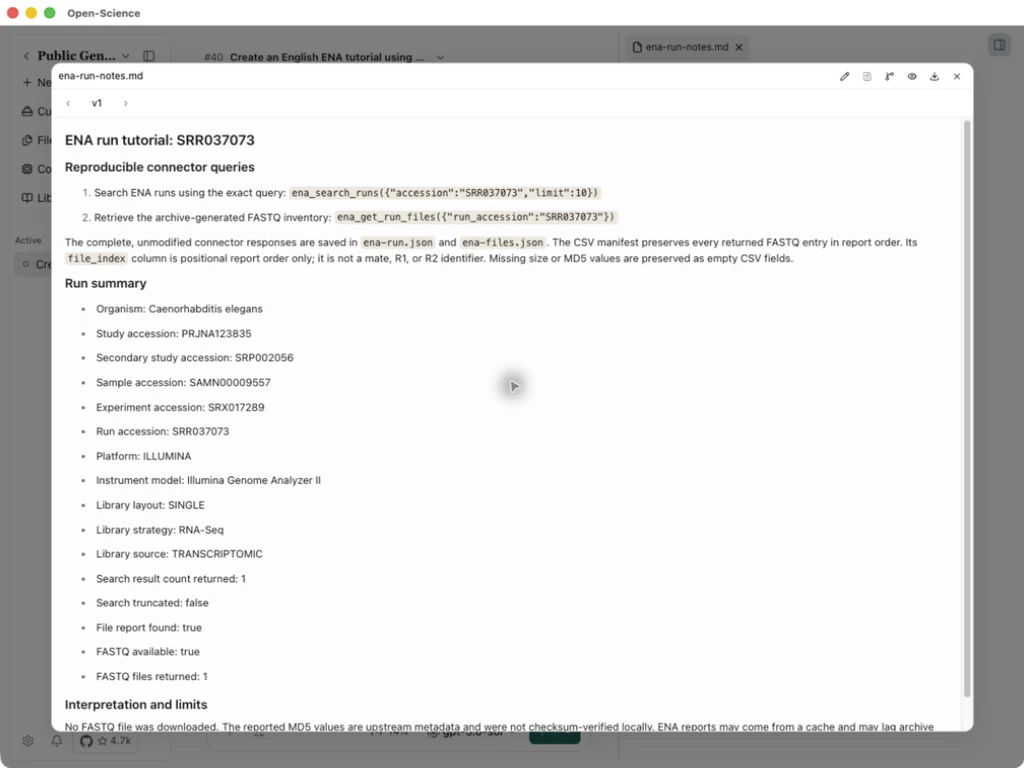
Call ena_search_runs with accession SRR037073 and limit 10, then
ena_get_run_files with run_accession SRR037073. Do not download FASTQ files.
Save the complete responses as ena-run.json and ena-files.json.
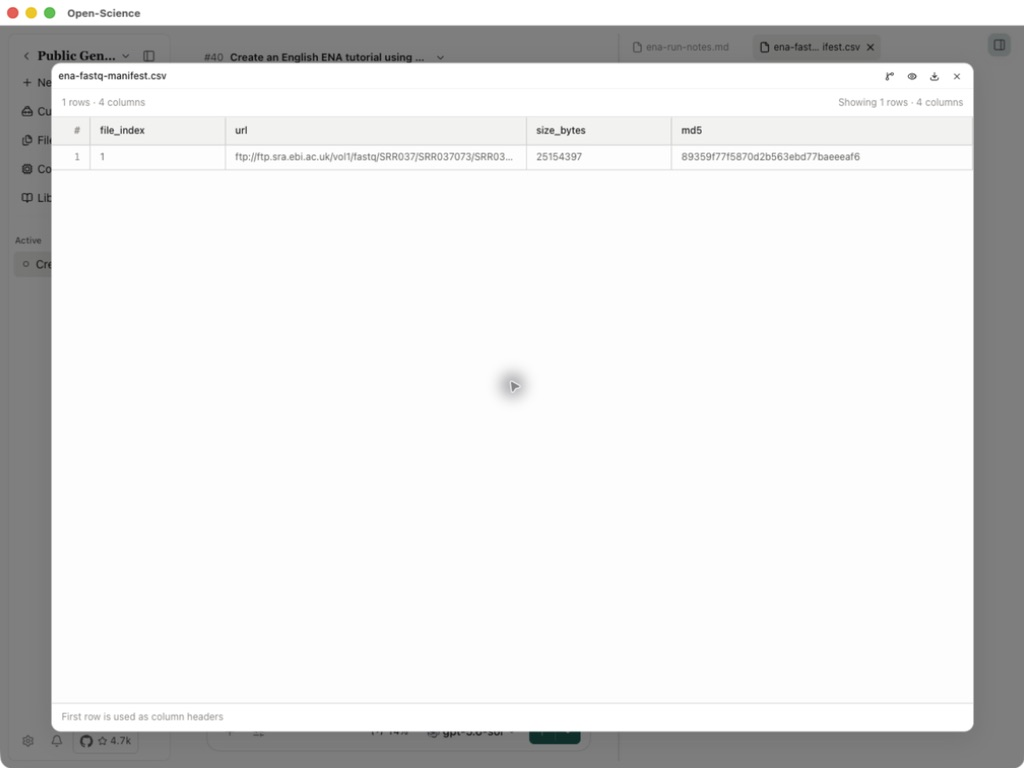
Save every returned file entry as ena-fastq-manifest.csv with columns
file_index,url,size_bytes,md5. Save ena-run-notes.md with the exact inputs,
run identity, completeness flags and download limits. Keep everything in
English. Report actual errors or empty results; do not invent data.
Open the generated notes. The actual search returned 1 run, Caenorhabditis elegans, study PRJNA123835, RNA-Seq, SINGLE, with truncated: false. Confirm the organism and layout before using its files.
Open the CSV and compare it with ena-files.json. This run has found: true, fastq_available: true and 1 file, sized 25,154,397 bytes. The manifest retains its FTP URL and upstream MD5. Copy the complete value from the downloadable file if a preview column is clipped.
Query notes · FASTQ manifest · Run response · File response
Both queries and manifest generation completed. No FASTQ file was downloaded or checksum-verified in this example. A later download is a separate step. Exact parameters
2. Discover runs by topic and inspect project files
Use ena_query_runs when you have a research topic but no accession. It combines organism, library strategy and keyword filters with AND. At least one filter is required; tax_id includes descendant taxa. The default limit is 100 and the maximum is 1,000. A truncated response has no continuation cursor: narrow the query instead of treating the returned count as the dataset total.
Worked example Discover five human RNA-Seq runs and inspect an ENA and a PRIDE file inventory
- Enable Omics Archives in Settings → Connectors, then open a session with a connected model and an available Notebook runtime. This example uses Codex subscription.
- Use the prompt below to request metadata only. The ENA query and PRIDE project are separate examples; they are not matched samples from one study.
- Open
ena-discovery.jsonand inspect the query, organism, run accessions andtruncatedbefore selecting files.
Use Omics Archives through Session Notebook. Query ena_query_runs with
tax_id 9606, library_strategy "RNA-Seq", keyword "breast" and limit 5.
For the first returned run, call both ena_get_run_files and
ena_get_submitted_files. Separately call pride_get_project_files for
PXD000001, page 0, page_size 5; fetch its next_page once if present.
Save the exact requests and responses as ena-discovery.json,
ena-file-inventory.json and pride-file-pages.json. Save a combined
omics-file-inventory.csv and omics-discovery-notes.md. Keep generated
FASTQ, original submitted files and PRIDE records distinct. Preserve
every supplied location, size and checksum; do not infer missing values
or checksum algorithms. State query limits and pagination. Do not download
data files. Keep everything in English and report actual empty results.
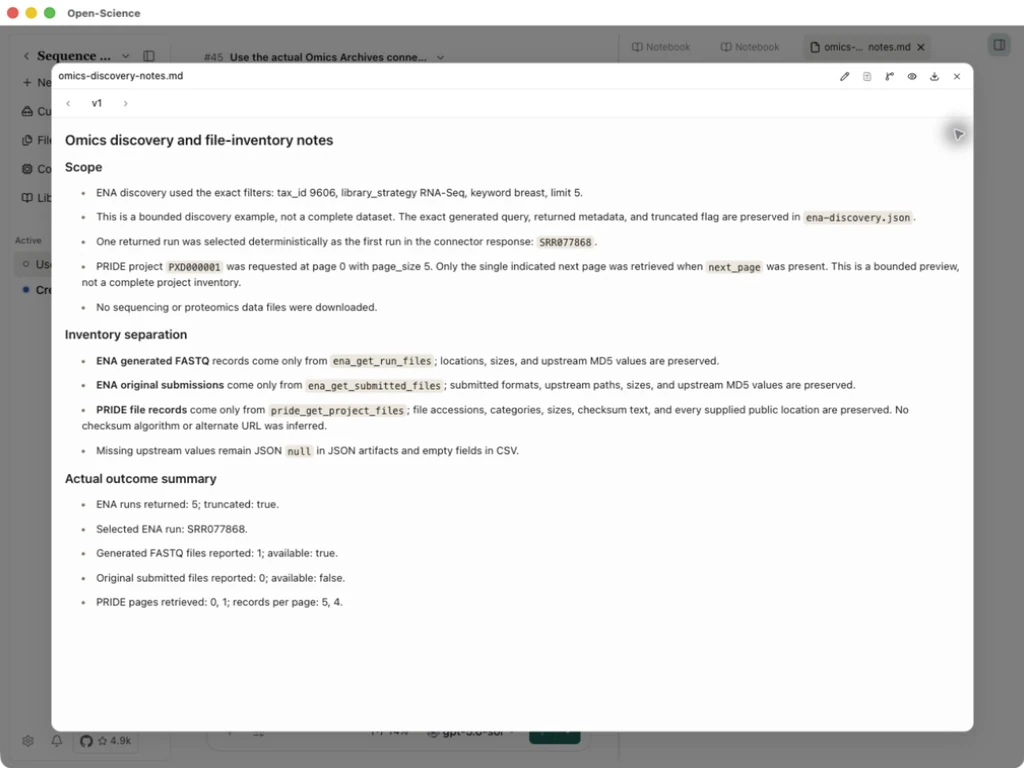
- Compare both inventories for the selected ENA run. In this example, the query returns 5 runs with
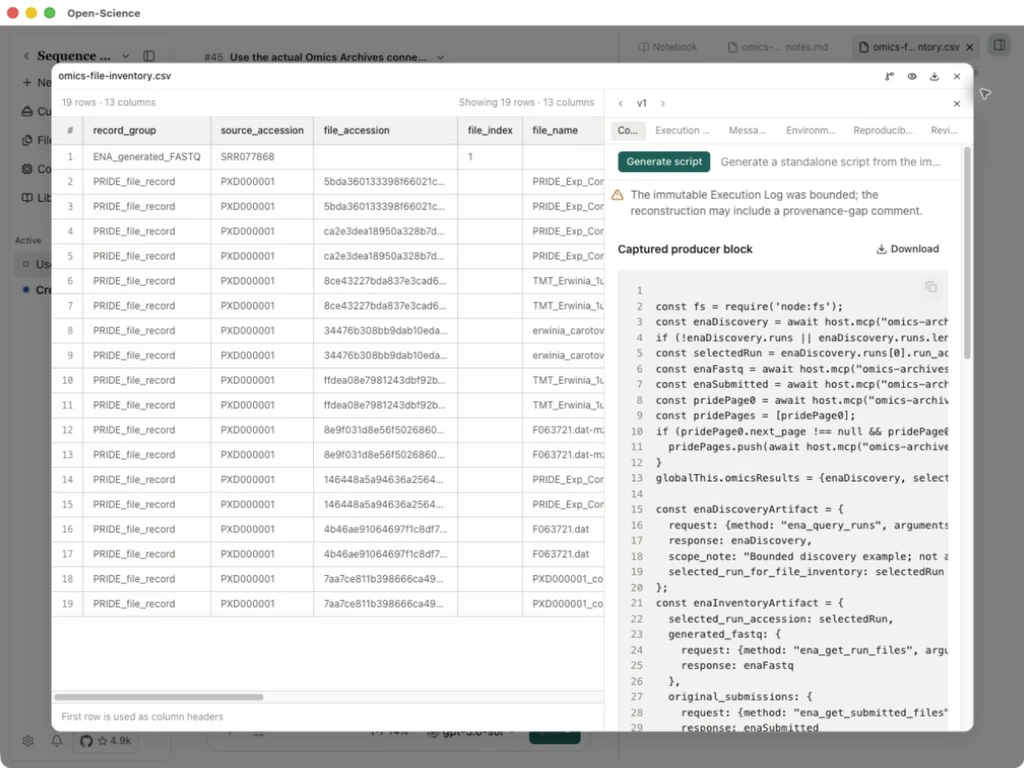
truncated: true. The first run, SRR077868, has 1 archive FASTQ, sized 462,508,712 bytes, and an upstream MD5. Its original-submission inventory hasfound: truebutsubmitted_available: falseand 0 files. An existing run therefore need not provide both inventories. - Inspect the PRIDE pages. PXD000001 returns 5 records on page 0 and 4 on page 1, with
api_total: 9and the finalnext_page: null. The combined CSV has 19 rows because each of the nine PRIDE files supplies two locations, alongside the one ENA FASTQ row. Count file accessions separately from download locations.
Query notes · Combined inventory · ENA discovery · ENA file inventories · PRIDE pages
The output is a file inventory, not downloaded sequencing or proteomics data. Archive FASTQ and original submissions such as BAM/CRAM are different products. Keep ENA's original FTP path literally, including any # character. For PRIDE, use next_page and the returned metadata; api_total may be absent for other projects, and checksum text does not always identify its algorithm. Before a separate download, select the needed format, check storage and verify bytes when an upstream checksum is available. See the operation reference for exact inputs.