Translate a full PDF
Read a paper in another language while retaining the original for comparison. Full-text translation prepares the document text, saves translated paragraphs as work progresses, and keeps saved translations with the managed PDF. It does not replace the original PDF or verify the paper's findings.
Prepare the paper and model
- Obtain the full PDF and open it from Library, Reading, Inbox, an uploaded attachment or a saved file. A reference with only metadata or an abstract is not a full-text PDF.
- Enlarge the preview if needed, then choose Full-text translation in the PDF toolbar.
- Choose Prepare full text. Wait for Full text prepared before starting a translation. Inspect the original pages if text is missing or the PDF is scanned; preparation does not guarantee that every figure label or table was extracted.
- Choose Target language, then Translation method and Model. Use a model offered as available by the picker.
| Method | What to configure |
|---|---|
| Agent | An available Agent model, or Main model when supported. In v0.36.0, Codex subscription models cannot run this PDF translation operation. Select a compatible translation model without replacing the conversation's Main model. |
| Direct API | A configured, available API model. Subscription sign-in cannot be used as a Direct API credential. See provider setup. |
| Local model, when offered | Install the model through the displayed controls and wait until it is ready. Local translation runs one paragraph at a time. |
For Agent and Direct API, document text and the glossary are sent to the selected model. Check the chosen service before translating restricted material. The screenshot shows the preparation and model controls; the selected Codex subscription makes Translate document unavailable.
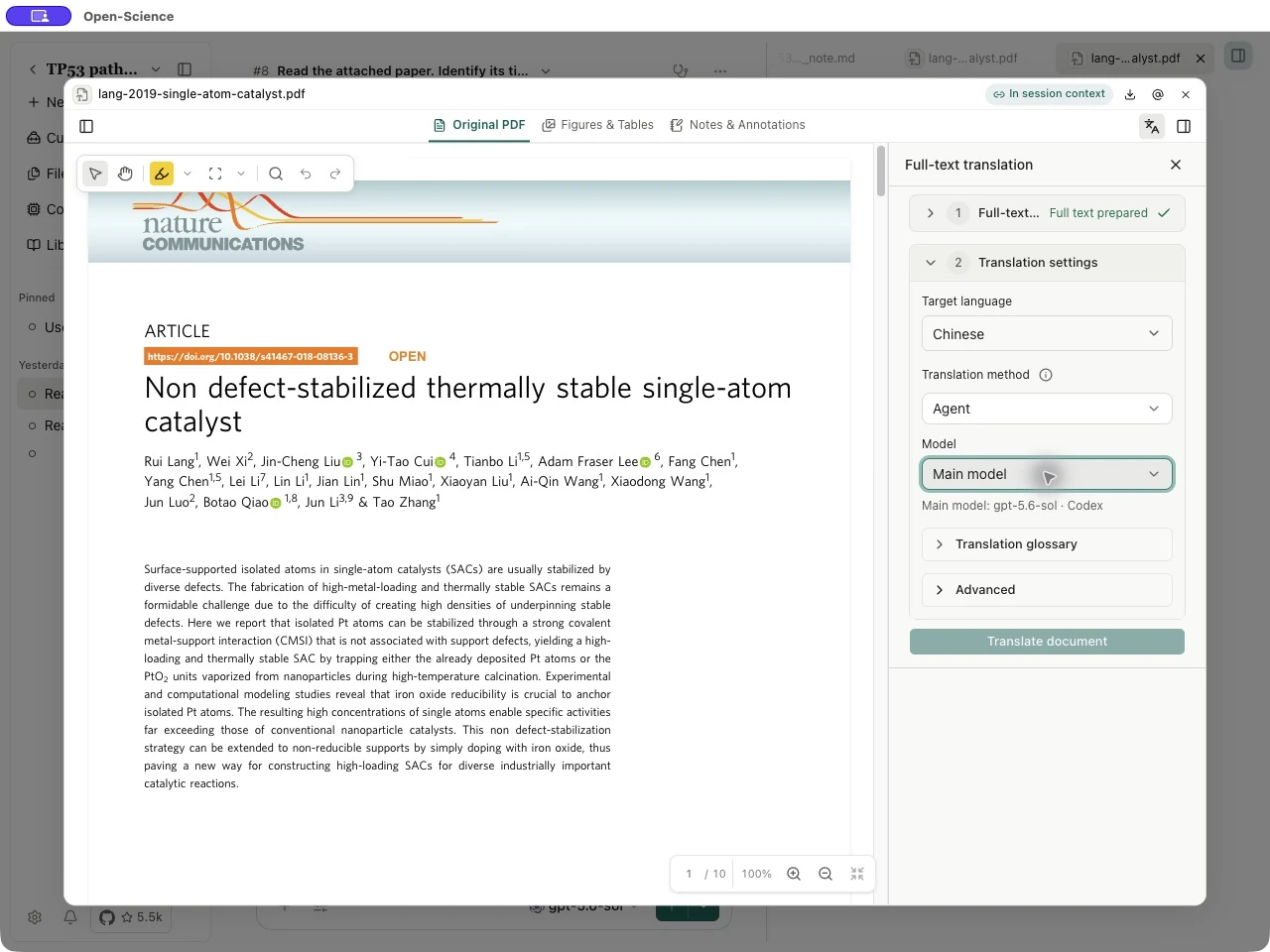
The pictured paper is Lang et al., Non defect-stabilized thermally stable single-atom catalyst, licensed under CC BY 4.0.
Translate and resume
- Open Translation glossary when a technical term needs consistent wording. Add a Source term and its Preferred translation with Add term. Review these terms before starting.
- Leave Advanced → Concurrent translations at the default for a first run. More concurrent requests can encounter provider limits.
- Choose Translate document. Watch the translated-paragraph count; a partial count is not a completed document.
- To interrupt, choose Cancel. Completed paragraphs are kept. Use Continue translation to resume the saved work, or Retry when an error offers that action. Read a paragraph's error before using Skip and continue, which leaves a gap to review.
- Reopen the same managed PDF and choose its edition in Saved translations. Check Saved translation parameters to confirm the language and model. To change them, choose New translation, rather than mixing different settings into a retry.
Verified copies of the same PDF share saved editions across Literature, Reading, Inbox and Workspace. Matching a filename or DOI alone does not establish identical content. This local sharing does not synchronize translations to another computer.
Compare and export
Use Original, Translation and Compare to inspect the source and translated pages when available. Check technical terms, negations, quantities, units and figure references against the original. Review Translation issues and any passages that retain original text; a translated paragraph count does not guarantee that every passage fits the rendered page.
Choose Export translated PDF, save a separate copy, then reopen it in a PDF reader. Check the page count and several text-heavy and figure-heavy pages. Untranslated content remains in its original language; some passages retain original text in the PDF while their translations remain readable in the sidebar. Keep the original available for citations and scientific interpretation.
| If you see | Next step |
|---|---|
| Prepare full text before translating. | Complete preparation and inspect whether eligible paragraphs were found. |
| This subscription model cannot run PDF translation. Select another model. | Choose a supported translation model; changing the target language will not fix model compatibility. |
| Provider rate limit or temporary unavailability | Wait, then retry with the same saved settings. Avoid starting duplicate editions for the same interruption. |
| Progress could not be saved | Reopen the PDF to load the latest saved result before continuing. |
Use PDF annotations and document notes to record reading questions. Translation and annotation are separate tools.